
Cart appearance

14 years 3 months ago #57309
by geostar
Cart appearance was created by geostar
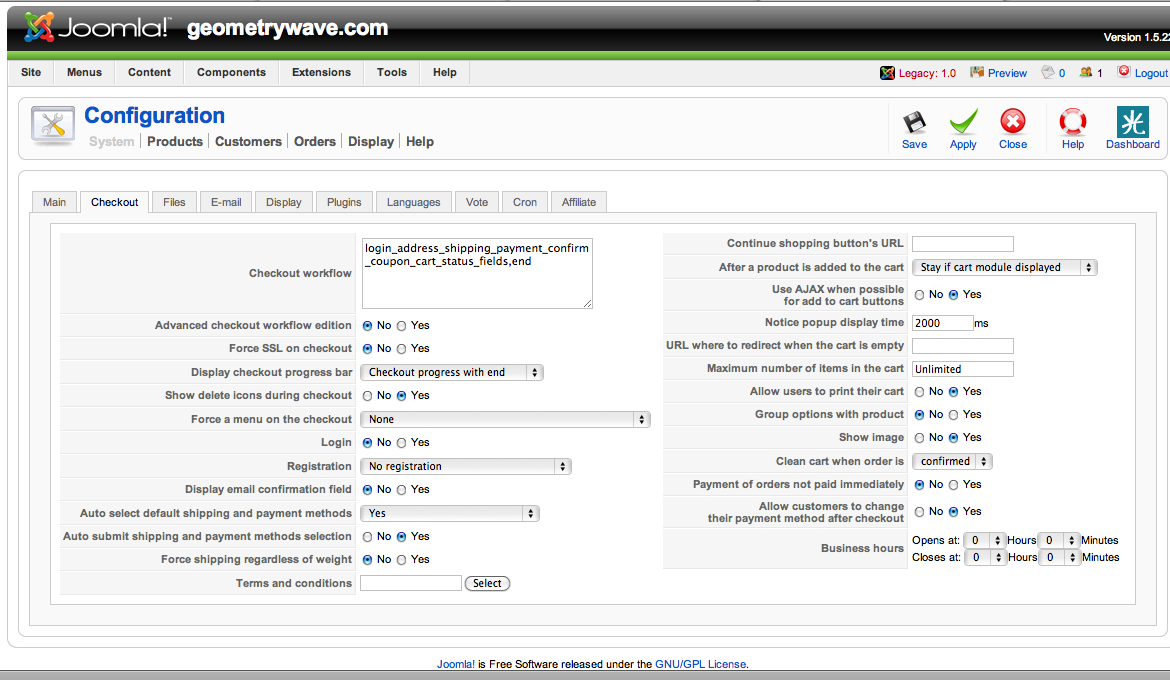
Hi, I have the Essentials version and am not a programmer. There are certain thing I cannot figure out. I have configured it for no log in and no registration required but it seems you have to log in regardless.
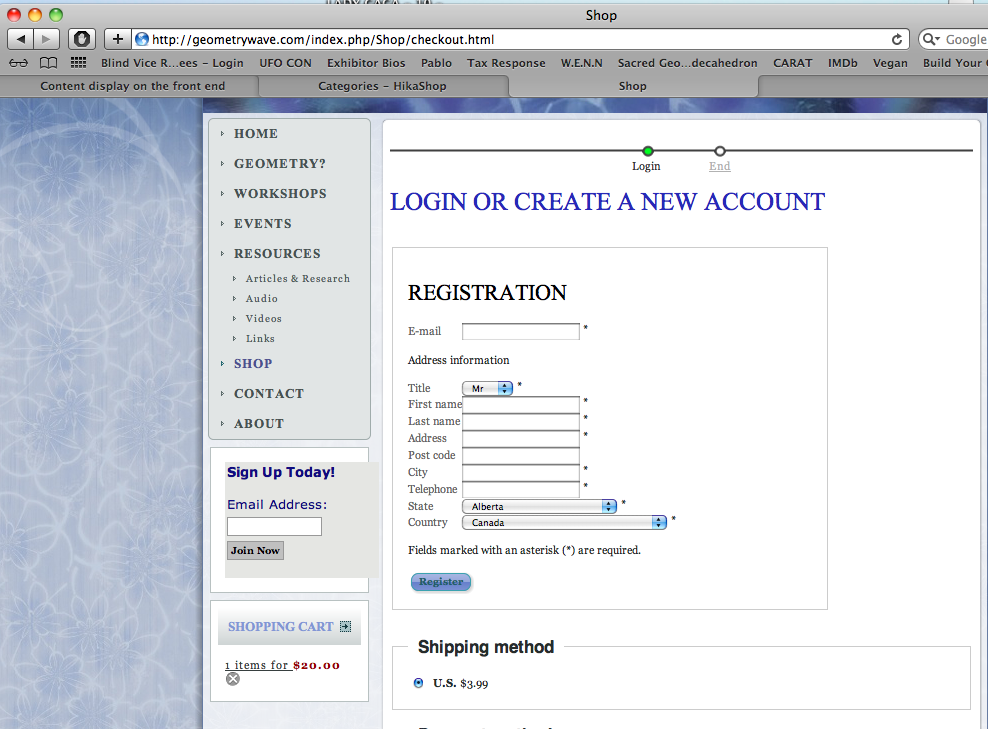
1. Can I change LOGIN OR CREATE A NEW ACCOUNT to Order information somewhere. I didn't see it in the front end css.
2. Can I change REGISTRATION to something else as well.
3. I ship to Canada and U.S. but would like the US as the default zone not Canada as is what shows in the cart.
4. The log in requires a telephone number but not a postal code, I would like to reverse this somehow.
5. I would like the VM-Tax-3 to say Tax.
Attached is what the cart looks like when you first go to it and my configuration page
.
Thanks!
1. Can I change LOGIN OR CREATE A NEW ACCOUNT to Order information somewhere. I didn't see it in the front end css.
2. Can I change REGISTRATION to something else as well.
3. I ship to Canada and U.S. but would like the US as the default zone not Canada as is what shows in the cart.
4. The log in requires a telephone number but not a postal code, I would like to reverse this somehow.
5. I would like the VM-Tax-3 to say Tax.
Attached is what the cart looks like when you first go to it and my configuration page
.
Thanks!
Please Log in or Create an account to join the conversation.

14 years 3 months ago #57352
by Xavier
Replied by Xavier on topic Re: Cart appearance
Hi geostar,
For questions one and two, you can edit the language file in HikaShop > Configuration > Languages, and edit the language wanted.
You can see the FAQ here:
www.hikashop.com/en/support/documentation/faq.html#translation
3. You can set the default Zone in HikaShop > Display > Custom Fields > Address_country.
4. Still in HikaShop > Display > Custom Fields, in the listing you can set if the field must be required, and displayed.
5. I don't see VM_TAX_3 in my translation file, I think it's the name of your Tax Category.
For questions one and two, you can edit the language file in HikaShop > Configuration > Languages, and edit the language wanted.
You can see the FAQ here:
www.hikashop.com/en/support/documentation/faq.html#translation
3. You can set the default Zone in HikaShop > Display > Custom Fields > Address_country.
4. Still in HikaShop > Display > Custom Fields, in the listing you can set if the field must be required, and displayed.
5. I don't see VM_TAX_3 in my translation file, I think it's the name of your Tax Category.
Please Log in or Create an account to join the conversation.

14 years 3 months ago #57408
by nicolas
Replied by nicolas on topic Re: Cart appearance
5. You can turn off the "display advanced taxes" option of the configuration in order to not have the tax category name used and instead display a generic "tax" text.
Please Log in or Create an account to join the conversation.
Time to create page: 0.052 seconds