

- Posts: 5
- Thank you received: 0
change color of Carousel Proucts back box
14 years 3 months ago #57557
by Cstrike
change color of Carousel Proucts back box was created by Cstrike
Hi I created a carousel that show the products that contain the featured category, the problem is that there is a back semi-transparent box where the name of the product is displayed and also on the price, I searched trough hikashop css files but I didn't see any place where to change the color of that box.
I included a screenshot with an arrow pointing the box color that I need to change, but also I noticed that the text is showing on top of the image, is there a way to make the text show below the image so that it doesn't show in top of it?
Thanks for your patience
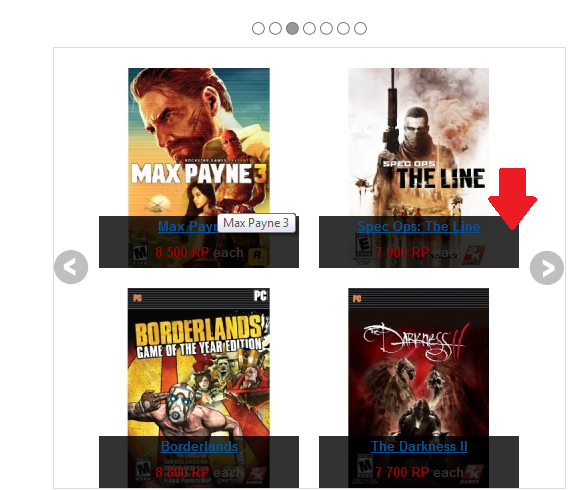
I included a screenshot with an arrow pointing the box color that I need to change, but also I noticed that the text is showing on top of the image, is there a way to make the text show below the image so that it doesn't show in top of it?
Thanks for your patience
Please Log in or Create an account to join the conversation.

14 years 3 months ago #57627
by nicolas
Replied by nicolas on topic Re: change color of Carousel Proucts back box
Hi,
You are apparently using the "pane" layout on your listing. You should change it to "image and title" and the text will be below the image as you want.
For the color of the pane (the semi transparent area), you will find it defined in the CSS of HikaShop that you can edit via the Display tab of the configuration:
.hikashop_img_pane_panel {
position: absolute;
bottom: 0px;
background: rgba(0, 0, 0, 0. ;
;
background-color: black 9;
filter: alpha(opacity=80) 9;
text-align: center !important;
}
You are apparently using the "pane" layout on your listing. You should change it to "image and title" and the text will be below the image as you want.
For the color of the pane (the semi transparent area), you will find it defined in the CSS of HikaShop that you can edit via the Display tab of the configuration:
.hikashop_img_pane_panel {
position: absolute;
bottom: 0px;
background: rgba(0, 0, 0, 0.
;background-color: black 9;
filter: alpha(opacity=80) 9;
text-align: center !important;
}
Please Log in or Create an account to join the conversation.
14 years 3 months ago #57629
by Cstrike
Replied by Cstrike on topic Re: change color of Carousel Proucts back box
Thanks I appreciate your prompt response it help me a lot, its working now how I wanted.
One of the things that made me choose your product is that I see you have a really good support staff.
Thanks again
One of the things that made me choose your product is that I see you have a really good support staff.
Thanks again
Please Log in or Create an account to join the conversation.
Time to create page: 0.057 seconds