

- Posts: 12
- Thank you received: 0
Display variants as thumbnails
14 years 2 months ago #57736
by chama
Display variants as thumbnails was created by chama
Hi team,
With the default settings of Hikashop (business), the individual product page is displayed with the thumbnail and the full size variant. When I change the variants, it reflects only on the product image leaving the thumbnail as the default. Please see the attached for the current product page.
What I need is, not to display the larger product image but change the thumbnail according to the variant selections. And when click on it, display the full size image.
Your help is much appreciated.
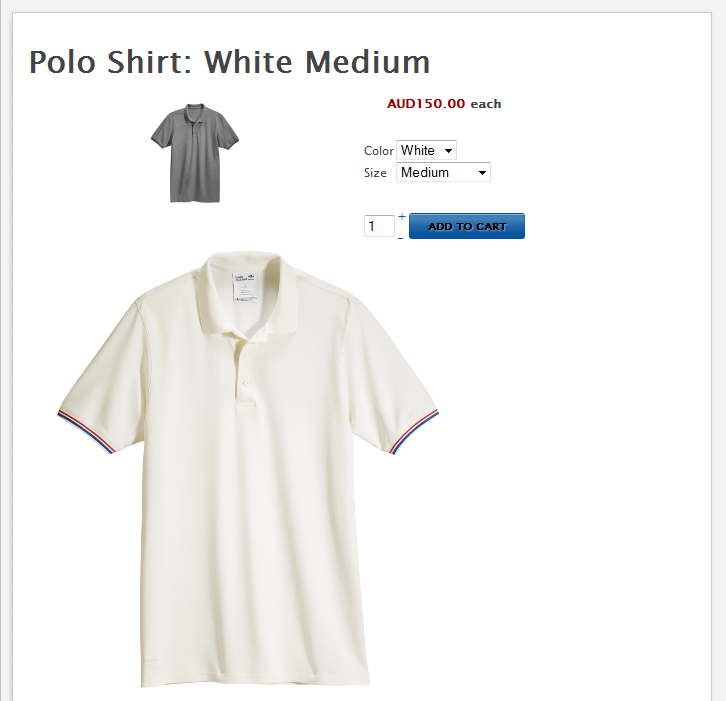
With the default settings of Hikashop (business), the individual product page is displayed with the thumbnail and the full size variant. When I change the variants, it reflects only on the product image leaving the thumbnail as the default. Please see the attached for the current product page.
What I need is, not to display the larger product image but change the thumbnail according to the variant selections. And when click on it, display the full size image.
Your help is much appreciated.
Please Log in or Create an account to join the conversation.

14 years 2 months ago #57788
by Xavier
Replied by Xavier on topic Re: Display variants as thumbnails
Hi chama,
By default in HikaShop, only the thumbnail is displayed and on click it display the full sized image.
I think the problem come from your template, a conflict with the js seems to be present.
To display one thumbnail to one variant, you just have to edit each variant of your product and apply an image on it.
By this way, when you change the variant, it change the thumbnail, and onlick it display the full sized image of the variant.
By default in HikaShop, only the thumbnail is displayed and on click it display the full sized image.
I think the problem come from your template, a conflict with the js seems to be present.
To display one thumbnail to one variant, you just have to edit each variant of your product and apply an image on it.
By this way, when you change the variant, it change the thumbnail, and onlick it display the full sized image of the variant.
Please Log in or Create an account to join the conversation.

14 years 2 months ago #57851
by nicolas
Replied by nicolas on topic Re: Display variants as thumbnails
I think that the problem is that you added your variant images in the description of the variants instead of adding them in the "images" area of each variant.
Could you check that ?
Could you check that ?
Please Log in or Create an account to join the conversation.
14 years 2 months ago #57885
by chama
Replied by chama on topic Re: Display variants as thumbnails
Thanks Xavier and Nicolas,
Yes, I had the variant image on the product description, not as an "image". Changed it and it's all good!
Thanks for your quick responses.
Chama...
Yes, I had the variant image on the product description, not as an "image". Changed it and it's all good!
Thanks for your quick responses.
Chama...
Please Log in or Create an account to join the conversation.
Time to create page: 0.154 seconds