

- Posts: 10
- Thank you received: 0
Change the auto-generated product code when I copy
14 years 2 months ago #61128
by dc10555
Change the auto-generated product code when I copy was created by dc10555
Where would I go about changing this?
I have a product which I would like to duplicate and change the image and name, however when I do so the product code is auto generated is "Car_Decal_copy1359717116" Is there any way to change this so that the product code is generated as random numbers i.e "1359717116". Since this would look less of a mess in the long run. I'm sure it would just be a case of removing the PhP which generates the "Car_Decal_copy" part right? I just don't know where this would be located
I have a product which I would like to duplicate and change the image and name, however when I do so the product code is auto generated is "Car_Decal_copy1359717116" Is there any way to change this so that the product code is generated as random numbers i.e "1359717116". Since this would look less of a mess in the long run. I'm sure it would just be a case of removing the PhP which generates the "Car_Decal_copy" part right? I just don't know where this would be located
Please Log in or Create an account to join the conversation.

14 years 2 months ago #61132
by nicolas
Replied by nicolas on topic Re: Change the auto-generated product code when I copy
That's done with the line:
$newProduct->product_code = $this->template->product_code.'_copy'.rand();
in the file administrator/components/com_hikashop/helpers/import.php
$newProduct->product_code = $this->template->product_code.'_copy'.rand();
in the file administrator/components/com_hikashop/helpers/import.php
The following user(s) said Thank You: dc10555
Please Log in or Create an account to join the conversation.
14 years 2 months ago #61137
by dc10555
Awesome that worked like a charm!
Replied by dc10555 on topic Re: Change the auto-generated product code when I copy
nicolas wrote: That's done with the line:
$newProduct->product_code = $this->template->product_code.'_copy'.rand();
in the file administrator/components/com_hikashop/helpers/import.php
Awesome that worked like a charm!
Please Log in or Create an account to join the conversation.
Less
More
- Posts: 100
- Thank you received: 1
12 years 4 months ago #160323
by paddyrolls
Replied by paddyrolls on topic Re: Change the auto-generated product code when I copy
Hi Nicolas
Could you tell me if it is possible to do an override on import.php. Using the developer information on your website for template overrides will it work for helper files:
/website/administrator/templates/isis/html/hikashop_import.php
Thanks
Patrick
Could you tell me if it is possible to do an override on import.php. Using the developer information on your website for template overrides will it work for helper files:
/website/administrator/templates/isis/html/hikashop_import.php
Thanks
Patrick
Please Log in or Create an account to join the conversation.
12 years 4 months ago #160325
by nicolas
Replied by nicolas on topic Re: Change the auto-generated product code when I copy
Yes, almost any file of HikaShop can be overridden.
For the import helper file which is located in administrator/components/com_hikashop/helpers/import.php you need to create a file in administrator/templates/isis/html/com_hikashop/administrator/helpers.import.php
You can copy the same code from the original file but you need to change the class name and add "Override" to it.
That way, in order to increase the backward compatibility, you can include the original file from the override file and have your Override class extend from the original class.
For the import helper file which is located in administrator/components/com_hikashop/helpers/import.php you need to create a file in administrator/templates/isis/html/com_hikashop/administrator/helpers.import.php
You can copy the same code from the original file but you need to change the class name and add "Override" to it.
That way, in order to increase the backward compatibility, you can include the original file from the override file and have your Override class extend from the original class.
Please Log in or Create an account to join the conversation.
Less
More
- Posts: 100
- Thank you received: 1
12 years 4 months ago #160417
by paddyrolls
Replied by paddyrolls on topic Re: Change the auto-generated product code when I copy
HI Nicolas
Firstly really appreciate your assistance.
I have created a file to /public_html/dev_j3/administrator/templates/isis/html/com_hikashop/administrator/helpers.import.php.
I have changed the class name from "hikashopImportHelper" to "roartestOverride" but it does not seem to take effect?
I have also tried class roartest extends hikashopImportHelper but this did not take effect as well.
Could you advise if the location is correct?
Thanks
Patrick
Firstly really appreciate your assistance.
I have created a file to /public_html/dev_j3/administrator/templates/isis/html/com_hikashop/administrator/helpers.import.php.
I have changed the class name from "hikashopImportHelper" to "roartestOverride" but it does not seem to take effect?
I have also tried class roartest extends hikashopImportHelper but this did not take effect as well.
Could you advise if the location is correct?
Thanks
Patrick
Please Log in or Create an account to join the conversation.

12 years 4 months ago #160431
by Xavier
Replied by Xavier on topic Re: Change the auto-generated product code when I copy
Hi,
The name must be "hikashopImportHelperOverride".
The name must be "hikashopImportHelperOverride".
The following user(s) said Thank You: paddyrolls
Please Log in or Create an account to join the conversation.
Less
More
- Posts: 100
- Thank you received: 1
12 years 4 months ago - 12 years 4 months ago #160505
by paddyrolls
Replied by paddyrolls on topic Re: Change the auto-generated product code when I copy
Hi Xavier
I am currently using:
Hikashop Version: 2.3.1
Joomla: 3x
PHP: 5x
I changed the name to "hikashopImportHelperOverride" but it still no luck. Can't seem to get it to use the file under /public_html/dev_j3/administrator/templates/isis/html/com_hikashop/administrator/helpers.import.php
Thanks
Patrick
I am currently using:
Hikashop Version: 2.3.1
Joomla: 3x
PHP: 5x
I changed the name to "hikashopImportHelperOverride" but it still no luck. Can't seem to get it to use the file under /public_html/dev_j3/administrator/templates/isis/html/com_hikashop/administrator/helpers.import.php
Thanks
Patrick
Last edit: 12 years 4 months ago by paddyrolls.
Please Log in or Create an account to join the conversation.
12 years 4 months ago #160594
by Xavier
Replied by Xavier on topic Re: Change the auto-generated product code when I copy
Hi,
Are you sure that the override has been made in the correct template ?
Are you using isis as backend template ?
Are you sure that the override has been made in the correct template ?
Are you using isis as backend template ?
Please Log in or Create an account to join the conversation.
Less
More
- Posts: 100
- Thank you received: 1
12 years 4 months ago #160662
by paddyrolls
Replied by paddyrolls on topic Re: Change the auto-generated product code when I copy
Hi Xavier
Yes I am using the isis template for the backend. I have disabled Hathor to make sure.
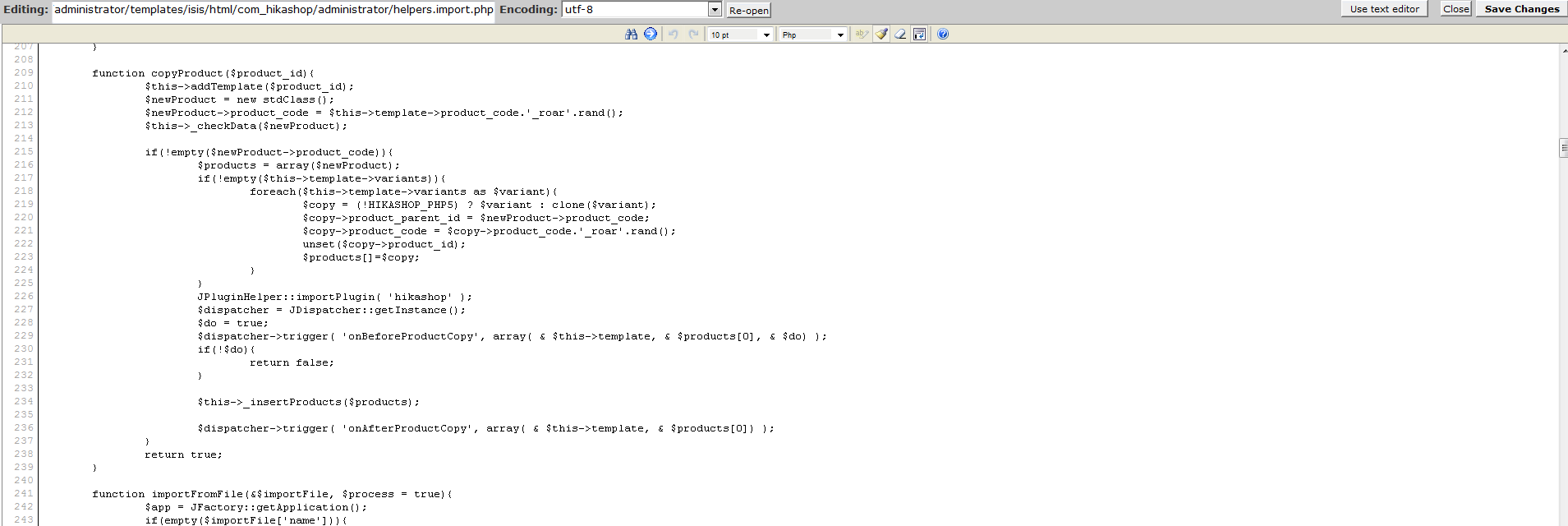
Again I know this is not a hikashop issue and so really appreciate your assistance...If override works, then it makes Hikashop extremely flexible.
Thanks
Patrick
Yes I am using the isis template for the backend. I have disabled Hathor to make sure.
Again I know this is not a hikashop issue and so really appreciate your assistance...If override works, then it makes Hikashop extremely flexible.
Thanks
Patrick
Please Log in or Create an account to join the conversation.
12 years 4 months ago #160677
by nicolas
Replied by nicolas on topic Re: Change the auto-generated product code when I copy
I made a mistake in the path of the file. It should be:
administrator/templates/isis/html/com_hikashop/administrator/helpers/import.override.php
administrator/templates/isis/html/com_hikashop/administrator/helpers/import.override.php
The following user(s) said Thank You: paddyrolls
Please Log in or Create an account to join the conversation.
Less
More
- Posts: 100
- Thank you received: 1
12 years 4 months ago #160750
by paddyrolls
Replied by paddyrolls on topic Re: Change the auto-generated product code when I copy
HI Nicolas
Thanks very much for clearing that up.
The final location was as you mentioned
administrator/templates/isis/html/com_hikashop/administrator/helpers/import.override.php
The name of the class in the import.php file was hikashopImportHelper. As Xavier advised, I couldn't rename it but just had to
put Override. In the end the class name used in the override file was "hikashopImportHelperOverride".
Again really appreciate the assistance.
Regards
Patrick
Thanks very much for clearing that up.
The final location was as you mentioned
administrator/templates/isis/html/com_hikashop/administrator/helpers/import.override.php
The name of the class in the import.php file was hikashopImportHelper. As Xavier advised, I couldn't rename it but just had to
put Override. In the end the class name used in the override file was "hikashopImportHelperOverride".
Again really appreciate the assistance.
Regards
Patrick
Please Log in or Create an account to join the conversation.
Time to create page: 0.072 seconds