

- Posts: 16
- Thank you received: 1
Show cart module only when it has something in
13 years 5 months ago #97324
by erik_jung
Replied by erik_jung on topic Show cart module only when it has something in
I switch "Use AJAX when possible" Yes to No and it now works fine. Thanks for you help.
Please Log in or Create an account to join the conversation.
12 years 1 month ago #166851
by maujbigo
Replied by maujbigo on topic Show cart module only when it has something in
Hi,
Has the option to hide the empty cart if there is no product?
I noticed that in this post was said it would be added on the next version and that was a couple of years ago.
So it might have happened already but I cant figure out.
Thanks
Has the option to hide the empty cart if there is no product?
I noticed that in this post was said it would be added on the next version and that was a couple of years ago.
So it might have happened already but I cant figure out.
Thanks
Please Log in or Create an account to join the conversation.

12 years 1 month ago #166864
by nicolas
Replied by nicolas on topic Show cart module only when it has something in
Hi,
Yes. You can use a translation override in order to remove the default text in the cart when it is empty:
hikashop.com/download/languages.html#modify
Then, Joomla should not display the module if its content is empty.
Yes. You can use a translation override in order to remove the default text in the cart when it is empty:
hikashop.com/download/languages.html#modify
Then, Joomla should not display the module if its content is empty.
Please Log in or Create an account to join the conversation.
9 years 10 months ago #253637
by verzevoul
Replied by verzevoul on topic Show cart module only when it has something in
Old post but I m curious!
Have you managed to hide the cart if the cart is empty? I did erase translation from language file and in the module but the module is there. Only the text I erased is missing. What I m missing here?
Have you managed to hide the cart if the cart is empty? I did erase translation from language file and in the module but the module is there. Only the text I erased is missing. What I m missing here?
Please Log in or Create an account to join the conversation.

9 years 10 months ago - 9 years 10 months ago #253679
by Philip
Replied by Philip on topic Show cart module only when it has something in
Hello,
You have to configure an new option in your Cart Module Configuration :
- Go to Extensions => Modules
- Use the input search to find required module with "Cart"
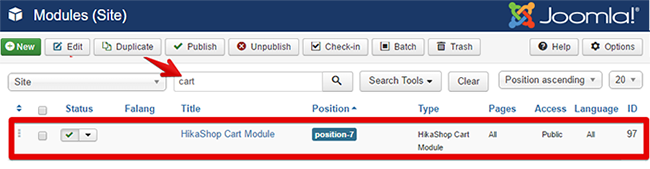
- Click on "HikaShop Cart Module" to edit it.
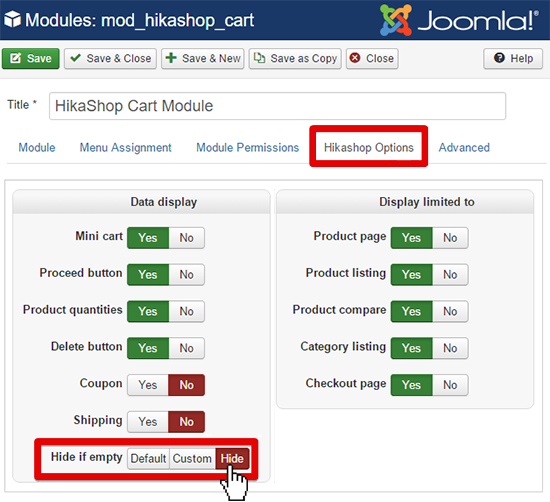
- Go on HikaShop options tab
- Then reproduce this configuration for Hide if empty option to Hide
Regards
You have to configure an new option in your Cart Module Configuration :
- Go to Extensions => Modules
- Use the input search to find required module with "Cart"
- Click on "HikaShop Cart Module" to edit it.
- Go on HikaShop options tab
- Then reproduce this configuration for Hide if empty option to Hide
Regards
Last edit: 9 years 10 months ago by Philip.
Please Log in or Create an account to join the conversation.
8 years 10 months ago #282366
by arnask
Replied by arnask on topic Show cart module only when it has something in
It still shows module, even if its empty.
Latest Joomla and Hikashop.
Latest Joomla and Hikashop.
Please Log in or Create an account to join the conversation.
8 years 10 months ago #282367
by nicolas
Replied by nicolas on topic Show cart module only when it has something in
Hi,
It's probably a problem with how your template is rendering the modules:
www.hikashop.com/forum/content-creation/...if-empty.html#274262
It's probably a problem with how your template is rendering the modules:
www.hikashop.com/forum/content-creation/...if-empty.html#274262
The following user(s) said Thank You: arnask
Please Log in or Create an account to join the conversation.
8 years 10 months ago #282396
by arnask
Replied by arnask on topic Show cart module only when it has something in
Thanks nicolas, yes you are right.
Just for others using Yootheme templates: Go to Joomla backend >> Extensions >> Templates >> Open your template (edit) >> Options >> Modules find your module and set Style to Blank.
More info: yootheme.com/support/question/62620
Just for others using Yootheme templates: Go to Joomla backend >> Extensions >> Templates >> Open your template (edit) >> Options >> Modules find your module and set Style to Blank.
More info: yootheme.com/support/question/62620
The following user(s) said Thank You: Philip
Please Log in or Create an account to join the conversation.
Time to create page: 0.206 seconds