

- Posts: 120
- Thank you received: 1
How to show weight and brand on product page?
14 years 2 months ago #62097
by watashi
How to show weight and brand on product page? was created by watashi
I want product weight and brand to be displayed on product page among other secifications. Is there an option in HS configuration settings to do that? Or do I have to manually adjust product/show page in Views?
Please Log in or Create an account to join the conversation.

14 years 2 months ago #62177
by nicolas
Replied by nicolas on topic Re: How to show weight and brand on product page?
The weight is hidden on the product page with that CSS:
.hikashop_product_weight_main{
display:none;
}
Remove it from the hikashop front end CSS file and it should be displayed automatically.
For the manufacturer, there is no option to display it. You can edit the view file like that:
www.hikashop.com/forum/4-how-to/46861-ch...t.html?lang=en#47470
.hikashop_product_weight_main{
display:none;
}
Remove it from the hikashop front end CSS file and it should be displayed automatically.
For the manufacturer, there is no option to display it. You can edit the view file like that:
www.hikashop.com/forum/4-how-to/46861-ch...t.html?lang=en#47470
Please Log in or Create an account to join the conversation.
14 years 2 months ago #62463
by watashi
Replied by watashi on topic Re: How to show weight and brand on product page?
Hello Nicolas,
Thanks for usual perfect support!
I could do that and now Manufacturer's name is shown on my product page.
However, may I ask two more questions?
1. EXISTING CODE
I see the below code in the show view. What is this for? Due to some reason it seems to be always empty for my products. Is it not same as brands?
2. URL TO BRAND
I have inserted this code in the view "show_block_custom_main" right after tag "table":
It works correctly, but what is the name of variable to be inserted instead of "#" in order to make link to Brand description?
Is it possible?
P.S. With Hikashop I will soon learn how to code sites. :lol:
Thanks for usual perfect support!
I could do that and now Manufacturer's name is shown on my product page.
However, may I ask two more questions?
1. EXISTING CODE
I see the below code in the show view. What is this for? Due to some reason it seems to be always empty for my products. Is it not same as brands?
<span id="hikashop_product_url_main" class="hikashop_product_url_main">
<?php
if (!empty ($this->element->product_url)) {
echo JText :: sprintf('MANUFACTURER_URL', '<a href="' . $this->element->product_url . '" target="_blank">' . $this->element->product_url . '</a>');
}
?>
</span>
2. URL TO BRAND
I have inserted this code in the view "show_block_custom_main" right after tag "table":
<?php
if(!empty($this->element->product_manufacturer_id)){
?>
<tr class="hikashop_product_custom_<?php echo $oneExtraField->field_namekey;?>_line">
<td class="key">
<span id="hikashop_product_custom_name_<?php echo $oneExtraField->field_id;?>" class="hikashop_product_custom_name">
Brand:
</span>
</td>
<td>
<span id="hikashop_product_custom_value_<?php echo $oneExtraField->field_id;?>" class="hikashop_product_custom_value">
<?php $class = hikashop_get('class.category');
$manufacturer = $class->get($this->element->product_manufacturer_id);
echo '<a href="#">'.$manufacturer->category_name.'</a>';
?>
<br />
</span>
</td>
</tr>
<?php
}
?>
It works correctly, but what is the name of variable to be inserted instead of "#" in order to make link to Brand description?
Is it possible?
P.S. With Hikashop I will soon learn how to code sites. :lol:
Please Log in or Create an account to join the conversation.
14 years 2 months ago #62646
by nicolas
Replied by nicolas on topic Re: How to show weight and brand on product page?
1. It's the "URL" parameter of the product. It's not related to the URL of the manufacturer description on your website.
2. You would have to enter:
<?php global $Itemid; echo hikashop_completeLink('category&task=listing&cid='.$manufacturer->category_id.'&Itemid='.$Itemid); ?>
2. You would have to enter:
<?php global $Itemid; echo hikashop_completeLink('category&task=listing&cid='.$manufacturer->category_id.'&Itemid='.$Itemid); ?>
The following user(s) said Thank You: watashi
Please Log in or Create an account to join the conversation.
14 years 2 months ago #63686
by watashi
Replied by watashi on topic Re: How to show weight and brand on product page?
Hi Nicolas,
Your solution works perfectly!
However, I have one minor issue. As result, I have two absolutely same pages with absolutely same content, but different URLs:
1) One is generated by Brands Listing Module:
/brands/category/14-benassi
2) The other one is generated by the above solution:
/brands/category/cid-14
Is there any possibility to make the URLs uniformed/same?
As you know, search engines do not like duplicates, also it will mislead SEO specialist, who will need to promote individual pages (nobody know which of them will be indexed by Google and which will not be, therefore you do not know which page to be promoted by means of SEO)...
Your solution works perfectly!
However, I have one minor issue. As result, I have two absolutely same pages with absolutely same content, but different URLs:
1) One is generated by Brands Listing Module:
/brands/category/14-benassi
2) The other one is generated by the above solution:
/brands/category/cid-14
Is there any possibility to make the URLs uniformed/same?
As you know, search engines do not like duplicates, also it will mislead SEO specialist, who will need to promote individual pages (nobody know which of them will be indexed by Google and which will not be, therefore you do not know which page to be promoted by means of SEO)...
Please Log in or Create an account to join the conversation.
14 years 2 months ago #63862
by nicolas
Replied by nicolas on topic Re: How to show weight and brand on product page?
You would have to enter:
<?php global $Itemid; echo hikashop_completeLink('category&task=listing&cid='.$manufacturer->category_id.'&name='.$manufacturer->category_name.'&Itemid='.$Itemid); ?>
<?php global $Itemid; echo hikashop_completeLink('category&task=listing&cid='.$manufacturer->category_id.'&name='.$manufacturer->category_name.'&Itemid='.$Itemid); ?>
Please Log in or Create an account to join the conversation.
14 years 2 months ago #63896
by watashi
Replied by watashi on topic Re: How to show weight and brand on product page?
That really works! At least for English brands.
But regretfully, cyrillics characters are not converted. Is there a function ready for transliterating cyrillics?
The result of the above solution:
/brands/category/53-ЗАО%20Красный%20Октябрь
The correct link should be:
/brands/category/53-zao-krasnyj-oktyabr

But regretfully, cyrillics characters are not converted. Is there a function ready for transliterating cyrillics?
The result of the above solution:
/brands/category/53-ЗАО%20Красный%20Октябрь
The correct link should be:
/brands/category/53-zao-krasnyj-oktyabr
Please Log in or Create an account to join the conversation.
14 years 2 months ago #64026
by nicolas
Replied by nicolas on topic Re: How to show weight and brand on product page?
You would have to enter:
<?php global $Itemid; $app =& JFactory::getApplication(); echo hikashop_completeLink('category&task=listing&cid='.$manufacturer->category_id.'&name='.$app->stringURLSafe($manufacturer->category_name).'&Itemid='.$Itemid); ?>
<?php global $Itemid; $app =& JFactory::getApplication(); echo hikashop_completeLink('category&task=listing&cid='.$manufacturer->category_id.'&name='.$app->stringURLSafe($manufacturer->category_name).'&Itemid='.$Itemid); ?>
Please Log in or Create an account to join the conversation.
14 years 2 months ago #64052
by watashi
Replied by watashi on topic Re: How to show weight and brand on product page?
Thank you!
It is much better now. But I have found that if I find the product from the shop, the link is:
/shop/category/53-zao-krasnyj-oktyabr
But if I come to this product from brands, it is still different:
/brands/category/53-zao-krasnyj-oktyabr
Is there any possibility to replace "brands" with "shop"? If I succeed this, I will avoid any duplicate pages on my site. That would be great!
Sorry for bothering you with my personal requests..
It is much better now. But I have found that if I find the product from the shop, the link is:
/shop/category/53-zao-krasnyj-oktyabr
But if I come to this product from brands, it is still different:
/brands/category/53-zao-krasnyj-oktyabr
Is there any possibility to replace "brands" with "shop"? If I succeed this, I will avoid any duplicate pages on my site. That would be great!
Sorry for bothering you with my personal requests..
Please Log in or Create an account to join the conversation.
14 years 2 months ago #64195
by nicolas
Replied by nicolas on topic Re: How to show weight and brand on product page?
You would have to enter:
<?php $app =& JFactory::getApplication(); echo hikashop_completeLink('category&task=listing&cid='.$manufacturer->category_id.'&name='.$app->stringURLSafe($manufacturer->category_name).'&Itemid=XXX'); ?>
where XXX is the id of your brands menu.
<?php $app =& JFactory::getApplication(); echo hikashop_completeLink('category&task=listing&cid='.$manufacturer->category_id.'&name='.$app->stringURLSafe($manufacturer->category_name).'&Itemid=XXX'); ?>
where XXX is the id of your brands menu.
Please Log in or Create an account to join the conversation.
14 years 2 months ago - 14 years 2 months ago #64217
by watashi
Replied by watashi on topic Re: How to show weight and brand on product page?
Nicolas, thank you!
I have managed to have the below code, which creates a link to Manufacturer's page. It shall be inserted into view product/show_block_custom_main after the row <table width="100%">:
<?php
if(!empty($this->element->product_manufacturer_id)){
?>
<tr class="hikashop_product_custom_<?php echo $oneExtraField->field_namekey;?>_line">
<td class="key">
<span id="hikashop_product_custom_name_<?php echo $oneExtraField->field_id;?>" class="hikashop_product_custom_name">
Manufacturer
</span>
</td>
<td>
<span id="hikashop_product_custom_value_<?php echo $oneExtraField->field_id;?>" class="hikashop_product_custom_value">
<?php $class = hikashop_get('class.category');
$manufacturer = $class->get($this->element->product_manufacturer_id);
global $Itemid;
$app =& JFactory::getApplication();
echo '<a href="'.hikashop_completeLink('category&task=listing&cid='.$manufacturer->category_id.'&name='.$app->stringURLSafe($manufacturer->category_name).'&Itemid=261').'">'.$manufacturer->category_name.'</a>';
?>
<br />
</span>
</td>
</tr>
<?php
}
?>
The manufacturer's name (and link) are shown as the first row of specifications.
P.S. Why don't you include this feature as an option into your next release?
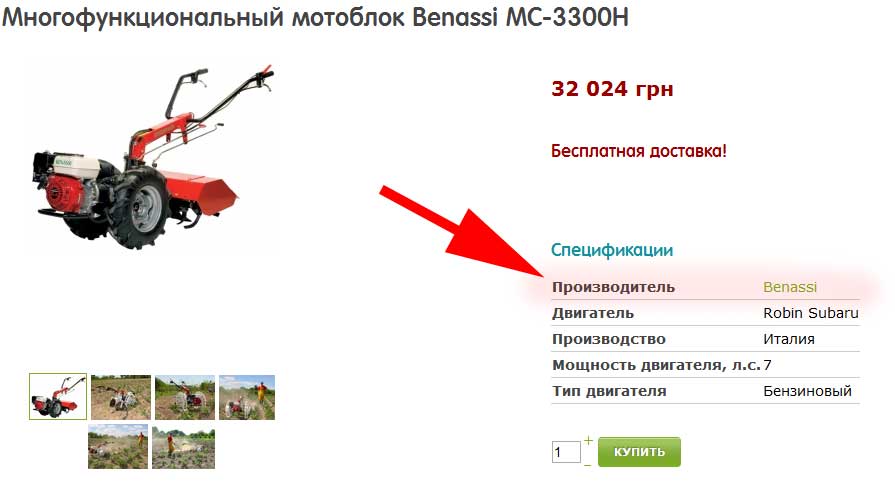
I have managed to have the below code, which creates a link to Manufacturer's page. It shall be inserted into view product/show_block_custom_main after the row <table width="100%">:
<?php
if(!empty($this->element->product_manufacturer_id)){
?>
<tr class="hikashop_product_custom_<?php echo $oneExtraField->field_namekey;?>_line">
<td class="key">
<span id="hikashop_product_custom_name_<?php echo $oneExtraField->field_id;?>" class="hikashop_product_custom_name">
Manufacturer
</span>
</td>
<td>
<span id="hikashop_product_custom_value_<?php echo $oneExtraField->field_id;?>" class="hikashop_product_custom_value">
<?php $class = hikashop_get('class.category');
$manufacturer = $class->get($this->element->product_manufacturer_id);
global $Itemid;
$app =& JFactory::getApplication();
echo '<a href="'.hikashop_completeLink('category&task=listing&cid='.$manufacturer->category_id.'&name='.$app->stringURLSafe($manufacturer->category_name).'&Itemid=261').'">'.$manufacturer->category_name.'</a>';
?>
<br />
</span>
</td>
</tr>
<?php
}
?>
The manufacturer's name (and link) are shown as the first row of specifications.
P.S. Why don't you include this feature as an option into your next release?
Last edit: 14 years 2 months ago by watashi.
Please Log in or Create an account to join the conversation.
14 years 1 month ago #64385
by nicolas
Replied by nicolas on topic Re: How to show weight and brand on product page?
We'll do something like that yes.
Please Log in or Create an account to join the conversation.
Time to create page: 0.105 seconds