

- Posts: 966
- Thank you received: 11
Coupon Amount Incorrect in Email
14 years 2 months ago #62614
by MyWorld
Coupon Amount Incorrect in Email was created by MyWorld
Sorry... I posted in the "General Talk" section by mistake so I'm moving the post here. The one in General Talk can be deleted as it's the incorrect forum for this.
Attached is a pic of the result of my test using the coupon with both awoCoupon and Hikashop.
The coupon is configured to take 100% off the shipping cost which is $5.00. And I checked "apply changes before taxes" and there is no taxes on the coupon code.
No matter what I try the coupon amount is not showing correctly in the Email. The amount shows correctly on the website and on Paypal but not in the email. It keeps adding more to the discount. The coupon discount that I'm testing is $5 when the email comes in it's showing $6.70.
I do not have taxes on the coupon so I don't understand the extra amount that is being added and I don't know what to do next. I've been trying to get this to work for about 4 days now
Thanks!!
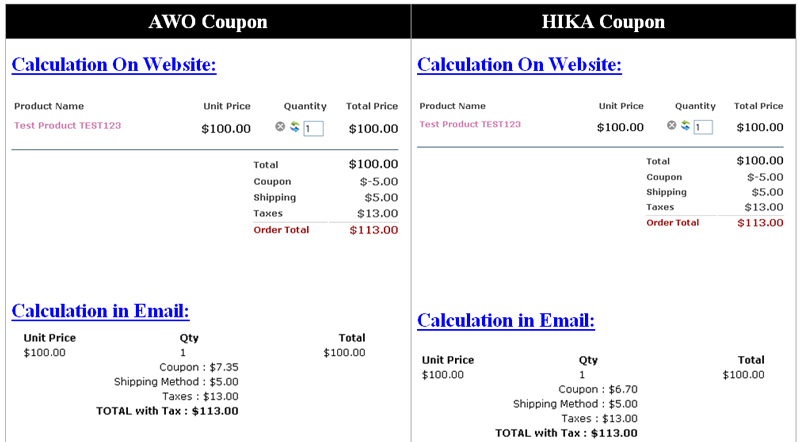
Attached is a pic of the result of my test using the coupon with both awoCoupon and Hikashop.
The coupon is configured to take 100% off the shipping cost which is $5.00. And I checked "apply changes before taxes" and there is no taxes on the coupon code.
No matter what I try the coupon amount is not showing correctly in the Email. The amount shows correctly on the website and on Paypal but not in the email. It keeps adding more to the discount. The coupon discount that I'm testing is $5 when the email comes in it's showing $6.70.
I do not have taxes on the coupon so I don't understand the extra amount that is being added and I don't know what to do next. I've been trying to get this to work for about 4 days now
Thanks!!
Please Log in or Create an account to join the conversation.
14 years 2 months ago #62676
by MyWorld
Replied by MyWorld on topic Re: Coupon Amount Incorrect in Email
As requested over here http://www.hikashop.com/en/forum/2-general-talk-about-hikashop/61919-coupon-amount-incorrect-in-email.html#62668, have attached the screen shots.
Please Log in or Create an account to join the conversation.

14 years 2 months ago #62798
by nicolas
Replied by nicolas on topic Re: Coupon Amount Incorrect in Email
Please try to change the option "apply discount" to "after taxes" in the configuration.
Please Log in or Create an account to join the conversation.
14 years 2 months ago #62832
by MyWorld
Replied by MyWorld on topic Re: Coupon Amount Incorrect in Email
I'm getting the same result. This is what it is showing on the website and on Paypal which is correct.
Total $100.00
Coupon $-5.00
Shipping $5.00
Taxes $13.00
Order Total $113.00
This is what it shows in the email.
Total $100.00
Coupon : $8.00
Shipping Method : $5.00
Taxes : $13.00
TOTAL with Tax : $113.00
Total $100.00
Coupon $-5.00
Shipping $5.00
Taxes $13.00
Order Total $113.00
This is what it shows in the email.
Total $100.00
Coupon : $8.00
Shipping Method : $5.00
Taxes : $13.00
TOTAL with Tax : $113.00
Please Log in or Create an account to join the conversation.
14 years 2 months ago #62917
by MyWorld
Replied by MyWorld on topic Re: Coupon Amount Incorrect in Email
The coupon code is not working correctly unless I am totally missing something. I have tried so many things for about a week now and I'm not getting the correct amount to show in the email. I have remove awoCoupon completely from the website so that I can test using only HikaShop coupon and I'm getting the same results. This is really frustrating.
Here's an example that I used with HikaShop Coupon:
THE WEBSITE:
Total $100.00
Coupon $-10.00
Shipping $5.00
Taxes $13.00
Order Total $108.00
THE EMAIL:
Total $100.00
Coupon $3.00
Shipping $5.00
Taxes $13.00
Order Total $108.00
Thanks!!
Here's an example that I used with HikaShop Coupon:
THE WEBSITE:
Total $100.00
Coupon $-10.00
Shipping $5.00
Taxes $13.00
Order Total $108.00
THE EMAIL:
Total $100.00
Coupon $3.00
Shipping $5.00
Taxes $13.00
Order Total $108.00
Thanks!!
Please Log in or Create an account to join the conversation.
14 years 1 month ago #63084
by nicolas
Replied by nicolas on topic Re: Coupon Amount Incorrect in Email
Can you please give a backend access of your website via our contact forum with a link to this thread so that we can look at the problem ?
Please Log in or Create an account to join the conversation.
Less
More
- Posts: 27
- Thank you received: 0
14 years 1 month ago - 14 years 1 month ago #67875
by Christoph59
Replied by Christoph59 on topic Re: Coupon Amount Incorrect in Email
Hi Nicolas, I am having the same problem coupon value on site shows 100 whereas in the email it's value is 120. Thanks for your response christoph
further info: tax rate set is 20 percent and option apply coupon before tax is already chosen in the global config
further info: tax rate set is 20 percent and option apply coupon before tax is already chosen in the global config
Last edit: 14 years 1 month ago by Christoph59. Reason: More detailed info on problem
Please Log in or Create an account to join the conversation.

14 years 4 weeks ago #68038
by Eliot
Replied by Eliot on topic Re: Coupon Amount Incorrect in Email
Hi Christoph,
Could you please give me screenshot of your coupon configuration?
Also, an example of case where the price emailed is wrong would be welcome
Could you please give me screenshot of your coupon configuration?
Also, an example of case where the price emailed is wrong would be welcome
Please Log in or Create an account to join the conversation.
Less
More
- Posts: 27
- Thank you received: 0
14 years 4 weeks ago #68227
by Christoph59
Replied by Christoph59 on topic Re: Coupon Amount Incorrect in Email
Hi Eliot, tested everything a couple of times but no success. I would like to change to a percent coupon and the tax rule in Austria says that this has to be applied before tax (it does not make any difference in the end but it has to be displayed in that way). I have enclosed 4 pics. On the site the net price and the discount (which is 10%) is displayed correctly but the tax sum and the final total is not. The email order overview shows something comepletly different: price is a gross price (before tax) and discount/Tax/total mixed up.
For further info: I have modified the the checkout/cart.php as instructed by Nicolas in another thread to show only net prices at checkout: $this->params->set('price_with_tax', 0); in the checkout/cart.php.
Thanks for your quick help!
Christoph
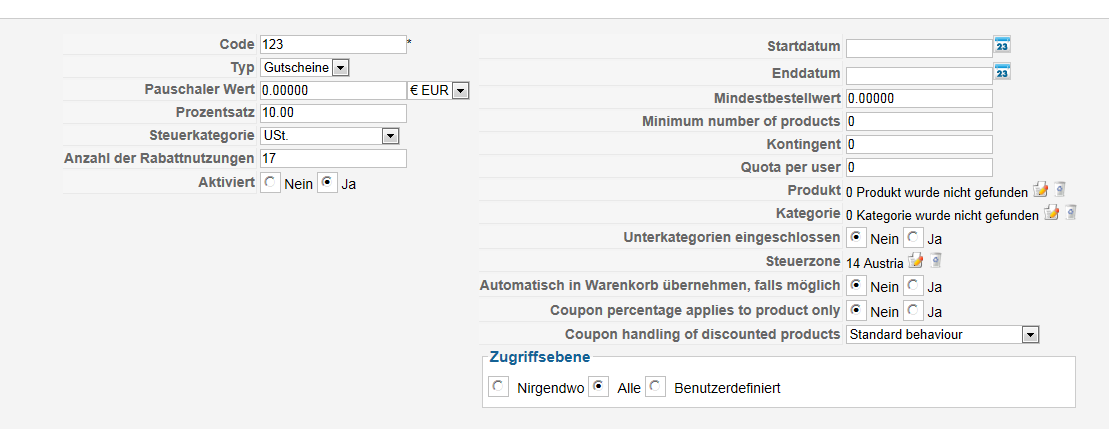
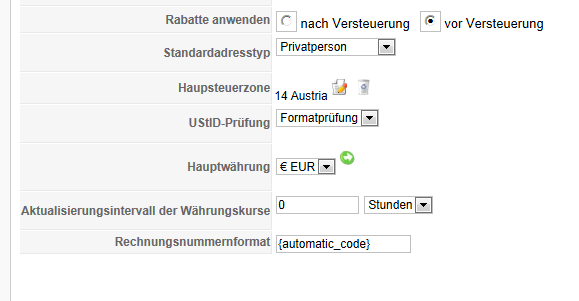
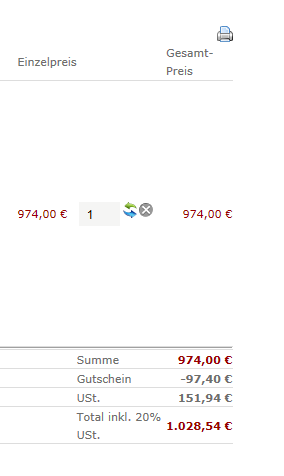
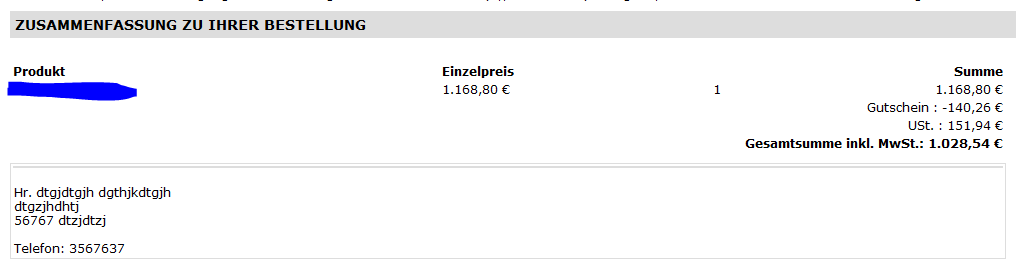
For further info: I have modified the the checkout/cart.php as instructed by Nicolas in another thread to show only net prices at checkout: $this->params->set('price_with_tax', 0); in the checkout/cart.php.
Thanks for your quick help!
Christoph
Please Log in or Create an account to join the conversation.
14 years 3 weeks ago #68407
by nicolas
Replied by nicolas on topic Re: Coupon Amount Incorrect in Email
Hi,
First, please make sure that you're using the latest version of HikaShop. We fixed different things with the tax/discount calculations so it could come from the fact that you're on an old version of HikaShop.
Then, please try to remove any customization to the emails/checkout page as they could produce such display (do a backup and then use the trash icon on the Emails/Views listing for the elements you customized).
First, please make sure that you're using the latest version of HikaShop. We fixed different things with the tax/discount calculations so it could come from the fact that you're on an old version of HikaShop.
Then, please try to remove any customization to the emails/checkout page as they could produce such display (do a backup and then use the trash icon on the Emails/Views listing for the elements you customized).
Please Log in or Create an account to join the conversation.
Less
More
- Posts: 27
- Thank you received: 0
14 years 3 weeks ago #68663
by Christoph59
Replied by Christoph59 on topic Re: Coupon Amount Incorrect in Email
Hi Nicolas,
I did what you said (update to 1.6.0. and get rid of cutom.) on my backed up xampp environment but as expected it turned out to become a big mess as my site is highly customized with changes in many different files and not all changes done by recommended way via "views" (work on 1.5.8.). also submitting an order has no effect to my cart module...
I am unfortunately short of time (marketing campaign starting in less than 2 weeks) and I need to get the discount system running showing the correct figures on site and the email. I have for now achieved a basic workaround for the email notification (order creation) with the only problem remaining that I have to use a fixed figure and not a variable here (so I can´t use different levels of discounts):
if(bccomp($data->order_discount_price,0,5)){
echo '<tr><td colspan="4" style="text-align:right">'.JText::_('HIKASHOP_COUPON').' : ';
if($config->get('price_with_tax')){
echo $currencyHelper->format(($data->order_discount_price/1.2)*-1,$data->order_currency_id);
}else{
echo $currencyHelper->format(($data->order_discount_price-@$data->order_discount_tax)*-1,$data->order_currency_id);
}
Can you help and let me know if there is a solution for that. The code in the last line does reproduces VAT-discount*(1+tax rate) - in this case 20%). Also, how can I implement a subtotal without VAT as shown on the screenshot of my previous email. If there a a couple of products added I need this.
Thanks for your help!
regards
Christoph
I did what you said (update to 1.6.0. and get rid of cutom.) on my backed up xampp environment but as expected it turned out to become a big mess as my site is highly customized with changes in many different files and not all changes done by recommended way via "views" (work on 1.5.8.). also submitting an order has no effect to my cart module...
I am unfortunately short of time (marketing campaign starting in less than 2 weeks) and I need to get the discount system running showing the correct figures on site and the email. I have for now achieved a basic workaround for the email notification (order creation) with the only problem remaining that I have to use a fixed figure and not a variable here (so I can´t use different levels of discounts):
if(bccomp($data->order_discount_price,0,5)){
echo '<tr><td colspan="4" style="text-align:right">'.JText::_('HIKASHOP_COUPON').' : ';
if($config->get('price_with_tax')){
echo $currencyHelper->format(($data->order_discount_price/1.2)*-1,$data->order_currency_id);
}else{
echo $currencyHelper->format(($data->order_discount_price-@$data->order_discount_tax)*-1,$data->order_currency_id);
}
Can you help and let me know if there is a solution for that. The code in the last line does reproduces VAT-discount*(1+tax rate) - in this case 20%). Also, how can I implement a subtotal without VAT as shown on the screenshot of my previous email. If there a a couple of products added I need this.
Thanks for your help!
regards
Christoph
Please Log in or Create an account to join the conversation.
Less
More
- Posts: 27
- Thank you received: 0
14 years 3 weeks ago #68744
by Christoph59
Replied by Christoph59 on topic Re: Coupon Amount Incorrect in Email
Hi Nicolas,
I was thinking too complicated. I have onlyproducts with the same tax rate so the "1.2" fixed figure always works and the discount in the settings can be different without the need to change anything in the files.
To close the thread can you pls. advise on the only remianing questition on how to display a subtotal without vat.
Many thanks
Christoph
I was thinking too complicated. I have onlyproducts with the same tax rate so the "1.2" fixed figure always works and the discount in the settings can be different without the need to change anything in the files.
To close the thread can you pls. advise on the only remianing questition on how to display a subtotal without vat.
Many thanks
Christoph
Please Log in or Create an account to join the conversation.
14 years 3 weeks ago #68921
by nicolas
Replied by nicolas on topic Re: Coupon Amount Incorrect in Email
Hi,
You can use that PHP to display the total with VAT:
<?php echo JText::sprintf('TOTAL_WITHOUT_VAT',$currencyHelper->format($data->cart->full_total->prices[0]->price_value,$data->order_currency_id)); ?>
That's what we're doing actually in the latest versions of HikaShop based on whether the VAT display is turned on or off in the configuration.
You can use that PHP to display the total with VAT:
<?php echo JText::sprintf('TOTAL_WITHOUT_VAT',$currencyHelper->format($data->cart->full_total->prices[0]->price_value,$data->order_currency_id)); ?>
That's what we're doing actually in the latest versions of HikaShop based on whether the VAT display is turned on or off in the configuration.
Please Log in or Create an account to join the conversation.
Less
More
- Posts: 27
- Thank you received: 0
14 years 3 weeks ago #69034
by Christoph59
Replied by Christoph59 on topic Re: Coupon Amount Incorrect in Email
hi nicolas,
thanks. I was not precise - sorry - I need the subtotal without tax before discount (this is shown in the cart but not in the email notification). Tried for hours but without php knowledge its always a guess how to change the code. I can get the figure by adding the total without vat + discount using your code after the final total but I have no clue how to code it to be displayed before the discount.
Thanks for your continous help
thanks. I was not precise - sorry - I need the subtotal without tax before discount (this is shown in the cart but not in the email notification). Tried for hours but without php knowledge its always a guess how to change the code. I can get the figure by adding the total without vat + discount using your code after the final total but I have no clue how to code it to be displayed before the discount.
Thanks for your continous help
Please Log in or Create an account to join the conversation.
14 years 3 weeks ago #69036
by nicolas
Replied by nicolas on topic Re: Coupon Amount Incorrect in Email
Hi,
The discount is displayed by that code:
echo $currencyHelper->format($data->order_discount_price*-1,$data->order_currency_id);
just put your code before.
The discount is displayed by that code:
echo $currencyHelper->format($data->order_discount_price*-1,$data->order_currency_id);
just put your code before.
Please Log in or Create an account to join the conversation.
Less
More
- Posts: 27
- Thank you received: 0
14 years 3 weeks ago #69223
by Christoph59
Replied by Christoph59 on topic Re: Coupon Amount Incorrect in Email
Hi Nicolas
works perfectly many thanks!
works perfectly many thanks!
Please Log in or Create an account to join the conversation.
Time to create page: 0.144 seconds