

- Posts: 3
- Thank you received: 0
some little problems...
14 years 2 months ago #62797
by juls
some little problems... was created by juls
Hello,
I’m a absolute beginner in this – and my english is not the best but I hope you might understand my questions and that someone can help me...
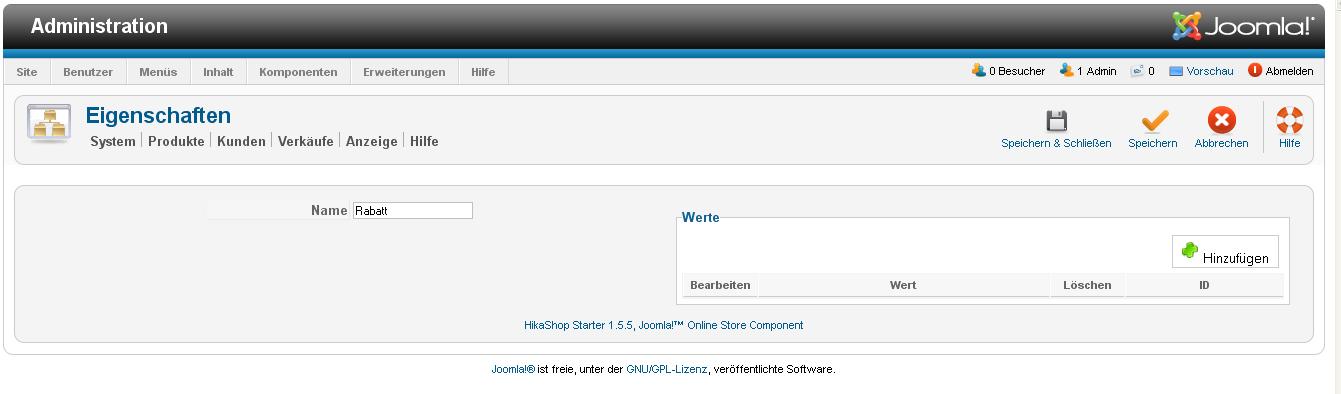
1. I created two categories – one for print products and one for gym equipment. Is it possible to assign each category a discount (for example for the printproducts 12 % and for the gym products 20 %)? I read in another theat that you can do this by characters – but the problem is that if I want to create a character I can enter just the name – nothing else (see screenshot Hikshop_charactersbug) Is this a bug oder do I made some mistakes?
2.I have some problems with the payment modulation – is there any payment just for invoice?
3. Is it possible to change each „next“-Button in the checkout workflow – so it’s named by the next option (for example „ adress“ – “shippin” – “payment” …)?
4. I have the problem that I have just a “next”-button in the checkout workflow but no “previous” button – where can I change that?
5. Do I have to add a weight on EVERY product to see the shipping information? For some products I don’t know the weights – the shipping is for fee – so the weight doesn’t matter….
6. the “title-”field at the address is named in English (Mr/Mrs/…) - where can I change that into German?
Thank you very much!
Juli
I’m a absolute beginner in this – and my english is not the best but I hope you might understand my questions and that someone can help me...
1. I created two categories – one for print products and one for gym equipment. Is it possible to assign each category a discount (for example for the printproducts 12 % and for the gym products 20 %)? I read in another theat that you can do this by characters – but the problem is that if I want to create a character I can enter just the name – nothing else (see screenshot Hikshop_charactersbug) Is this a bug oder do I made some mistakes?
2.I have some problems with the payment modulation – is there any payment just for invoice?
3. Is it possible to change each „next“-Button in the checkout workflow – so it’s named by the next option (for example „ adress“ – “shippin” – “payment” …)?
4. I have the problem that I have just a “next”-button in the checkout workflow but no “previous” button – where can I change that?
5. Do I have to add a weight on EVERY product to see the shipping information? For some products I don’t know the weights – the shipping is for fee – so the weight doesn’t matter….
6. the “title-”field at the address is named in English (Mr/Mrs/…) - where can I change that into German?
Thank you very much!
Juli
Please Log in or Create an account to join the conversation.

14 years 2 months ago - 14 years 2 months ago #62812
by Xavier
Replied by Xavier on topic Re: some little problems...
Hi juls,
1. The discounts can be applied on categories, in HikaShop > Order > Discounts, create a new discount and affect it only on the category wanted.
2. I think that you can use the "check" method, edit this method name, description and the check information to put the text to display after the order.
3. Yes it's possible, you can read that post which explain how to change the text:
www.hikashop.com/en/forum/4-how-to/9242-...ext-button.html#9242
4. There is no "previous" button, you can edit the view "checkout / step" in HikaShop > Display > Views to add this button, but it require some php skills.
You can too enable the progress bar in the checkout options.
5. You can set a shipping method with a minimum weight of 0kg, then your products don't need a price.
6. The translations can be changed in HikaShop > Configuration > Languages, edit the language file and replace the text between the quotes.
1. The discounts can be applied on categories, in HikaShop > Order > Discounts, create a new discount and affect it only on the category wanted.
2. I think that you can use the "check" method, edit this method name, description and the check information to put the text to display after the order.
3. Yes it's possible, you can read that post which explain how to change the text:
www.hikashop.com/en/forum/4-how-to/9242-...ext-button.html#9242
4. There is no "previous" button, you can edit the view "checkout / step" in HikaShop > Display > Views to add this button, but it require some php skills.
You can too enable the progress bar in the checkout options.
5. You can set a shipping method with a minimum weight of 0kg, then your products don't need a price.
6. The translations can be changed in HikaShop > Configuration > Languages, edit the language file and replace the text between the quotes.
Last edit: 14 years 2 months ago by Xavier.
The following user(s) said Thank You: juls
Please Log in or Create an account to join the conversation.
14 years 2 months ago #62861
by juls
Replied by juls on topic Re: some little problems...
Hi Xavier,
thank you very very much for the help!!!
I created two different discount but where can I affect it only on the category? We just got the essencial version - might be that this option is just for the bussiness version?
Thanks for the tip for question 2,3 and 5 with the check method - it works perfect!
I'm gonna ask someone how requires phpskills to help me with nr4..
And just one more quetion to nr.5:
I try to finde the file in the languages but I coudn't find it... Where can it be?
Greetings
Juli
thank you very very much for the help!!!
I created two different discount but where can I affect it only on the category? We just got the essencial version - might be that this option is just for the bussiness version?
Thanks for the tip for question 2,3 and 5 with the check method - it works perfect!
I'm gonna ask someone how requires phpskills to help me with nr4..
And just one more quetion to nr.5:
I try to finde the file in the languages but I coudn't find it... Where can it be?
Greetings
Juli
Please Log in or Create an account to join the conversation.
14 years 2 months ago #62935
by Xavier
Replied by Xavier on topic Re: some little problems...
Hi juli,
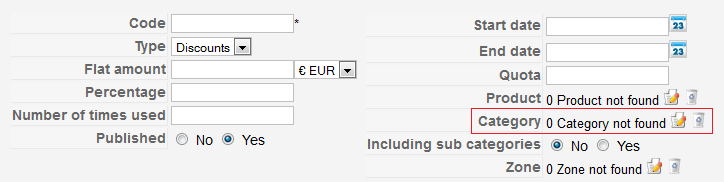
In the discount form, just add a category, look at this picture:
The languages files are in HikaShop > System > Configuration, the tab languages, then click on the edit button.
In this file search for: HIKA_TITLE_MR.
In the discount form, just add a category, look at this picture:
The languages files are in HikaShop > System > Configuration, the tab languages, then click on the edit button.
In this file search for: HIKA_TITLE_MR.
Please Log in or Create an account to join the conversation.
14 years 2 months ago #62939
by juls
Replied by juls on topic Re: some little problems...
Hi Xavier,
it seems that it doesn't work with our version of Hikashop
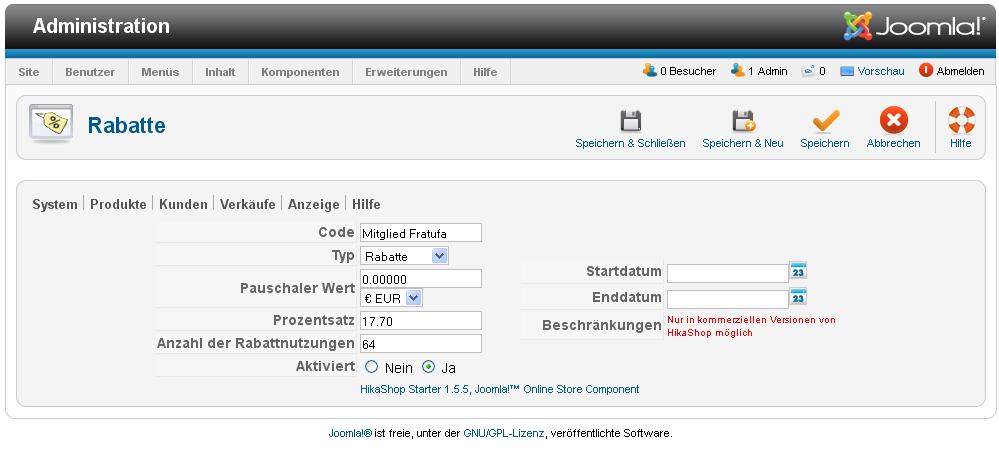
We don't have the option to select the category....
and I couldn't find in file HIKA_TITLE_MR - seems it doesn't exist - just "HIKA_TITLE="Titel""...
But thanks für your help!!!
Greetings
Juli
it seems that it doesn't work with our version of Hikashop
We don't have the option to select the category....
and I couldn't find in file HIKA_TITLE_MR - seems it doesn't exist - just "HIKA_TITLE="Titel""
...But thanks für your help!!!
Greetings
Juli
Please Log in or Create an account to join the conversation.
14 years 2 months ago #62940
by Xavier
Replied by Xavier on topic Re: some little problems...
You don't have the essential version installed on your website, only the free version.
That's why you can't apply the discounts on categories.
For the translation, it's maybe due to you version of HikaShop 1.5.5 which is not the last version. Maybe the text has changed, I think it wasn't "HIKA_TITLE_MR".
That's why you can't apply the discounts on categories.
For the translation, it's maybe due to you version of HikaShop 1.5.5 which is not the last version. Maybe the text has changed, I think it wasn't "HIKA_TITLE_MR".
Please Log in or Create an account to join the conversation.
Time to create page: 0.074 seconds