
- Posts: 33
- Thank you received: 0
Shipping Method on Log-in Layout
- trustedcomputer
-
 Topic Author
- Offline
Less
More
14 years 1 month ago #66096
by trustedcomputer
Shipping Method on Log-in Layout was created by trustedcomputer
Hi,
Upon checking out on the layout of "Login", Manual Shipping Method is listed but although all other shipping methods (USPS, UPS and FedDex) are enabled/published. Once logged in, USPS and Manual Shipping appear but not the other ones.
Question:
How to remove Manual Shipping Method on Login layout or make the other shipping methods appear there
Upon checking out on the layout of "Login", Manual Shipping Method is listed but although all other shipping methods (USPS, UPS and FedDex) are enabled/published. Once logged in, USPS and Manual Shipping appear but not the other ones.
Question:
How to remove Manual Shipping Method on Login layout or make the other shipping methods appear there
Please Log in or Create an account to join the conversation.
14 years 1 month ago #66114
by jrod
Replied by jrod on topic Re: Shipping Method on Log-in Layout
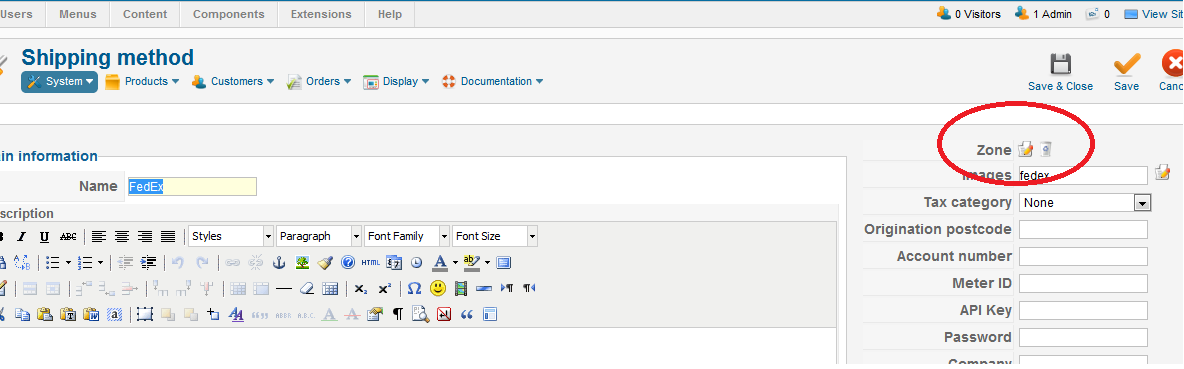
In the shipping methods, such as "FedEx", check to see if anything is set next to zones, press the delete icon to remove the restriction, save and see if it shows up.
Please Log in or Create an account to join the conversation.
- trustedcomputer
-
Topic Author
- Offline
Less
More
- Posts: 33
- Thank you received: 0
14 years 1 month ago #66115
by trustedcomputer
Replied by trustedcomputer on topic Re: Shipping Method on Log-in Layout
Thanks, nothing is set in the zones. Also the product has a weight to it of 2 LBs, so weight isn't an issue either.
Please Log in or Create an account to join the conversation.
14 years 1 month ago #66116
by jrod
Replied by jrod on topic Re: Shipping Method on Log-in Layout
to remove the shipping options, go to
System/Configuration/Checkout
and in the Checkout workflow drag the Shipping into the rubbish can
(I have the business edition, so I am not sure if it is the same in your edition)
System/Configuration/Checkout
and in the Checkout workflow drag the Shipping into the rubbish can
(I have the business edition, so I am not sure if it is the same in your edition)
Please Log in or Create an account to join the conversation.
- trustedcomputer
-
Topic Author
- Offline
Less
More
- Posts: 33
- Thank you received: 0
14 years 1 month ago #66118
by trustedcomputer
Replied by trustedcomputer on topic Re: Shipping Method on Log-in Layout
The Hikashop I'm working on is the Essential version. Yeah, I guess it's different from the Business in this window (see pic attached) as I don't see "shipping" as an option to trash.
Please Log in or Create an account to join the conversation.
14 years 1 month ago #66124
by jrod
Replied by jrod on topic Re: Shipping Method on Log-in Layout
its the third one over, in the grey area where it says Login, Address, Shipping, Payment
try dragging the one that says Shipping into the trash can
try dragging the one that says Shipping into the trash can
Please Log in or Create an account to join the conversation.
- trustedcomputer
-
Topic Author
- Offline
Less
More
- Posts: 33
- Thank you received: 0
14 years 1 month ago #66126
by trustedcomputer
Replied by trustedcomputer on topic Re: Shipping Method on Log-in Layout
That "Shipping" you are referring to displays after a user logs in. But my question is referring to the page before the user logged in (pls see attached).
Please Log in or Create an account to join the conversation.
14 years 1 month ago #66127
by jrod
Replied by jrod on topic Re: Shipping Method on Log-in Layout
In your checkout workflow you have
Login, Address, Shipping, Payment, Coupon, Cart, Status, and Fields all on one page like the gray line shows and also shows in the second image you sent.
If you put the Shipping into the trash then it should remove it. (you can put it back again afterwards).
You can have multiple checkout pages, for example, on the first image that you posted there is blue text that says "Add Step". If you press "Add Step" and then drag the Shipping to the next gray line, that might solve the FedEx thing, because I guess FedEx needs to know the address before it can calculate. So try this
Add Step
drag Shipping to that new step
Save
and see if that works.
Login, Address, Shipping, Payment, Coupon, Cart, Status, and Fields all on one page like the gray line shows and also shows in the second image you sent.
If you put the Shipping into the trash then it should remove it. (you can put it back again afterwards).
You can have multiple checkout pages, for example, on the first image that you posted there is blue text that says "Add Step". If you press "Add Step" and then drag the Shipping to the next gray line, that might solve the FedEx thing, because I guess FedEx needs to know the address before it can calculate. So try this
Add Step
drag Shipping to that new step
Save
and see if that works.
The following user(s) said Thank You: nicolas
Please Log in or Create an account to join the conversation.
- trustedcomputer
-
Topic Author
- Offline
Less
More
- Posts: 33
- Thank you received: 0
14 years 1 month ago #66283
by trustedcomputer
Replied by trustedcomputer on topic Re: Shipping Method on Log-in Layout
Hi, I tried the add step, but the result wasn't what I was looking for. Finally now I got the UPS to show, but I noticed this error message. Could you tell me what this means? Could this be why the Fedex shipping method isn't showing?
Please Log in or Create an account to join the conversation.
- trustedcomputer
-
Topic Author
- Offline
Less
More
- Posts: 33
- Thank you received: 0
14 years 1 month ago #66285
by trustedcomputer
Replied by trustedcomputer on topic Re: Shipping Method on Log-in Layout
Sorry, nevermind. I see that FedEx hasn't been configured with passwords and such. That must've been why FedEx isn't showing up and has an error message.
Please Log in or Create an account to join the conversation.
- trustedcomputer
-
Topic Author
- Offline
Less
More
- Posts: 33
- Thank you received: 0
14 years 1 month ago #66288
by trustedcomputer
Replied by trustedcomputer on topic Re: Shipping Method on Log-in Layout
So, I dragged "shipping" into the trashcan and the whole area (highlighted in red in the picture attached) did disappear along with the shipping methods that used to be listed after the user logs in on the "checkout" page.
1) Is there a way to get rid of that area circled in red without getting rid of the shipping methods on the checkout page?
2) Is there a way to make USPS, UPS and FedEx appear on the login page (same page as the picture attached)? I did read in other forum discussions that USPS, UPS and FedEx require address to calculate shipping. Is that why they don't appear on the login page (same page as the picture attached)?
1) Is there a way to get rid of that area circled in red without getting rid of the shipping methods on the checkout page?
2) Is there a way to make USPS, UPS and FedEx appear on the login page (same page as the picture attached)? I did read in other forum discussions that USPS, UPS and FedEx require address to calculate shipping. Is that why they don't appear on the login page (same page as the picture attached)?
Please Log in or Create an account to join the conversation.
14 years 1 month ago #66304
by jrod
Replied by jrod on topic Re: Shipping Method on Log-in Layout
can attach the pic
Please Log in or Create an account to join the conversation.
- trustedcomputer
-
Topic Author
- Offline
Less
More
- Posts: 33
- Thank you received: 0
14 years 1 month ago #66306
by trustedcomputer
Replied by trustedcomputer on topic Re: Shipping Method on Log-in Layout
Oh sorry. Here it is!
Please Log in or Create an account to join the conversation.
14 years 1 month ago #66308
by jrod
Replied by jrod on topic Re: Shipping Method on Log-in Layout
Thanks!
I just installed FedEx on my shop really quick to see.
It said that SOAP was not installed.
So I found this thread..... SOAP is needed for the Fedex plugin.
www.hikashop.com/en/forum/2-general-talk...ml?limit=20&start=60
And then I found this FAQ on why shipping methods don't show up, there are twelve things to check:
I don't see any shipping methods during the checkout, what is the problem ?
www.hikashop.com/en/support/documentatio...ins-listing.html#faq
For your first question about removing the area in red, but keeping the shipping methods, can you explain more?
I just installed FedEx on my shop really quick to see.
It said that SOAP was not installed.
So I found this thread..... SOAP is needed for the Fedex plugin.
www.hikashop.com/en/forum/2-general-talk...ml?limit=20&start=60
And then I found this FAQ on why shipping methods don't show up, there are twelve things to check:
I don't see any shipping methods during the checkout, what is the problem ?
www.hikashop.com/en/support/documentatio...ins-listing.html#faq
For your first question about removing the area in red, but keeping the shipping methods, can you explain more?
The following user(s) said Thank You: trustedcomputer
Please Log in or Create an account to join the conversation.
- trustedcomputer
-
Topic Author
- Offline
Less
More
- Posts: 33
- Thank you received: 0
14 years 1 month ago #66470
by trustedcomputer
Replied by trustedcomputer on topic Re: Shipping Method on Log-in Layout
Thanks for the reminder regarding SOAP and the FAQ. However, I wonder if they only apply to the "Check Out" page and not the "Login" page.
Regards to the area I circled in red in the last picture I uploaded, I noticed that when I delete "shipping" as in your suggestion, on the page shown in the picture I last uploaded "hikashop_q2c.png", the red circled area disappears and when I entered the login information on that same page and press enter, on the next page ("Check Out" page), the shipping methods are also not present. Basically, removing "shipping" took out shipping methods on both of these pages. However, I was wondering 1) If there is a way to not have any shipping methods on the "Login" page, but have all the shipping methods show up on the "Checkout" page (if not, I am thinking right now that this probably isn't a good idea to do anyway, right?) and 2) If there is a way to make all shipping methods appear on both of these pages.
Thank you!
Regards to the area I circled in red in the last picture I uploaded, I noticed that when I delete "shipping" as in your suggestion, on the page shown in the picture I last uploaded "hikashop_q2c.png", the red circled area disappears and when I entered the login information on that same page and press enter, on the next page ("Check Out" page), the shipping methods are also not present. Basically, removing "shipping" took out shipping methods on both of these pages. However, I was wondering 1) If there is a way to not have any shipping methods on the "Login" page, but have all the shipping methods show up on the "Checkout" page (if not, I am thinking right now that this probably isn't a good idea to do anyway, right?) and 2) If there is a way to make all shipping methods appear on both of these pages.
Thank you!
Please Log in or Create an account to join the conversation.
14 years 1 month ago #66487
by jrod
Replied by jrod on topic Re: Shipping Method on Log-in Layout
on the first page of checkout say you want Login, Cart, Coupon and Address
and on the second page of checkout you want shipping and payment.
In System, Configuration, Checkout Workflow, you will see the words "Add Step" near the area you were previously working at. Press that, it will create a new gray line. Drag the Shipping into that, and also the Payment. Save it.
So you should have Login, Address, Coupon, Cart on the first page, and Shipping and Payment on the second page of checkout.
and on the second page of checkout you want shipping and payment.
In System, Configuration, Checkout Workflow, you will see the words "Add Step" near the area you were previously working at. Press that, it will create a new gray line. Drag the Shipping into that, and also the Payment. Save it.
So you should have Login, Address, Coupon, Cart on the first page, and Shipping and Payment on the second page of checkout.
Please Log in or Create an account to join the conversation.
14 years 1 month ago #66488
by jrod
Replied by jrod on topic Re: Shipping Method on Log-in Layout
I've attached an image of my checkout workflow to explain more. I've put my comments in red.
I have four stages of my checkout process, which I've numbered in red. It appears you would like two, so use the "Add Step" button to add a new stage to your checkout workflow and drag Shipping and Payment to that stage
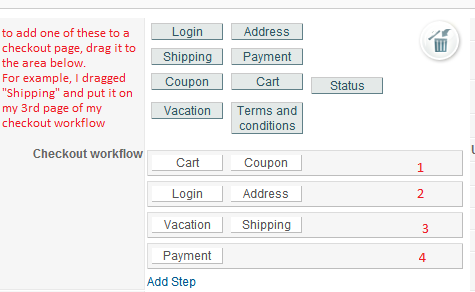
I have four stages of my checkout process, which I've numbered in red. It appears you would like two, so use the "Add Step" button to add a new stage to your checkout workflow and drag Shipping and Payment to that stage
Please Log in or Create an account to join the conversation.
- trustedcomputer
-
Topic Author
- Offline
Less
More
- Posts: 33
- Thank you received: 0
14 years 1 month ago #66489
by trustedcomputer
Replied by trustedcomputer on topic Re: Shipping Method on Log-in Layout
Hi Jrod,
I don't think I'm getting across what I was asking. Let me try again. Please see both pictures attached. I'm exploring the option of having the red circled area be removed (no shipping methods) in the first picture and at he same time having the page represented by the second picture look like that (with shipping methods).
I don't think I'm getting across what I was asking. Let me try again. Please see both pictures attached. I'm exploring the option of having the red circled area be removed (no shipping methods) in the first picture and at he same time having the page represented by the second picture look like that (with shipping methods).
Please Log in or Create an account to join the conversation.
14 years 1 month ago #66490
by jrod
Replied by jrod on topic Re: Shipping Method on Log-in Layout
You want Login, Registration, and Cart on the first page of your checkout (everything that is in your first picture, minus the read area). Correct?
Then after the user logs in it shows address, shipping methods (usps, fedex, etc.). like your second image. Correct?
Then after the user logs in it shows address, shipping methods (usps, fedex, etc.). like your second image. Correct?
Please Log in or Create an account to join the conversation.
- trustedcomputer
-
Topic Author
- Offline
Less
More
- Posts: 33
- Thank you received: 0
14 years 1 month ago #66491
by trustedcomputer
Replied by trustedcomputer on topic Re: Shipping Method on Log-in Layout
Yes.
Please Log in or Create an account to join the conversation.
Time to create page: 0.187 seconds