

- Posts: 78
- Thank you received: 0
Checkout row display problem
15 years 7 months ago #6646
by jasonm
Checkout row display problem was created by jasonm
Back again,
I've got an issue with checkout, the alternate product rows are displayed on a black background. It looks like our template has a module 'row1' that is clashing with hikashop 'row1' used for every second row. What is the best way to get around this?
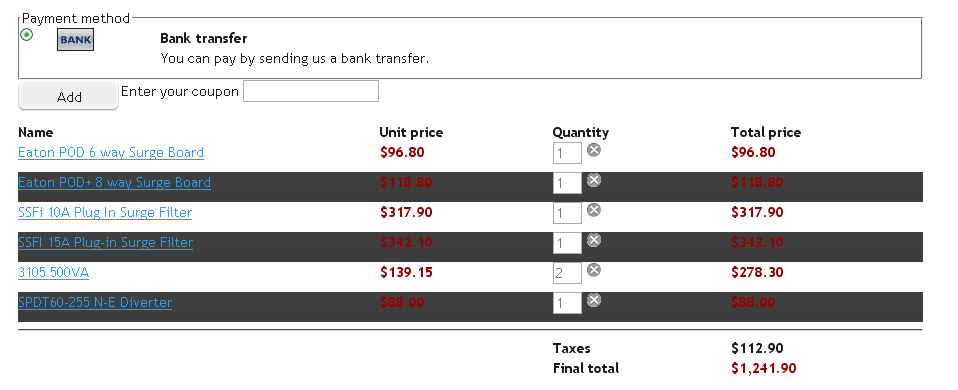
I've got an issue with checkout, the alternate product rows are displayed on a black background. It looks like our template has a module 'row1' that is clashing with hikashop 'row1' used for every second row. What is the best way to get around this?
Please Log in or Create an account to join the conversation.

15 years 7 months ago #6662
by nicolas
Replied by nicolas on topic Re: Checkout row display problem
You should try to override the row1 css of your template by adding the CSS below to the hikashop front end CSS in the config under the tab display:
#hikashop_checkout_cart tr.row1 { background : #FFF }
#hikashop_checkout_cart tr.row1 { background : #FFF }
Please Log in or Create an account to join the conversation.
15 years 7 months ago #6750
by jasonm
Replied by jasonm on topic Re: Checkout row display problem
No that didn't work, would it be easier to stop the rows alternating ie declare them all as row 0 rather than 0,1,0,1?
Please Log in or Create an account to join the conversation.
15 years 7 months ago #6754
by nicolas
Replied by nicolas on topic Re: Checkout row display problem
Did you save your configuration so that the new CSS file is used and did you clear your browser's cache ?
Maybe your modification isn't visible because of that...
Otherwise, yes, you can go in the menu Display->Views and edit the file cart of the view checkout and remove the class on the tr tag.
Maybe your modification isn't visible because of that...
Otherwise, yes, you can go in the menu Display->Views and edit the file cart of the view checkout and remove the class on the tr tag.
Please Log in or Create an account to join the conversation.
15 years 7 months ago #6757
by jasonm
Replied by jasonm on topic Re: Checkout row display problem
I work in Firefox and test changes in a clean IE just to avoid the cache issue.
Class removed and now working OK, thanks Nicolas.
Class removed and now working OK, thanks Nicolas.
Please Log in or Create an account to join the conversation.
Time to create page: 0.154 seconds