

- Posts: 15
- Thank you received: 0
How to adjust images space ?
14 years 1 month ago #66767
by shiva
How to adjust images space ? was created by shiva
I bought styles package, using style "pictureblue"
My product page image set to width: 300 height: 300
Then showing big space between main image and small images.
May I know how to move up small images ?
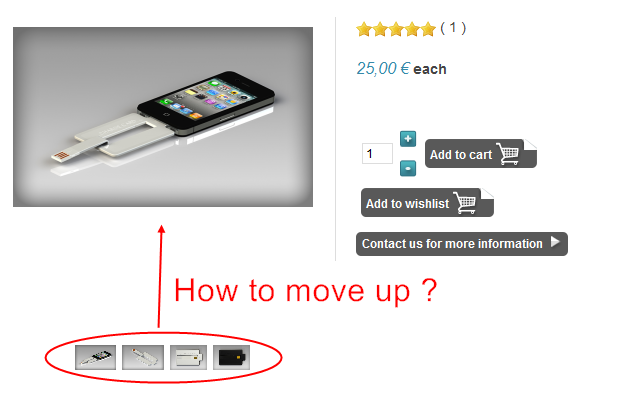
My product page image set to width: 300 height: 300
Then showing big space between main image and small images.
May I know how to move up small images ?
Please Log in or Create an account to join the conversation.

14 years 1 month ago #66960
by Xavier
Replied by Xavier on topic Re: How to adjust images space ?
Hi shiva,
You can move it up by editing the css properties. Edit the "frontend css file" in HikaShop > Configuration > Display.
Firebug can help you to find the correct class to edit, some documentation here:
www.hikashop.com/en/support/documentation/faq.html#css
You can move it up by editing the css properties. Edit the "frontend css file" in HikaShop > Configuration > Display.
Firebug can help you to find the correct class to edit, some documentation here:
www.hikashop.com/en/support/documentation/faq.html#css
Please Log in or Create an account to join the conversation.
14 years 1 month ago #66981
by shiva
Replied by shiva on topic Re: How to adjust images space ?
I'm not programmer and I never use Firebug.
I'm appreciated if you can tell me where and how to edit it, so I can try to play with it.
I'm using style "pictureblue"
Thank you for help.
I'm appreciated if you can tell me where and how to edit it, so I can try to play with it.
I'm using style "pictureblue"
Thank you for help.
Please Log in or Create an account to join the conversation.

14 years 1 month ago #67024
by nicolas
Replied by nicolas on topic Re: How to adjust images space ?
Could you give a link to that page so that we can look at the HTML/CSS of your page ?
Please Log in or Create an account to join the conversation.
14 years 1 month ago #67060
by shiva
Replied by shiva on topic Re: How to adjust images space ?
Please Log in or Create an account to join the conversation.
14 years 1 month ago #67081
by Xavier
Replied by Xavier on topic Re: How to adjust images space ?
Hi shiva,
You can try to change the property "Product page image height" in HikaShop > Display > Files / images.
Or edit the css property:
I recommend to use the first solution.
You can try to change the property "Product page image height" in HikaShop > Display > Files / images.
Or edit the css property:
Code:
.hikashop_product_main_image_thumb{
height: 22px !important;
}
I recommend to use the first solution.
The following user(s) said Thank You: shiva
Please Log in or Create an account to join the conversation.
Time to create page: 0.077 seconds