
- Posts: 23
- Thank you received: 0
pagination steps
- Goldingarts
-
 Topic Author
- Offline
Less
More
14 years 1 week ago #67690
by Goldingarts
pagination steps was created by Goldingarts
Hi,
I'm displaying 6 products on a page, but the pagination at the bottom is showing steps of 5 and I need to change to 6,12,18,24....etc
I can't find where to change the steps, any ideas?
Many thanks,
Derek
I'm displaying 6 products on a page, but the pagination at the bottom is showing steps of 5 and I need to change to 6,12,18,24....etc
I can't find where to change the steps, any ideas?
Many thanks,
Derek
Please Log in or Create an account to join the conversation.

Less
More
- Posts: 12953
- Thank you received: 1778
14 years 1 week ago #67778
by Mohamed Thelji
Replied by Mohamed Thelji on topic Re: pagination steps
Hi Derek,
I don't think that this is possible without making BIG changes, but you should maybe disable the pagination with some CSS code like this :
Hope this will help you.
I don't think that this is possible without making BIG changes, but you should maybe disable the pagination with some CSS code like this :
Code:
.hikashop_products_pagination{ display:none; }
Please Log in or Create an account to join the conversation.
- Goldingarts
-
Topic Author
- Offline
Less
More
- Posts: 23
- Thank you received: 0
14 years 1 week ago #67822
by Goldingarts
Replied by Goldingarts on topic Re: pagination steps
Is the code for the pagination in a single location or scattered throughout the system?
How does the code decide to use steps of 5?
How does the code decide to use steps of 5?
Please Log in or Create an account to join the conversation.
- Goldingarts
-
Topic Author
- Offline
Less
More
- Posts: 23
- Thank you received: 0
14 years 1 week ago #67823
by Goldingarts
Replied by Goldingarts on topic Re: pagination steps
if I disable the pagination how can the customer see there are more products??
Please Log in or Create an account to join the conversation.
Less
More
- Posts: 12953
- Thank you received: 1778
14 years 1 week ago #67839
by Mohamed Thelji
Replied by Mohamed Thelji on topic Re: pagination steps
the pagination will be set to "all" with this code.
Please Log in or Create an account to join the conversation.

14 years 4 days ago #68720
by didero
Replied by didero on topic Re: pagination steps
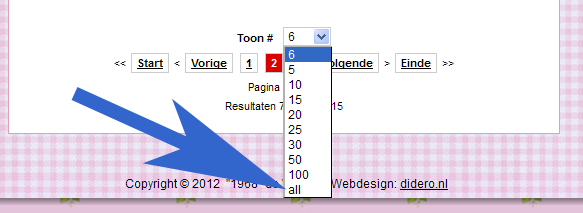
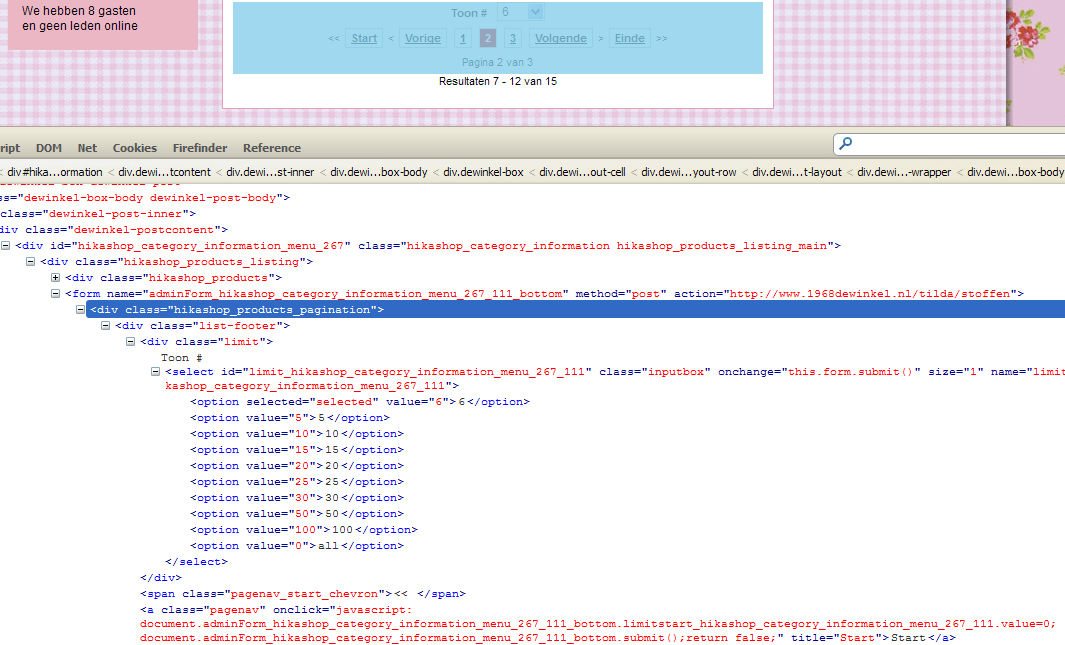
I am struggling with the same. Like Spock would say it will be logical that the pagination steps will be shown with steps equally like the setup in the configuration of Hikashop. So showing 6 products initially per page (2 rows of 3 products) should result in the numbers 6, 12, 18 etc. in the input field. Not 5,10,15 etc. The other thing is once a value like 10 or 5 is chosen the initial value of 6 is lost (cookie?). And there is an input of "all", this a English value for all products in that category where it should be Dutch "Alle". Can't imagine that these values can't be set somewhere or be calculated automatically depending on the settings made in the product output/view (2 rows - maximum of 6 products per page).
Please Log in or Create an account to join the conversation.

14 years 2 days ago #68914
by nicolas
Replied by nicolas on topic Re: pagination steps
You can redefine yourself the pagination in the file administrator/components/com_hikashop/helpers/pagination.php
We'll look at improving that for next version.
We'll look at improving that for next version.
The following user(s) said Thank You: didero
Please Log in or Create an account to join the conversation.
14 years 2 days ago - 14 years 2 days ago #68937
by didero
Replied by didero on topic Re: pagination steps
Nicolas, thank you so much. This one is easily fixed for my purpose. Changed the last part of the file to:
function getLimitBox(){
$limits = array ();
$limits[] = JHTML::_('select.option', (string)$this->limit);
for ($i = 6; $i <= 32; $i += 6) {
$limits[] = JHTML::_('select.option', "$i");
}
$limits[] = JHTML::_('select.option', '48');
$limits[] = JHTML::_('select.option', '96');
$limits[] = JHTML::_('select.option', '0', JText::_('Alle'));
return JHTML::_('select.genericlist', $limits, 'limit'.$this->hikaSuffix, 'class="inputbox" size="1" onchange="this.form.submit()"', 'value', 'text', $this->_viewall ? 0 : $this->limit);
}
}
In action here: www.1968dewinkel.nl/stoffen-lint/stoffen-katoen
function getLimitBox(){
$limits = array ();
$limits[] = JHTML::_('select.option', (string)$this->limit);
for ($i = 6; $i <= 32; $i += 6) {
$limits[] = JHTML::_('select.option', "$i");
}
$limits[] = JHTML::_('select.option', '48');
$limits[] = JHTML::_('select.option', '96');
$limits[] = JHTML::_('select.option', '0', JText::_('Alle'));
return JHTML::_('select.genericlist', $limits, 'limit'.$this->hikaSuffix, 'class="inputbox" size="1" onchange="this.form.submit()"', 'value', 'text', $this->_viewall ? 0 : $this->limit);
}
}
In action here: www.1968dewinkel.nl/stoffen-lint/stoffen-katoen
Last edit: 14 years 2 days ago by didero.
Please Log in or Create an account to join the conversation.
Time to create page: 0.215 seconds