

- Posts: 48
- Thank you received: 0
Question about the cart.
14 years 1 month ago #67965
by guido
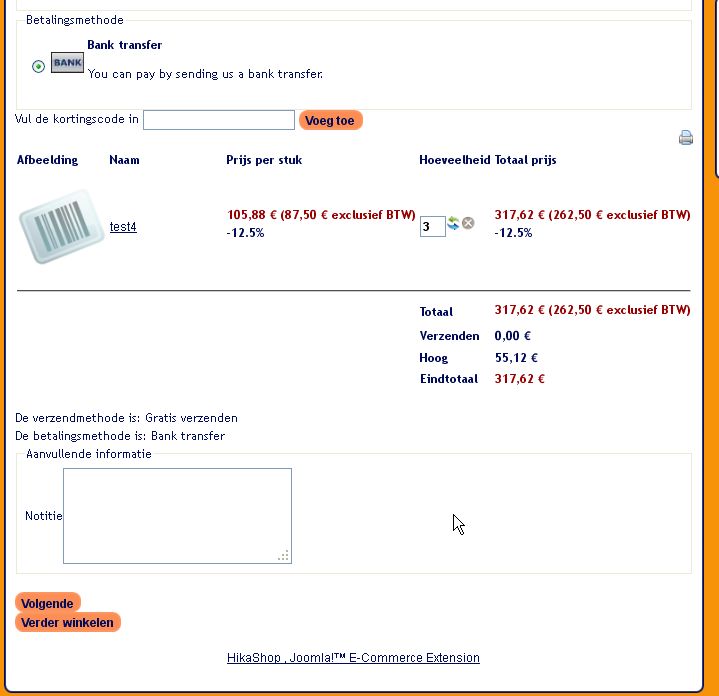
When i put something in the cart and go to the cart i see at the bottom two buttons (in dutch).
1. Volgende = Go to the payment display in my case bank transfer.
2. Verder winkelen = go back to the shop and look for some more articles.
i want to have an extra line between those buttons.
and where can i change the text for those buttons.
With regards,
Guido
Question about the cart. was created by guido
When i put something in the cart and go to the cart i see at the bottom two buttons (in dutch).
1. Volgende = Go to the payment display in my case bank transfer.
2. Verder winkelen = go back to the shop and look for some more articles.
i want to have an extra line between those buttons.
and where can i change the text for those buttons.
With regards,
Guido
Please Log in or Create an account to join the conversation.

14 years 1 month ago #68133
by nicolas
Replied by nicolas on topic Re: Question about the cart.
Hi,
Like for any text in HikaShop, you can use a translation override to change the text of these buttons:
www.hikashop.com/en/download/languages.html#modify
To add space between the buttons, you can use that CSS:
#hikashop_checkout_shopping_button{
padding:10px !important;
}
Like for any text in HikaShop, you can use a translation override to change the text of these buttons:
www.hikashop.com/en/download/languages.html#modify
To add space between the buttons, you can use that CSS:
#hikashop_checkout_shopping_button{
padding:10px !important;
}
Please Log in or Create an account to join the conversation.
14 years 1 month ago #68233
by guido
Replied by guido on topic Re: Question about the cart.
Could you tell me where to find that css.
Guido
Guido
Please Log in or Create an account to join the conversation.
14 years 1 month ago #68283
by mrazy
Should be here: Components > HikaShop > System > Display Tab > CSS (halfway down on the left) > Front-end CSS File > Edit icon
Replied by mrazy on topic Re: Question about the cart.
guido wrote: Could you tell me where to find that css.
Guido
Should be here: Components > HikaShop > System > Display Tab > CSS (halfway down on the left) > Front-end CSS File > Edit icon
The following user(s) said Thank You: nicolas
Please Log in or Create an account to join the conversation.
14 years 1 month ago #68894
by guido
Replied by guido on topic Re: Question about the cart.
Hello i copied the code on the right place in the css but the buttons are still connecting each other, the only thing that changed was the text in the button that went lower so it was half visible.
Pls help
Pls help
Please Log in or Create an account to join the conversation.
14 years 1 month ago #68897
by nicolas
Replied by nicolas on topic Re: Question about the cart.
Then try like that instead:
#hikashop_checkout_shopping_button{
margin:10px !important;
}
#hikashop_checkout_shopping_button{
margin:10px !important;
}
Please Log in or Create an account to join the conversation.
14 years 1 month ago - 14 years 1 month ago #68900
by guido
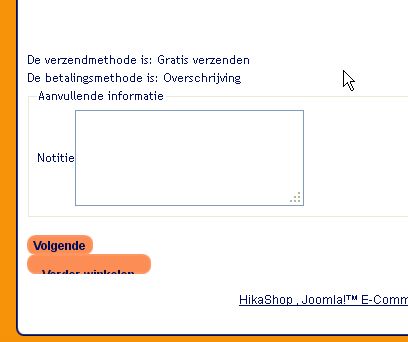
Nope.
I just want an empty line between those two buttons.
Greetings,
Guido
Replied by guido on topic Re: Question about the cart.
Nope.
I just want an empty line between those two buttons.
Greetings,
Guido
Last edit: 14 years 1 month ago by guido.
Please Log in or Create an account to join the conversation.
14 years 1 month ago #68979
by nicolas
Replied by nicolas on topic Re: Question about the cart.
I'm trying to give you CSS advice without knowing what CSS you have on your website so it's kind of hard to guess right. It would help if you could give a link to your website.
Please Log in or Create an account to join the conversation.
14 years 1 month ago #68982
by guido
Replied by guido on topic Re: Question about the cart.
Please Log in or Create an account to join the conversation.
14 years 1 month ago #68983
by nicolas
Replied by nicolas on topic Re: Question about the cart.
Regsitration is not activated on your website and you didn't provide a user account so I can't access the checkout.
Please Log in or Create an account to join the conversation.
14 years 1 month ago #68986
by guido
Replied by guido on topic Re: Question about the cart.
try demo demo
Please Log in or Create an account to join the conversation.
14 years 1 month ago #68989
by nicolas
Replied by nicolas on topic Re: Question about the cart.
That's indeed because of your template's CSS. Use that CSS and it should work:
#hikashop_checkout_page span.art-button-wrapper { margin: 10px; !important}
#hikashop_checkout_page span.art-button-wrapper { margin: 10px; !important}
Please Log in or Create an account to join the conversation.
14 years 1 month ago #68999
by guido
Replied by guido on topic Re: Question about the cart.
Nicolas,
And where do i find that.
Is that in template manager, then looking in template css?
Do i have to put the whole sentence in it:
#hikashop_checkout_page span.art-button-wrapper { margin: 10px; !important}
Guido
And where do i find that.
Is that in template manager, then looking in template css?
Do i have to put the whole sentence in it:
#hikashop_checkout_page span.art-button-wrapper { margin: 10px; !important}
Guido
Please Log in or Create an account to join the conversation.
14 years 1 month ago #69000
by guido
Replied by guido on topic Re: Question about the cart.
Found it.
Thanks
Thanks
Please Log in or Create an account to join the conversation.
Time to create page: 0.083 seconds