

- Posts: 171
- Thank you received: 4
auto-import csv file every 10 minutes
13 years 3 months ago #107033
by jesper
Replied by jesper on topic Re: auto-import csv file every 10 minutes
i have changed the case..
itemId:product_code;Item:product_name;ItemWebDescription:product_description;StockActual:product_quantity;Price:price_value;CreateDateTime:product_created;
but it still gives the error
itemId:product_code;Item:product_name;ItemWebDescription:product_description;StockActual:product_quantity;Price:price_value;CreateDateTime:product_created;
but it still gives the error
Please Log in or Create an account to join the conversation.

13 years 3 months ago #107054
by Xavier
Replied by Xavier on topic Re: auto-import csv file every 10 minutes
Hi,
These columns don't exist, you have to use the columns used by HikaShop else it won't work.
You can export your current products to a csv file to see how it's formatted, and see which columns are authorized.
Here is some documentation about csv import:
www.hikashop.com/fr/support/documentatio...shop-import.html#csv
These columns don't exist, you have to use the columns used by HikaShop else it won't work.
You can export your current products to a csv file to see how it's formatted, and see which columns are authorized.
Here is some documentation about csv import:
www.hikashop.com/fr/support/documentatio...shop-import.html#csv
The following user(s) said Thank You: jesper
Please Log in or Create an account to join the conversation.
13 years 3 months ago #107056
by jesper
Replied by jesper on topic auto-import csv file every 10 minutes
So i have misunderstood the purpose of the field column names ?
I though it was some sort of translation line from one name to hikashop names for the columns
If that is not the purpose on the Hikashop Products Cron Update Plugin then what is its purpose ?
But that is properly not possible from the provider... i have to write a conversion part into the script then...
I though it was some sort of translation line from one name to hikashop names for the columns
If that is not the purpose on the Hikashop Products Cron Update Plugin then what is its purpose ?
But that is properly not possible from the provider... i have to write a conversion part into the script then...
Please Log in or Create an account to join the conversation.

13 years 3 months ago #107079
by nicolas
Replied by nicolas on topic auto-import csv file every 10 minutes
Xavier was talking about the import interface.
The cron plugin goal is indeed to update the products data with CSV automatically and the column names field allows you to associate the columns of the CSV with the columns in hikashop.
I checked the code and actually the column names field should only contain lower case names. Please put everything in lower case in there and that should be better.
The cron plugin goal is indeed to update the products data with CSV automatically and the column names field allows you to associate the columns of the CSV with the columns in hikashop.
I checked the code and actually the column names field should only contain lower case names. Please put everything in lower case in there and that should be better.
The following user(s) said Thank You: jesper
Please Log in or Create an account to join the conversation.
13 years 3 months ago #107081
by jesper
Replied by jesper on topic auto-import csv file every 10 minutes
ah thanx.. that was the problem...i though i should write them as in the file..
now it seems to work
it would be good if you could make this plugin be able to get wildcards as filenames like "uploadfolder/*.cvs" or just "uploadfolder/*" and it would parse all files in that folder mathing the wildcards defined.
but thats not needed right now for me
now it seems to work
it would be good if you could make this plugin be able to get wildcards as filenames like "uploadfolder/*.cvs" or just "uploadfolder/*" and it would parse all files in that folder mathing the wildcards defined.
but thats not needed right now for me
Please Log in or Create an account to join the conversation.

12 years 7 months ago #143321
by verzevoul
Replied by verzevoul on topic auto-import csv file every 10 minutes
Hello Nikolas!
I m trying to do the same here but I m not sure if I understood well.
1. Using the Hikashop Products Cron Update Plugin, is all I need to do the job, or do I have to create a cron task in the configuration too?
I m asking because I saw the field frequency.
2. Is it ok to put my file on the public_html of my website with these info in my plugin?
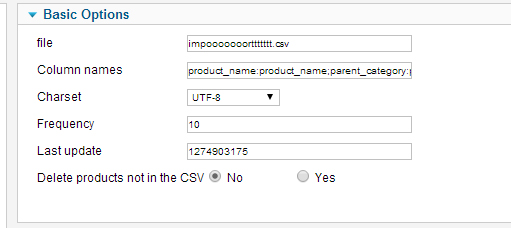
3. when I have 10 in frequency it means 10sec. Am I right?
I m trying to do the same here but I m not sure if I understood well.
1. Using the Hikashop Products Cron Update Plugin, is all I need to do the job, or do I have to create a cron task in the configuration too?
I m asking because I saw the field frequency.
2. Is it ok to put my file on the public_html of my website with these info in my plugin?
3. when I have 10 in frequency it means 10sec. Am I right?
Please Log in or Create an account to join the conversation.
12 years 7 months ago #143332
by verzevoul
Replied by verzevoul on topic auto-import csv file every 10 minutes
Ok.
I answered in all question by doing some more testing so
1. Using the Hikashop Products Cron Update Plugin, is all I need to do the job, or do I have to create a cron task in the configuration too?
Its no. I need to use the cron in the configuration too, to trigger the url. So why does the Frequency field is needed, since we use the cron task to do the job?
2. Is it ok to put my file on the public_html of my website with these info in my plugin?
Its yes
3. when I have 10 in frequency it means 10sec. Am I right?
I dont know since I use the cron to trigger the url.
I answered in all question by doing some more testing so
1. Using the Hikashop Products Cron Update Plugin, is all I need to do the job, or do I have to create a cron task in the configuration too?
Its no. I need to use the cron in the configuration too, to trigger the url. So why does the Frequency field is needed, since we use the cron task to do the job?
2. Is it ok to put my file on the public_html of my website with these info in my plugin?
Its yes
3. when I have 10 in frequency it means 10sec. Am I right?
I dont know since I use the cron to trigger the url.
Please Log in or Create an account to join the conversation.

12 years 7 months ago #143516
by Eliot
Replied by Eliot on topic auto-import csv file every 10 minutes
Glad to see you solved this and thanks for sharing your answers!
Please Log in or Create an account to join the conversation.

10 years 9 months ago #222641
by river
Replied by river on topic auto-import csv file every 10 minutes
Does the plugin used in this thread work with joomla 3.4.5 and Hikashop 2.6 ?
Please Log in or Create an account to join the conversation.
10 years 9 months ago #222650
by nicolas
Replied by nicolas on topic auto-import csv file every 10 minutes
Hi,
Yes, the plugin is included in HikaShop 2.6 and works fine. You just have to configure your cron in the HikaShop configuration and then the HikaShop product update cron plugin via the Joomla plugins manager.
Yes, the plugin is included in HikaShop 2.6 and works fine. You just have to configure your cron in the HikaShop configuration and then the HikaShop product update cron plugin via the Joomla plugins manager.
Please Log in or Create an account to join the conversation.
Time to create page: 0.235 seconds