
- Posts: 39
- Thank you received: 0
Address displays incorrectly in checkout
- 2ndrendermedia
-
 Topic Author
- Offline
Less
More
14 years 3 weeks ago - 14 years 3 weeks ago #68465
by 2ndrendermedia
Address displays incorrectly in checkout was created by 2ndrendermedia
Hello. I went to Display> Views and edited address_template to rearrange the layout of the addresses in the checkout. Unfortunately it doesn't seem to have completely done what i wanted it to. I changed the layout to the following:
This seems to have had no effect on the layout at all though. As you can see in the attached screenshot, the white form for inputting a new address shows in the correct order that I'd like (achieved by rearranging positions in Display> Custom fields), however the end result is the order seen in the pink address box to the left of it. How do i make the address that shows in the pink box display as I'd like it to?
Code:
?>
{address_company}
{address_title} {address_firstname} {address_lastname}
{address_street}
{address_city}
{address_state}
{address_post_code}
{address_country}
<?php echo JText::sprintf('TELEPHONE_IN_ADDRESS','{address_telephone}');?>
This seems to have had no effect on the layout at all though. As you can see in the attached screenshot, the white form for inputting a new address shows in the correct order that I'd like (achieved by rearranging positions in Display> Custom fields), however the end result is the order seen in the pink address box to the left of it. How do i make the address that shows in the pink box display as I'd like it to?
Last edit: 14 years 3 weeks ago by 2ndrendermedia.
Please Log in or Create an account to join the conversation.

14 years 3 weeks ago #68481
by Jerome
Jerome - Obsidev.com
HikaMarket & HikaSerial developer / HikaShop core dev team.
Replied by Jerome on topic Re: Address displays incorrectly in checkout
Hi,
The address_template is used by email, order and invoices : When the address is display only with text.
Using custom fields ordering is the correct method for the address edition in the checkout (and other front-end/back-end forms).
Regards,
The address_template is used by email, order and invoices : When the address is display only with text.
Using custom fields ordering is the correct method for the address edition in the checkout (and other front-end/back-end forms).
Regards,
Jerome - Obsidev.com
HikaMarket & HikaSerial developer / HikaShop core dev team.
Please Log in or Create an account to join the conversation.
- 2ndrendermedia
-
Topic Author
- Offline
Less
More
- Posts: 39
- Thank you received: 0
14 years 3 weeks ago #69369
by 2ndrendermedia
Replied by 2ndrendermedia on topic Re: Address displays incorrectly in checkout
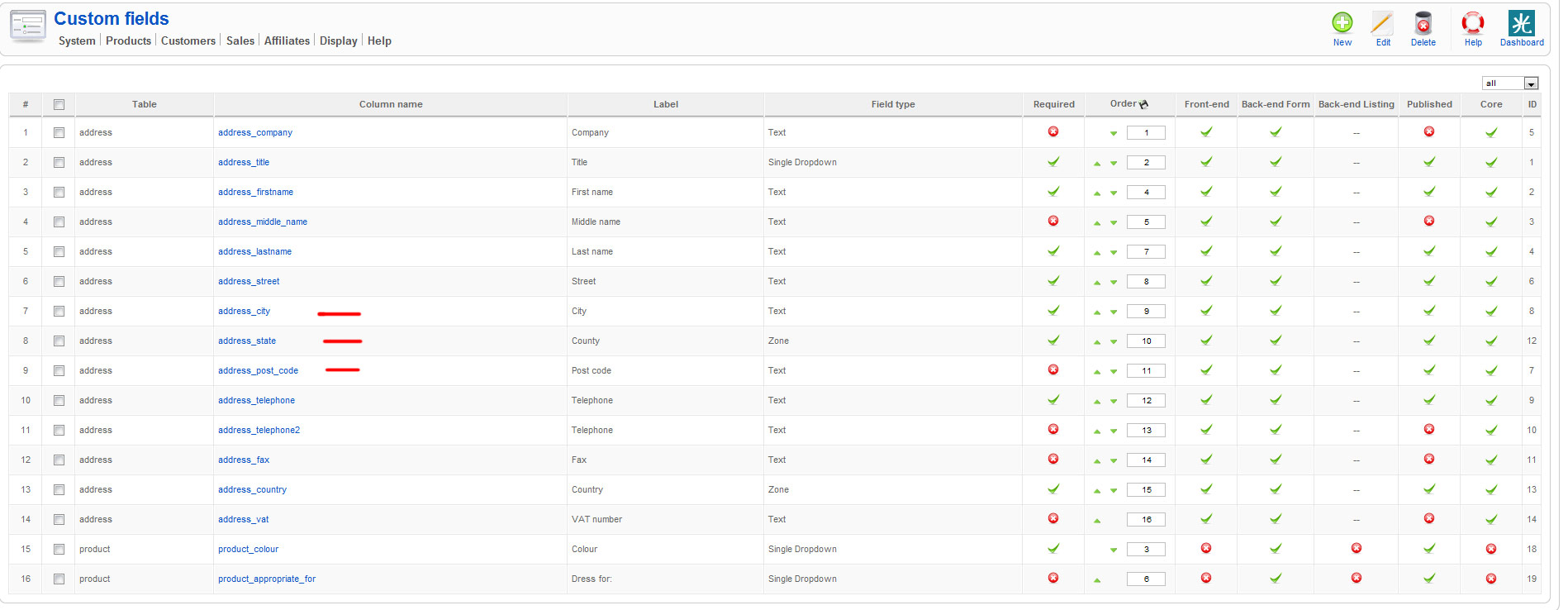
I think you misunderstand. I have rearranged the custom field ordering and yet the post code still shows before the city and county. Please see attached screenshot. You'll see that post code comes after city and county however you can see in the first screenshot i sent in my previous post that it doesn't display this way (look at the pink box in the original screenshot, not the white form).
Please Log in or Create an account to join the conversation.
14 years 2 weeks ago #69466
by Jerome
Jerome - Obsidev.com
HikaMarket & HikaSerial developer / HikaShop core dev team.
Replied by Jerome on topic Re: Address displays incorrectly in checkout
Hi,
I think that you didn't understand my answer.
You "pink" zone the address_template, the content that you posted on your first message.
The popup zone you the custom fields, your configuration send in your last message.
I don't see any problem.
The pink zone display the address_template content correctly (because it is only text) and the poup display custom fields with the right order.
Regards,
I think that you didn't understand my answer.
The address_template is used by email, order and invoices : When the address is display only with text.
Using custom fields ordering is the correct method for the address edition in the checkout (and other front-end/back-end forms).
You "pink" zone the address_template, the content that you posted on your first message.
The popup zone you the custom fields, your configuration send in your last message.
I don't see any problem.
The pink zone display the address_template content correctly (because it is only text) and the poup display custom fields with the right order.
Regards,
Jerome - Obsidev.com
HikaMarket & HikaSerial developer / HikaShop core dev team.
Please Log in or Create an account to join the conversation.
- 2ndrendermedia
-
Topic Author
- Offline
Less
More
- Posts: 39
- Thank you received: 0
14 years 2 weeks ago #69469
by 2ndrendermedia
Replied by 2ndrendermedia on topic Re: Address displays incorrectly in checkout
I'm confused now. The way i see it, I've changed the code to the following:
?>
{address_company}
{address_title} {address_firstname} {address_lastname}
{address_street}
{address_city}
{address_state}
{address_post_code}
{address_country}
<?php echo JText::sprintf('TELEPHONE_IN_ADDRESS','{address_telephone}');?>
In this, post code comes after (and on a separate line) to city and state. However in reality it still shows up before and on the same line as city and state in the pink box. I want it to display in the order shown above when in the pink box.
?>
{address_company}
{address_title} {address_firstname} {address_lastname}
{address_street}
{address_city}
{address_state}
{address_post_code}
{address_country}
<?php echo JText::sprintf('TELEPHONE_IN_ADDRESS','{address_telephone}');?>
In this, post code comes after (and on a separate line) to city and state. However in reality it still shows up before and on the same line as city and state in the pink box. I want it to display in the order shown above when in the pink box.
Please Log in or Create an account to join the conversation.

14 years 2 weeks ago #69543
by nicolas
Replied by nicolas on topic Re: Address displays incorrectly in checkout
Editing the address_template file is the correct thing to do. However, there are two address_template files. One for the backend, and one for the front end. On top of that, you might have several templates so yet more possibilities to not edit the correct one.
Please make sure that you're editing the frontend one for your frontend template and it will work.
Please make sure that you're editing the frontend one for your frontend template and it will work.
Please Log in or Create an account to join the conversation.
- 2ndrendermedia
-
Topic Author
- Offline
Less
More
- Posts: 39
- Thank you received: 0
14 years 2 weeks ago - 14 years 2 weeks ago #69640
by 2ndrendermedia
Replied by 2ndrendermedia on topic Re: Address displays incorrectly in checkout
Oh i see. That's solved the issue i was having. Thanks very much for your help once again. So glad i went with Hikashop for my eCommerce solution. The product itself is excellent and the customer support is just as good. 
Last edit: 14 years 2 weeks ago by 2ndrendermedia. Reason: spelling
Please Log in or Create an account to join the conversation.
Time to create page: 0.107 seconds