

- Posts: 136
- Thank you received: 1
Fade Setting - black overlay appearing
14 years 3 days ago #68878
by jacorr27
Fade Setting - black overlay appearing was created by jacorr27
Hi guys,
I am trying out the fade setting and there appears to be a strange black overlay that I can't get rid of.
Any ideas?
Thanks, jac
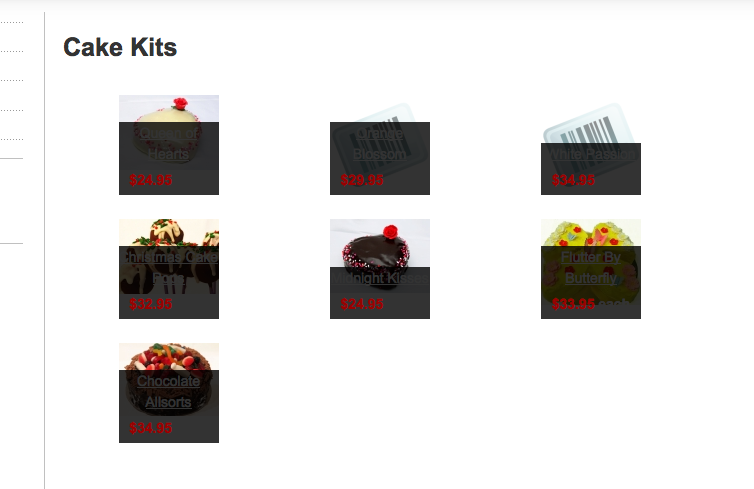
I am trying out the fade setting and there appears to be a strange black overlay that I can't get rid of.
Any ideas?
Thanks, jac
Please Log in or Create an account to join the conversation.

14 years 2 days ago #68974
by nicolas
Replied by nicolas on topic Re: Fade Setting - black overlay appearing
Hi,
That normal. See here:
demo.hikashop.com/index.php?option=com_c...5&Itemid=103&lang=en
In the first slider, there is a pane layout used. You images are really small so it doesn't look good.
You can change the color of the black backgroun by changing the CSS:
.hikashop_img_pane_panel {
position: absolute;
bottom: 0px;
background: rgba(0, 0, 0, 0. ;
;
background-color: black 9;
filter: alpha(opacity=80) 9;
text-align: center !important;
}
in the front end CSS file of HikaShop via the Display tab of the configuration.
That normal. See here:
demo.hikashop.com/index.php?option=com_c...5&Itemid=103&lang=en
In the first slider, there is a pane layout used. You images are really small so it doesn't look good.
You can change the color of the black backgroun by changing the CSS:
.hikashop_img_pane_panel {
position: absolute;
bottom: 0px;
background: rgba(0, 0, 0, 0.
;background-color: black 9;
filter: alpha(opacity=80) 9;
text-align: center !important;
}
in the front end CSS file of HikaShop via the Display tab of the configuration.
Please Log in or Create an account to join the conversation.
14 years 2 days ago #68998
by jacorr27
Replied by jacorr27 on topic Re: Fade Setting - black overlay appearing
Thank you, what exactly should I do with the css. I have tried removing the background colour, as well as changing the opacity but the black area still appears.
Please Log in or Create an account to join the conversation.
14 years 1 day ago #69071
by nicolas
Replied by nicolas on topic Re: Fade Setting - black overlay appearing
I don't know. What do you want to do with the semi transparent black overlay ?
Remove it ? change its color ?
In any case, if you don't see your changes, make sure that you clean your browser cache and that you save the configuration after changing the CSS.
Remove it ? change its color ?
In any case, if you don't see your changes, make sure that you clean your browser cache and that you save the configuration after changing the CSS.
Please Log in or Create an account to join the conversation.
Time to create page: 0.143 seconds