

- Posts: 136
- Thank you received: 1
No Payment Methods Found
14 years 2 weeks ago #70247
by jacorr27
No Payment Methods Found was created by jacorr27
Hi Nicolas,
I am having a problem with the checkout. Paypal is configured as a payment option although the message "No Payment Methods" appears until the user logs in. Then when they log in that message is gone and the order can be processed.
Please see the screenshot below.
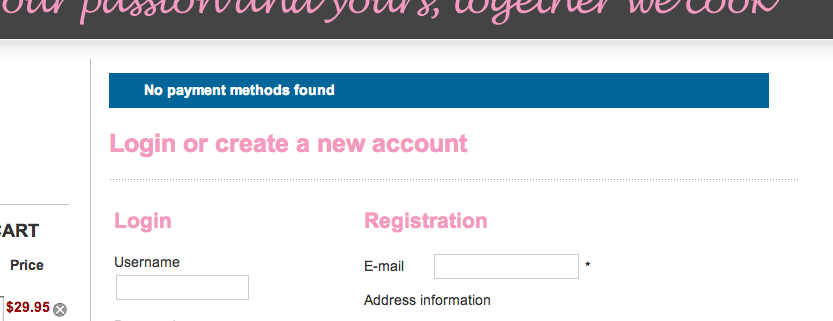
I am having a problem with the checkout. Paypal is configured as a payment option although the message "No Payment Methods" appears until the user logs in. Then when they log in that message is gone and the order can be processed.
Please see the screenshot below.
Please Log in or Create an account to join the conversation.

14 years 2 weeks ago #70249
by nicolas
Replied by nicolas on topic Re: No Payment Methods Found
It means that you didn't configure the PayPal plugin properly.
Please check each point of the FAQ:
www.hikashop.com/en/support/documentatio...ins-listing.html#faq
Please check each point of the FAQ:
www.hikashop.com/en/support/documentatio...ins-listing.html#faq
Please Log in or Create an account to join the conversation.
14 years 2 weeks ago #70260
by jacorr27
Replied by jacorr27 on topic Re: No Payment Methods Found
I've gone through all those steps and not having any luck.
Main currency is Australian with no change to layout, plugin is enabled, workflow checkout "login_address_shipping_payment_confirm_cart_status_fields,end"
I have turned on the debug mode but I can't figure out what the problem is.
Can you take a quick look www.togetherwecook.com.au ? If you order the product from cake kits section you should see the same problem.
Main currency is Australian with no change to layout, plugin is enabled, workflow checkout "login_address_shipping_payment_confirm_cart_status_fields,end"
I have turned on the debug mode but I can't figure out what the problem is.
Can you take a quick look www.togetherwecook.com.au ? If you order the product from cake kits section you should see the same problem.
Please Log in or Create an account to join the conversation.
14 years 2 weeks ago #70264
by nicolas
Replied by nicolas on topic Re: No Payment Methods Found
please post a screenshot of the options of your payment plugin.
Please Log in or Create an account to join the conversation.
14 years 2 weeks ago #70277
by jacorr27
Replied by jacorr27 on topic Re: No Payment Methods Found
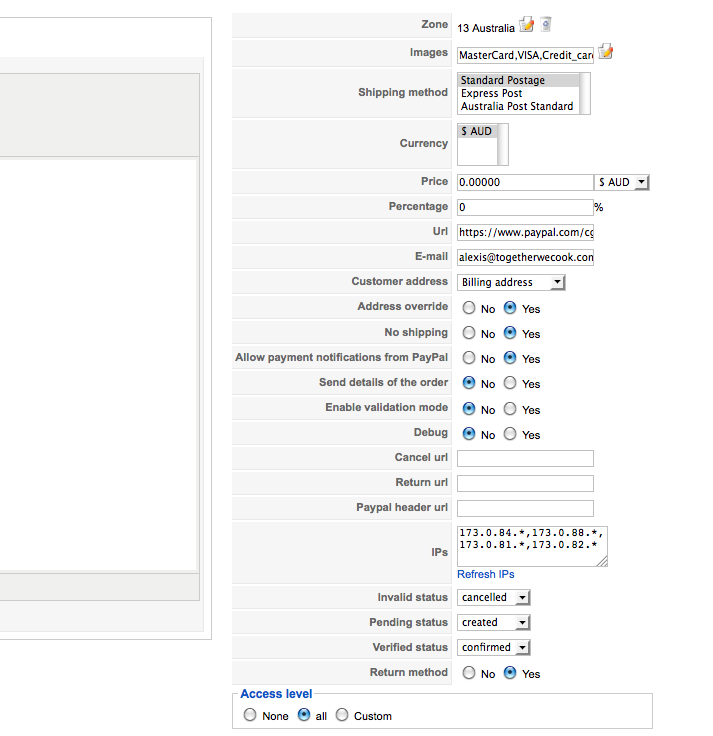
Screenshot attached
Please Log in or Create an account to join the conversation.
14 years 2 weeks ago #70382
by nicolas
Replied by nicolas on topic Re: No Payment Methods Found
Hi,
You have restricted your payment method to only display when the address of the user is in australia, and that the shipping method selected by the user is "standard postage".
I suppose that it's not what you want. Please remove the zone restriction and the shipping method restriction that you set.
These two points are clearly mentioned in the FAQ:
You have restricted your payment method to only display when the address of the user is in australia, and that the shipping method selected by the user is "standard postage".
I suppose that it's not what you want. Please remove the zone restriction and the shipping method restriction that you set.
These two points are clearly mentioned in the FAQ:
5/ If you restricted your payment methods to zones, check that the address you're using is inside those zones ! Otherwise the payment methods will be filtered out.
8/ When you select a currency or a shipping method in the options of the payment method, the payment method won't display unless that currency or shipping method is selected during the checkout. In most cases, these parameters shouldn't be selected so make sure they are unselected. To unselect them, you need to press the ctrl key and click on the selected currencies or shipping methods.
The following user(s) said Thank You: jacorr27
Please Log in or Create an account to join the conversation.
13 years 6 months ago #101082
by lancernz
Replied by lancernz on topic No Payment Methods Found
Hi,
While I'm having a nightmare time with the cart and address facility - can you explain how I remove 'restrictions' from the Paypal Pro payment option. If I untick the option then save the tick bounces straight back in and acts like nothing happened.
It may be that if I could get past this the rest will fall in to place?
While I'm having a nightmare time with the cart and address facility - can you explain how I remove 'restrictions' from the Paypal Pro payment option. If I untick the option then save the tick bounces straight back in and acts like nothing happened.
It may be that if I could get past this the rest will fall in to place?
Please Log in or Create an account to join the conversation.

Less
More
- Posts: 12953
- Thank you received: 1778
13 years 6 months ago - 13 years 6 months ago #101105
by Mohamed Thelji
Replied by Mohamed Thelji on topic No Payment Methods Found
Hi,
Regarding the zone restriction, you'll juste have to use the "trash icon" in front of your option, and for your shipping method option you can press "ctrl" on your keyboard and then click on the shipping method .
Hope this will help you a little.
Regarding the zone restriction, you'll juste have to use the "trash icon" in front of your option, and for your shipping method option you can press "ctrl" on your keyboard and then click on the shipping method
.Hope this will help you a little.
Last edit: 13 years 6 months ago by Mohamed Thelji.
Please Log in or Create an account to join the conversation.
13 years 6 months ago #101116
by lancernz
Replied by lancernz on topic No Payment Methods Found
Thank you - I got it to remove the tick in the restrictions. It's working, but I haven't been able to get the PayPal Pro version to work. Still, one is better than nothing!
Please Log in or Create an account to join the conversation.
Less
More
- Posts: 12953
- Thank you received: 1778
13 years 6 months ago #101133
by Mohamed Thelji
Replied by Mohamed Thelji on topic No Payment Methods Found
Ok, so can you show me how did you configured your paypal pro payment method through some screenshots ?
Please Log in or Create an account to join the conversation.
13 years 6 months ago #101235
by lancernz
Replied by lancernz on topic No Payment Methods Found
Thanks for your interest Mohamed.
Basically it's configured the same as the PayPal standard except it has the additional 'Username' 'Password' and 'Signature' that you obtain from the PayPal account.
I'm not getting an error that it can't connect, just that when it's selected as the sole payment option I get the dreaded 'No payment options' message as a website user.
Basically it's configured the same as the PayPal standard except it has the additional 'Username' 'Password' and 'Signature' that you obtain from the PayPal account.
I'm not getting an error that it can't connect, just that when it's selected as the sole payment option I get the dreaded 'No payment options' message as a website user.
Please Log in or Create an account to join the conversation.
Less
More
- Posts: 12953
- Thank you received: 1778
13 years 6 months ago - 13 years 6 months ago #101428
by Mohamed Thelji
Replied by Mohamed Thelji on topic No Payment Methods Found
Ok can you give me a temporary access to your back-end for testing purpose through Private Message?
Last edit: 13 years 6 months ago by Mohamed Thelji.
Please Log in or Create an account to join the conversation.
13 years 6 months ago #101467
by nicolas
Replied by nicolas on topic No Payment Methods Found
I can see that you configured your shop for AUD and NZD. However, PayPal Pro does not support AUD nor NZD. That's why the plugin is not showing up since PayPal Pro will refuse the payment.
You will have to use another payment gateway than PayPal Pro as you won't be able to use PayPal Pro in NZ.
You will have to use another payment gateway than PayPal Pro as you won't be able to use PayPal Pro in NZ.
Please Log in or Create an account to join the conversation.
13 years 6 months ago #101573
by lancernz
Replied by lancernz on topic No Payment Methods Found
Always the obvious - although since the standard worked I hoped the pro would too. Many thanks for checking.
Please Log in or Create an account to join the conversation.
Time to create page: 0.188 seconds