

- Posts: 15
- Thank you received: 0
Customizing product details page
14 years 2 weeks ago - 14 years 2 weeks ago #71036
by shiva
Customizing product details page was created by shiva
Hi,
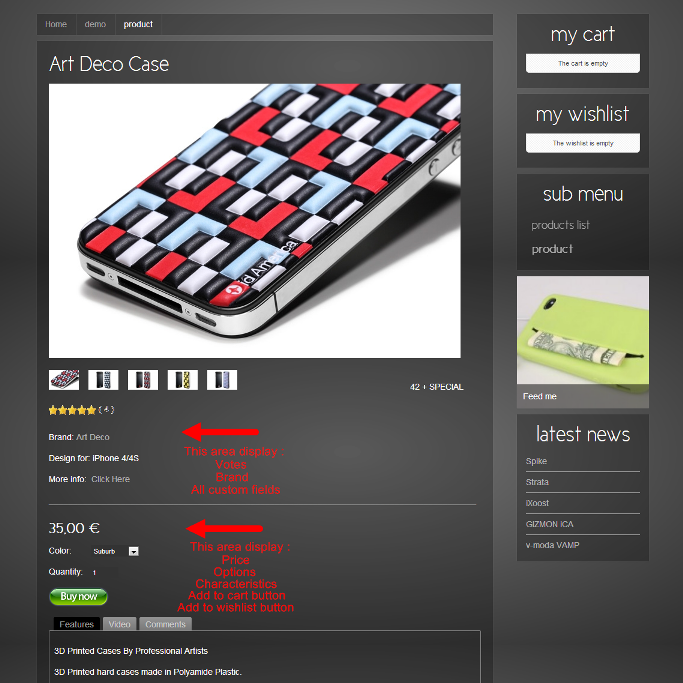
Normally following product information by default display on right side of main image.
Vote/brand/price/options/characteristics/add to cart button/add to wishlist button/custom fields
I like to display above information on the bottom of main image because I need space to display big image.
May I know how to do ? thank you for help.
Please see example below.
Normally following product information by default display on right side of main image.
Vote/brand/price/options/characteristics/add to cart button/add to wishlist button/custom fields
I like to display above information on the bottom of main image because I need space to display big image.
May I know how to do ? thank you for help.
Please see example below.
Last edit: 14 years 2 weeks ago by shiva.
Please Log in or Create an account to join the conversation.

14 years 1 week ago #71343
by Xavier
Replied by Xavier on topic Re: Customizing product details page
Hi,
You just have to edit the view "product / show_default" in HikaShop > Display > Views.
And then you can place the elements as you wish. Move it <div> by <div>.
Some knowledge in html are required.
You just have to edit the view "product / show_default" in HikaShop > Display > Views.
And then you can place the elements as you wish. Move it <div> by <div>.
Some knowledge in html are required.
Please Log in or Create an account to join the conversation.
14 years 1 week ago #71350
by shiva
Replied by shiva on topic Re: Customizing product details page
Thank you for the answer.
I found the file, but I'm not a programmer, will be very difficulty for me to add codes.
I already tried to put this for commercial job but unfortunately still can't find help.
I like to move "ALL" information from right side to bottom of image.
I'm appreciated if you can explain details.
I found the file, but I'm not a programmer, will be very difficulty for me to add codes.
I already tried to put this for commercial job but unfortunately still can't find help.
I like to move "ALL" information from right side to bottom of image.
I'm appreciated if you can explain details.
Please Log in or Create an account to join the conversation.
14 years 1 week ago #71416
by Xavier
Replied by Xavier on topic Re: Customizing product details page
In this view, you can cut and paste all the elements in the div with the id "hikashop_product_right_part" at the top of the div with the id "hikashop_product_bottom_part"
Please Log in or Create an account to join the conversation.
Time to create page: 0.082 seconds