
- Posts: 16
- Thank you received: 0
Display all Currency Prices in various views?
- WillPatterson
-
 Topic Author
- Offline
Less
More
13 years 11 months ago #71408
by WillPatterson
Display all Currency Prices in various views? was created by WillPatterson
Hi, I'm new to using Hikashop so it's taking a while to find my way around templates etc.
I am in the process of creating a shop which has 4 currencies on it - american dollar, british pound, euro and the Brazilian real. I know there is a built in convertor for the various currencies but i want to then display the current currency values on each of the product detail pages and the category view.
So it should display something like
$220.00 each
R$ 440.00
€180.00
£160.00
thanks.
I am in the process of creating a shop which has 4 currencies on it - american dollar, british pound, euro and the Brazilian real. I know there is a built in convertor for the various currencies but i want to then display the current currency values on each of the product detail pages and the category view.
So it should display something like
$220.00 each
R$ 440.00
€180.00
£160.00
thanks.
Please Log in or Create an account to join the conversation.

13 years 11 months ago #71459
by Xavier
Replied by Xavier on topic Re: Display all Currency Prices in various views?
Hi,
To display the 4 currencies on a product view or listing view, you just have to edit the view "product / listing_price".
And in this view, copy and paste the following code:
Replace the "$price->price_currency_id" by the currency id wanted, you can find the currencies id in HikaShop > System > Currencies.
You will have:
To display the 4 currencies on a product view or listing view, you just have to edit the view "product / listing_price".
And in this view, copy and paste the following code:
Code:
echo $this->currencyHelper->format($price->price_value_with_tax,$price->price_currency_id);
Replace the "$price->price_currency_id" by the currency id wanted, you can find the currencies id in HikaShop > System > Currencies.
You will have:
Code:
echo $this->currencyHelper->format($price->price_value_with_tax,2);
echo $this->currencyHelper->format($price->price_value_with_tax,28);
echo $this->currencyHelper->format($price->price_value_with_tax,1);
echo $this->currencyHelper->format($price->price_value_with_tax,4);
Please Log in or Create an account to join the conversation.
- WillPatterson
-
Topic Author
- Offline
Less
More
- Posts: 16
- Thank you received: 0
13 years 11 months ago #71621
by WillPatterson
Replied by WillPatterson on topic Re: Display all Currency Prices in various views?
Thanks for the solution, though can you tell me where in this template to insert the code as there are lots of conditional statements in it, thanks.
Please Log in or Create an account to join the conversation.
13 years 11 months ago #71623
by Xavier
Replied by Xavier on topic Re: Display all Currency Prices in various views?
Hi,
If you need this display everywhere, you can replace all the occurence of "echo $this->currencyHelper->format($price->price_value_with_tax,$price->price_currency_id);".
Else it depends of your options.
If you display the price with tax, display "$price->price_value_with_tax" else "$price->price_value".
If you need this display everywhere, you can replace all the occurence of "echo $this->currencyHelper->format($price->price_value_with_tax,$price->price_currency_id);".
Else it depends of your options.
If you display the price with tax, display "$price->price_value_with_tax" else "$price->price_value".
The following user(s) said Thank You: WillPatterson
Please Log in or Create an account to join the conversation.
- WillPatterson
-
Topic Author
- Offline
Less
More
- Posts: 16
- Thank you received: 0
13 years 11 months ago - 13 years 11 months ago #71628
by WillPatterson
Replied by WillPatterson on topic Re: Display all Currency Prices in various views?
Thanks, i've replaced some of the content in the template with the code you suggested. It now displays all the currencies, though they are in a line and also the same numerical value though the correct currency icon is displayed, just the different values aren't.

Last edit: 13 years 11 months ago by WillPatterson. Reason: add image
Please Log in or Create an account to join the conversation.
- WillPatterson
-
Topic Author
- Offline
Less
More
- Posts: 16
- Thank you received: 0
13 years 11 months ago #71771
by WillPatterson
Replied by WillPatterson on topic Re: Display all Currency Prices in various views?
Is it possible to show the "converted currency" prices as well as the main default cost, one below the other?
Please Log in or Create an account to join the conversation.
13 years 11 months ago #71822
by Xavier
Replied by Xavier on topic Re: Display all Currency Prices in various views?
Hi,
Here is the solution, replace the line:
By:
Don't forget to update your currencies rates in HikaShop > System > Currencies, update rates in the toolbar.
Here is the solution, replace the line:
Code:
echo $this->currencyHelper->format($price->price_value,$price->price_currency_id);
By:
Code:
$dollarId = 2;
$bLivreId = 28;
$euroId = 1;
$livreId = 4;
$dollarPrice = $this->currencyHelper->convertUniquePrice($price->price_value, $price->price_currency_id, $dollarId);
$bLivrePrice = $this->currencyHelper->convertUniquePrice($price->price_value, $price->price_currency_id, $bLivreId);
$euroPrice = $this->currencyHelper->convertUniquePrice($price->price_value, $price->price_currency_id, $euroId);
$livrePrice = $this->currencyHelper->convertUniquePrice($price->price_value, $price->price_currency_id, $livreId);
echo $this->currencyHelper->format($dollarPrice,$dollarId)."<br/>";
echo $this->currencyHelper->format($bLivrePrice,$bLivreId)."<br/>";
echo $this->currencyHelper->format($euroPrice,$euroId)."<br/>";
echo $this->currencyHelper->format($livrePrice,$livreId)."<br/>";
Don't forget to update your currencies rates in HikaShop > System > Currencies, update rates in the toolbar.
Please Log in or Create an account to join the conversation.
- WillPatterson
-
Topic Author
- Offline
Less
More
- Posts: 16
- Thank you received: 0
13 years 11 months ago - 13 years 11 months ago #71827
by WillPatterson
Replied by WillPatterson on topic Re: Display all Currency Prices in various views?
Ha genius! thats awesome.
I have changed the code a little to make it more obvious what each is to:
$dollarId = 2;
$brazilId = 28;
$euroId = 1;
$britId = 4;
$dollarPrice = $this->currencyHelper->convertUniquePrice($price->price_value, $price->price_currency_id, $dollarId);
$brazilPrice = $this->currencyHelper->convertUniquePrice($price->price_value, $price->price_currency_id, $brazilId);
$euroPrice = $this->currencyHelper->convertUniquePrice($price->price_value, $price->price_currency_id, $euroId);
$britPrice = $this->currencyHelper->convertUniquePrice($price->price_value, $price->price_currency_id, $britId);
echo $this->currencyHelper->format($dollarPrice,$dollarId)."<br/>";
echo $this->currencyHelper->format($brazilPrice,$brazilId)."<br/>";
echo $this->currencyHelper->format($euroPrice,$euroId)."<br/>";
echo $this->currencyHelper->format($britPrice,$britId)."<br/>";
However it seems to put the currency icon in the wrong order (before the line return) so i get the attached picture
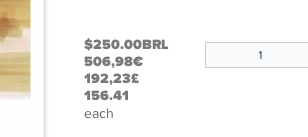
If i can get this solved i'd like to be able to wrap the currency icons in a class and the converted prices in another class so i can style them all individually, if you can point me in the right direction to doing this it would be appreciated and i am very thankful for all your assistance with this, regards...
I have changed the code a little to make it more obvious what each is to:
$dollarId = 2;
$brazilId = 28;
$euroId = 1;
$britId = 4;
$dollarPrice = $this->currencyHelper->convertUniquePrice($price->price_value, $price->price_currency_id, $dollarId);
$brazilPrice = $this->currencyHelper->convertUniquePrice($price->price_value, $price->price_currency_id, $brazilId);
$euroPrice = $this->currencyHelper->convertUniquePrice($price->price_value, $price->price_currency_id, $euroId);
$britPrice = $this->currencyHelper->convertUniquePrice($price->price_value, $price->price_currency_id, $britId);
echo $this->currencyHelper->format($dollarPrice,$dollarId)."<br/>";
echo $this->currencyHelper->format($brazilPrice,$brazilId)."<br/>";
echo $this->currencyHelper->format($euroPrice,$euroId)."<br/>";
echo $this->currencyHelper->format($britPrice,$britId)."<br/>";
However it seems to put the currency icon in the wrong order (before the line return) so i get the attached picture
If i can get this solved i'd like to be able to wrap the currency icons in a class and the converted prices in another class so i can style them all individually, if you can point me in the right direction to doing this it would be appreciated and i am very thankful for all your assistance with this, regards...
Last edit: 13 years 11 months ago by WillPatterson.
Please Log in or Create an account to join the conversation.
13 years 11 months ago #71842
by Xavier
Replied by Xavier on topic Re: Display all Currency Prices in various views?
You can maybe try to put the "<br/>" before, like: echo "<br/>".$this->currencyHelper->format($dollarPrice,$dollarId);
To add classes on the symbol and on the value, you will have to use the PHP function str_replace() like:
Be careful on the span order, because some currency symbol are before the value and other after.
To add classes on the symbol and on the value, you will have to use the PHP function str_replace() like:
Code:
echo "<span class='currValue'>".str_replace('$','<span class=\'yourClass\'>',$this->currencyHelper->format($britPrice,$britId))."</span></span>" ;
Be careful on the span order, because some currency symbol are before the value and other after.
Please Log in or Create an account to join the conversation.
- WillPatterson
-
Topic Author
- Offline
Less
More
- Posts: 16
- Thank you received: 0
13 years 11 months ago #71861
by WillPatterson
Replied by WillPatterson on topic Re: Display all Currency Prices in various views?
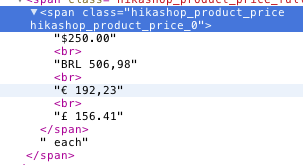
Hi, i've tried putting it before and after but it doesn't seem to make any difference. In looking at the source code of the outputted page it show the output correctly though it seems to change the break tag to a <br>.
Please Log in or Create an account to join the conversation.
- WillPatterson
-
Topic Author
- Offline
Less
More
- Posts: 16
- Thank you received: 0
13 years 11 months ago #71883
by WillPatterson
Replied by WillPatterson on topic Re: Display all Currency Prices in various views?
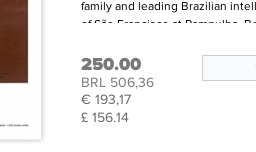
okay, i have nearly got this working how i want it to but it seems to be stripping out some of the information, seemingly the $ sign as the dollar price just doesn't show in the output, as the dollar price just shows the price and no symbol and the Brazilian Real just show the iso code BRL and not the symbol R$ as it's configured in the currency setting. Any ideas as to what would be causing this?, thanks again...
Please Log in or Create an account to join the conversation.
13 years 11 months ago #72025
by Xavier
Replied by Xavier on topic Re: Display all Currency Prices in various views?
Hi,
Are you using the code:
Because in this code, you have to add the currency symbol after "<span class=\'yourClass\'>" like:
For the BRL, with the str_replace you can change it with R$ like:
Are you using the code:
Code:
echo "<span class='currValue'>".str_replace('$','<span class=\'yourClass\'>',$this->currencyHelper->format($britPrice,$britId))."</span></span>" ;
Because in this code, you have to add the currency symbol after "<span class=\'yourClass\'>" like:
Code:
echo "<span class='currValue'>".str_replace('$','<span class=\'yourClass\'>$',$this->currencyHelper->format($britPrice,$britId))."</span></span>" ;
For the BRL, with the str_replace you can change it with R$ like:
Code:
echo "<span class='currValue'>".str_replace('BRL','<span class=\'yourClass\'>R$',$this->currencyHelper->format($britPrice,$britId))."</span></span>" ;
Please Log in or Create an account to join the conversation.
- WillPatterson
-
Topic Author
- Offline
Less
More
- Posts: 16
- Thank you received: 0
13 years 11 months ago #72031
by WillPatterson
Replied by WillPatterson on topic Re: Display all Currency Prices in various views?
Ah, thanks for that, i hadn't added in the currency values, which was a bit confusing as it was automatically adding in the £ and Euro.
I want to end the currency symbol class after the symbol so i can style it differently to the actual numerical value so i guess this should just be something like:
echo "<span class='currValue'>".str_replace('$','<span class=\'yourClass\'>$'"</span>",$this->currencyHelper->format($britPrice,$britId))."</span>" ;
thanks again for your help
I want to end the currency symbol class after the symbol so i can style it differently to the actual numerical value so i guess this should just be something like:
echo "<span class='currValue'>".str_replace('$','<span class=\'yourClass\'>$'"</span>",$this->currencyHelper->format($britPrice,$britId))."</span>" ;
thanks again for your help
Please Log in or Create an account to join the conversation.
13 years 11 months ago #72032
by Xavier
Replied by Xavier on topic Re: Display all Currency Prices in various views?
Yes, you should do like that.
Please Log in or Create an account to join the conversation.
Time to create page: 0.283 seconds