

- Posts: 136
- Thank you received: 1
Customise Check out & Login / Registration Page
15 years 7 months ago #7141
by jacorr27
Customise Check out & Login / Registration Page was created by jacorr27
Hi again,
Thanks for your wonderful support. I have business version of Hikashop and am (unsuccessfully) trying to modify both the Checkout and Login / Registration Page.
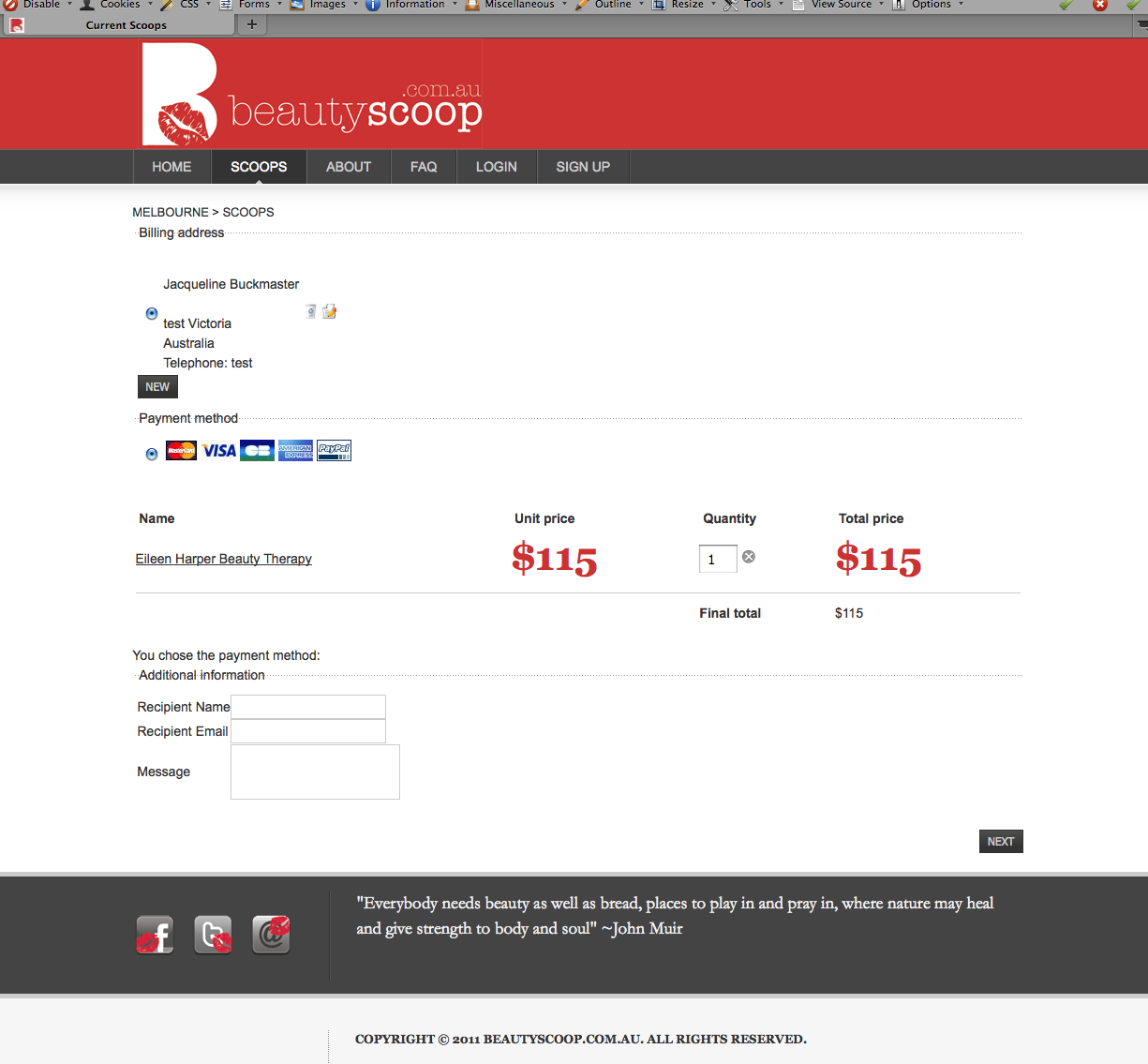
I'm trying to do things like remove some information Billing Address, Final Total. I'm also wanting to customise the headings to make them stand out more and remove the dotted line - and have them replaced with the solid line.
I have included a screenshot of the current checkout page.
If you could even just let me know which files to change - that would be much appreciated.
I have been changing the Display>Views - and also the front-end CSS file but am getting stuck!
Thank you in advance,
Thanks for your wonderful support. I have business version of Hikashop and am (unsuccessfully) trying to modify both the Checkout and Login / Registration Page.
I'm trying to do things like remove some information Billing Address, Final Total. I'm also wanting to customise the headings to make them stand out more and remove the dotted line - and have them replaced with the solid line.
I have included a screenshot of the current checkout page.
If you could even just let me know which files to change - that would be much appreciated.
I have been changing the Display>Views - and also the front-end CSS file but am getting stuck!
Thank you in advance,
Please Log in or Create an account to join the conversation.

15 years 7 months ago #7148
by nicolas
Replied by nicolas on topic Re: Customise Check out & Login / Registration Page
The CSS of HikaShop can be modified in the config under the tab display in the CSS zone. You don't need to edit the views of HikaShop for the changes you want to do.
If you want to remove completely the billing address handling, you need to remove the text 'address_' from the checkout workflow option of the configuration of HikaShop. If you just want to remove the title "billing address" you can add the CSS below:
#hikashop_checkout_address_left_part legend { display: none; }
If you want to change the information that is asked for the billing address, you can go in the menu Display->Custom fields and modify the fields.
The final total can be removed with the CSS:
.hikashop_checkout_cart_final_total_title, .hikashop_checkout_cart_final_total{
display: none;
}
The doted lines are styled by your template, you need to change your template CSS in order to make them solid. It's the same for the headings.
docs.joomla.org/Discover_your_template_c...n_how_to_change_them
If you want to remove completely the billing address handling, you need to remove the text 'address_' from the checkout workflow option of the configuration of HikaShop. If you just want to remove the title "billing address" you can add the CSS below:
#hikashop_checkout_address_left_part legend { display: none; }
If you want to change the information that is asked for the billing address, you can go in the menu Display->Custom fields and modify the fields.
The final total can be removed with the CSS:
.hikashop_checkout_cart_final_total_title, .hikashop_checkout_cart_final_total{
display: none;
}
The doted lines are styled by your template, you need to change your template CSS in order to make them solid. It's the same for the headings.
docs.joomla.org/Discover_your_template_c...n_how_to_change_them
Please Log in or Create an account to join the conversation.
15 years 7 months ago #7151
by jacorr27
Replied by jacorr27 on topic Re: Customise Check out & Login / Registration Page
Thank you - and also if I want to change the heading "Additional information" to be "Purchase as a Gift" where would I be able to modify that?
Similarly with the Payment section - there is a line of text that says "you chose the payment method" - I'd like to remove that too.
Similarly with the Payment section - there is a line of text that says "you chose the payment method" - I'd like to remove that too.
Please Log in or Create an account to join the conversation.
15 years 7 months ago #7154
by nicolas
Replied by nicolas on topic Re: Customise Check out & Login / Registration Page
You can change all the texts in HikaShop in the config under the tab languages by overriding the default translations:
www.hikashop.com/download/languages.html#modify
The "you chose the payment method" is displayed by the view status_ of the checkout workflow. You can remove it from the checkout workflow option of the configuration.
www.hikashop.com/download/languages.html#modify
The "you chose the payment method" is displayed by the view status_ of the checkout workflow. You can remove it from the checkout workflow option of the configuration.
Please Log in or Create an account to join the conversation.
Time to create page: 0.176 seconds