

- Posts: 26
- Thank you received: 0
Shipping costs based on states
15 years 7 months ago - 15 years 7 months ago #7145
by wwatty
Shipping costs based on states was created by wwatty
I am running into a problem with shipping and there has to be an easy way to do it that I am overlooking.
I am only shipping to the United States.
All states except Hawaii and Alaska have 5 different shipping costs based on total price in cart.
Hawaii and Alaska have 5 different shipping costs based on total price in cart.
The only zones I have enabled are United States of America and its states.
I created a custom shipping zone named "Alaska and Hawaii" and included those two states.
I created another custom shipping zone named "USA Contiguous" and included all states other than Alaska and Hawaii.
Then I created a custom tax zone for each "Alaska and Hawaii" and "USA Contiguous".
I set my default tax zone in the configuration to "USA Contiguous"
Then I created 5 shipping methods with the zone "USA Contiguous" and 5 with the zone "Alaska and Hawaii".
When I proceed to check out on the front end and I am not logged in I get the error message "No shipping methods available to your location".
I thought that prior to login the system was supposed to use the default tax zone from the configuration which I set to "USA Contiguous".
At the end of the day I want one shipping method to display for everyone in the US except Alaska and Hawaii (which would also be the default if not logged in) and one shipping method to display if you login/register and choose Alaska or Hawaii as your state (I don't want them to see the option for shipping to the other 48 states).
Please let me know what I am doing wrong.
Thanks
I am only shipping to the United States.
All states except Hawaii and Alaska have 5 different shipping costs based on total price in cart.
Hawaii and Alaska have 5 different shipping costs based on total price in cart.
The only zones I have enabled are United States of America and its states.
I created a custom shipping zone named "Alaska and Hawaii" and included those two states.
I created another custom shipping zone named "USA Contiguous" and included all states other than Alaska and Hawaii.
Then I created a custom tax zone for each "Alaska and Hawaii" and "USA Contiguous".
I set my default tax zone in the configuration to "USA Contiguous"
Then I created 5 shipping methods with the zone "USA Contiguous" and 5 with the zone "Alaska and Hawaii".
When I proceed to check out on the front end and I am not logged in I get the error message "No shipping methods available to your location".
I thought that prior to login the system was supposed to use the default tax zone from the configuration which I set to "USA Contiguous".
At the end of the day I want one shipping method to display for everyone in the US except Alaska and Hawaii (which would also be the default if not logged in) and one shipping method to display if you login/register and choose Alaska or Hawaii as your state (I don't want them to see the option for shipping to the other 48 states).
Please let me know what I am doing wrong.
Thanks
Last edit: 15 years 7 months ago by wwatty.
Please Log in or Create an account to join the conversation.

15 years 7 months ago #7150
by nicolas
Replied by nicolas on topic Re: Shipping costs based on states
In the "main tax zone" option, you should use the same zone as in your shipping methods, even if it's a shipping zone and not a tax zone. It's not really a problem actually to have a shipping zone as a main tax zone as tax and shipping zones are the same in HikaShop.
Please Log in or Create an account to join the conversation.
15 years 7 months ago #7178
by wwatty
Replied by wwatty on topic Re: Shipping costs based on states
I have set my main tax zone to my shipping zone "USA Contiguous". I needed to clear my cache and the error message is now gone. The problem I have now is that no tax is being applied on the checkout page until I login and no tax is being applied to my products in the admin back end anymore. I am trying to simplify my mess of zones so here is the new setup:
Configuration: main tax zone "USA Contiguous"
Zones: shipping zone "USA Contiguous", shipping zone "Alaska and Hawaii", country zone "United States of America" including all the USA states.
Taxes: One tax rate, one tax category, in the country zone "United States of America".
Shipping Methods: 5 methods using the shipping zone "USA Contiguous" and 5 using the shipping zone "Alaska and Hawaii"
Products: All products are using the only tax rate category I created.
This isn't because I have a shipping rate set as my main tax zone in the configuration is it?
Thanks.
Configuration: main tax zone "USA Contiguous"
Zones: shipping zone "USA Contiguous", shipping zone "Alaska and Hawaii", country zone "United States of America" including all the USA states.
Taxes: One tax rate, one tax category, in the country zone "United States of America".
Shipping Methods: 5 methods using the shipping zone "USA Contiguous" and 5 using the shipping zone "Alaska and Hawaii"
Products: All products are using the only tax rate category I created.
This isn't because I have a shipping rate set as my main tax zone in the configuration is it?
Thanks.
Please Log in or Create an account to join the conversation.
15 years 7 months ago #7180
by nicolas
Replied by nicolas on topic Re: Shipping costs based on states
The main tax zone is "USA Contiguous". That means that before the user enters his address, the system thinks that this user's location is "USA Contiguous".
However, your tax rule is restricted to the country USA which is different than the zone "USA Contiguous", so it doesn't apply.
You probably want to set in the main tax zone a state of that "USA Contiguous" zone. That way, the system will be able to use the tax rule that you defined for the USA, as the state is also within the USA country zone, and the default shipping methods displayed will be displayed considering that state as well which is in the zone "USA Contiguous". Exactly what you want.
However, your tax rule is restricted to the country USA which is different than the zone "USA Contiguous", so it doesn't apply.
You probably want to set in the main tax zone a state of that "USA Contiguous" zone. That way, the system will be able to use the tax rule that you defined for the USA, as the state is also within the USA country zone, and the default shipping methods displayed will be displayed considering that state as well which is in the zone "USA Contiguous". Exactly what you want.
Please Log in or Create an account to join the conversation.
15 years 7 months ago #7196
by wwatty
Replied by wwatty on topic Re: Shipping costs based on states
That fixed the problem. I have one more question that is off topic. If I use the default checkout workflow and I proceed to checkout and I am not logged in and I change my payment method (before logging in or registering) the page reloads and gives me a blank page with a next button as if I am proceeding without logging in or registering. If I press the next button I am taken to a page that shows me a blank Billing and Shipping address area along with shipping methods, payment methods, etc...
Why is it that after the page reloads for a change in payment method that the login/registration area disappears and I am forced to proceed with a checkout that is missing information?
BTW your support is excellent, Thanks
Why is it that after the page reloads for a change in payment method that the login/registration area disappears and I am forced to proceed with a checkout that is missing information?
BTW your support is excellent, Thanks
Please Log in or Create an account to join the conversation.
15 years 7 months ago #7200
by wwatty
Replied by wwatty on topic Re: Shipping costs based on states
Apparently it looks like it is logging me in automatically when the page refreshes with my admin login/password and there is no addresses associated with that. I assume this is something that is only going to affect me since I am the only one with the admin login/password saved for this site?
Please Log in or Create an account to join the conversation.
15 years 7 months ago #7202
by nicolas
Replied by nicolas on topic Re: Shipping costs based on states
Indeed.
Please Log in or Create an account to join the conversation.
15 years 7 months ago #7216
by wwatty
Replied by wwatty on topic Re: Shipping costs based on states
Argh, one more quick question, sorry I am hijacking my own thread. I am using the default checkout workflow and I have two payment options "Paypal" and "Check". When a potential customer proceeds to checkout and they press the next button they either complete the order (if they choose check payment method) or they create an order and go to the paypal site (if they use the Paypal payment method).
I am curious if there is a way to properly inform the customer when they are finalizing their order.
I just feel that the Next button doesn't give them enough warning that this is the end of the process and they are agreeing to buy the product (if they chose check payment method).
I am not sure if it is possible but would there be a way to change the next button to a "Submit Order" button depending on the payment method chosen and step in the checkout workflow? For example, if payment method "check" is chosen and the page is the last step prior to the step "end" in the checkout workflow change the button to "Submit Order".
Thanks again for your help. I almost never leave reviews on JED but Hikashop deserves it. The robust component and quality and speed at which you reply to questions is unmatched compared to any other Joomla extension I have used.
I am curious if there is a way to properly inform the customer when they are finalizing their order.
I just feel that the Next button doesn't give them enough warning that this is the end of the process and they are agreeing to buy the product (if they chose check payment method).
I am not sure if it is possible but would there be a way to change the next button to a "Submit Order" button depending on the payment method chosen and step in the checkout workflow? For example, if payment method "check" is chosen and the page is the last step prior to the step "end" in the checkout workflow change the button to "Submit Order".
Thanks again for your help. I almost never leave reviews on JED but Hikashop deserves it. The robust component and quality and speed at which you reply to questions is unmatched compared to any other Joomla extension I have used.
Please Log in or Create an account to join the conversation.
15 years 7 months ago #7218
by nicolas
Replied by nicolas on topic Re: Shipping costs based on states
You can edit the file step of the view checkout via the menu Display->Views and change the text of the next button based on the current payment method etc, but you'll need to know PHP for that.
Also, if you change the address and click next, then, it won't go to the last step bur if you don't change it and click on next it will. So the text on the button might not be accurate if you use a one step checkout (which is what we have by default).
Also, if you change the address and click next, then, it won't go to the last step bur if you don't change it and click on next it will. So the text on the button might not be accurate if you use a one step checkout (which is what we have by default).
Please Log in or Create an account to join the conversation.
15 years 7 months ago - 15 years 7 months ago #7220
by wwatty
Replied by wwatty on topic Re: Shipping costs based on states
I understand that it would be difficult to change the button based on all the variables. Would it be easier for me to change the default checkout workflow to add an additional step that would accomplish something similar?
My second observation related to the Next button is that if a customer has two addresses (for instance shipping and billing) and I have two shipment costs based on shipping location, and they choose to change their Shipping Address (to an address that falls into a different shipping payment method) using the default checkout workflow they have to press the Next button twice to proceed. The first press refreshes the page to account for the new address / shipping payment method and the second press takes them to the end of the checkout workflow.
Could that be fixed by forcing a page refresh each time a customer presses the radial button on the Address similar to how the page refreshes when they press the radial button on the Payment Method or Shipping Method?
Whew, long thread thanks for sticking with me.
My second observation related to the Next button is that if a customer has two addresses (for instance shipping and billing) and I have two shipment costs based on shipping location, and they choose to change their Shipping Address (to an address that falls into a different shipping payment method) using the default checkout workflow they have to press the Next button twice to proceed. The first press refreshes the page to account for the new address / shipping payment method and the second press takes them to the end of the checkout workflow.
Could that be fixed by forcing a page refresh each time a customer presses the radial button on the Address similar to how the page refreshes when they press the radial button on the Payment Method or Shipping Method?
Whew, long thread thanks for sticking with me.
Last edit: 15 years 7 months ago by wwatty.
Please Log in or Create an account to join the conversation.

15 years 7 months ago - 15 years 7 months ago #7221
by hdracing
Replied by hdracing on topic Re: Shipping costs based on states
Hi wwatty,
I was also concerned about the abrupt end of the checkout process with no indication that the next click of the NEXT button would submit the order. My solution, while not very elegant and does not address multi-language sites, was to add a line to the file Status of view Checkout.
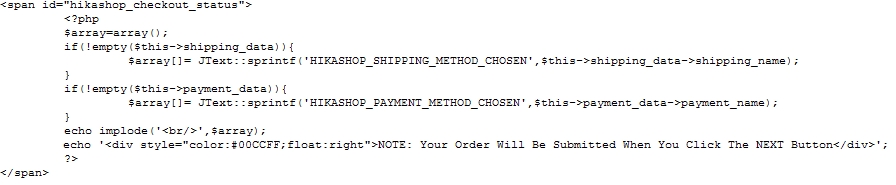
This solution might not work for every case, but works for me because I have altered the checkout workflow and only put the Status view in the final step.
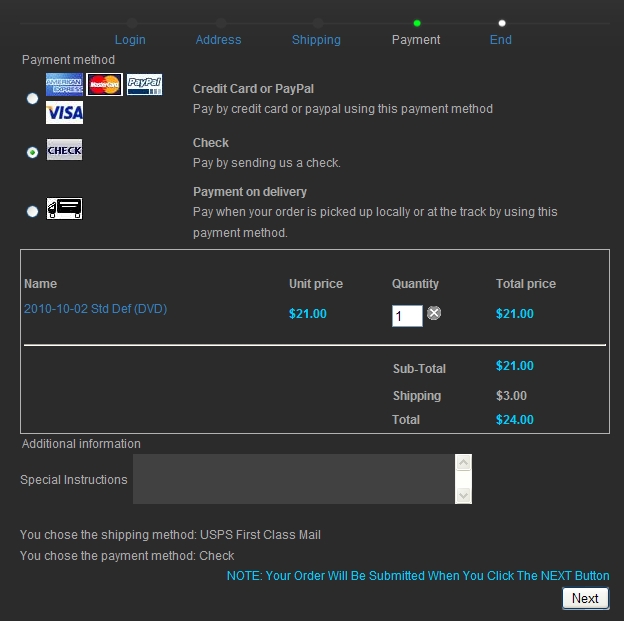
Regards,
Ed
I was also concerned about the abrupt end of the checkout process with no indication that the next click of the NEXT button would submit the order. My solution, while not very elegant and does not address multi-language sites, was to add a line to the file Status of view Checkout.
This solution might not work for every case, but works for me because I have altered the checkout workflow and only put the Status view in the final step.
Regards,
Ed
Last edit: 15 years 7 months ago by hdracing.
Please Log in or Create an account to join the conversation.
15 years 7 months ago #7224
by hdracing
Replied by hdracing on topic Re: Shipping costs based on states
Nicolas,
We need a tutorial on how to insert images in a post and have it appear where we want it to. :laugh: Then I might not have to edit the post to get it in the right spot.
Ed
We need a tutorial on how to insert images in a post and have it appear where we want it to. :laugh: Then I might not have to edit the post to get it in the right spot.
Ed
Please Log in or Create an account to join the conversation.
15 years 7 months ago #7226
by nicolas
Replied by nicolas on topic Re: Shipping costs based on states
Submitting the page when the radio button is clicked for addresses, like we already have for payment and shipping is an interesting idea. We'll look at that for next release.
Please Log in or Create an account to join the conversation.
15 years 7 months ago - 15 years 7 months ago #7228
by wwatty
Replied by wwatty on topic Re: Shipping costs based on states
Hi Ed, thanks for the tip. Could you share your checkout workflow with me? Does the NOTE appear only when using the "Check" Payment method, or is it displayed regardless of payment method?
Thank you!
Thank you!
Last edit: 15 years 7 months ago by wwatty.
Please Log in or Create an account to join the conversation.
15 years 7 months ago #7230
by hdracing
Replied by hdracing on topic Re: Shipping costs based on states
My checkout workflow is:
login,address,shipping_cart,payment_cart_fields_status_confirm,end
The line added to the file Status of view Checkout is the last one in the code image above that begins with echo.
I had to edit the post a couple of times because
wasn't working so I created an image of the code instead.
Regards,
Ed
login,address,shipping_cart,payment_cart_fields_status_confirm,end
The line added to the file Status of view Checkout is the last one in the code image above that begins with echo.
I had to edit the post a couple of times because
Code:
Regards,
Ed
Please Log in or Create an account to join the conversation.
15 years 7 months ago #7231
by hdracing
Replied by hdracing on topic Re: Shipping costs based on states
Sorry, I forgot to answer your last question.
The Note appears on all Payment steps no matter what form of payment is selected.
Ed
The Note appears on all Payment steps no matter what form of payment is selected.
Ed
Please Log in or Create an account to join the conversation.
15 years 7 months ago #7234
by wwatty
Replied by wwatty on topic Re: Shipping costs based on states
I couldn't get the "code" to work on this forum either so I just tried writing the code without any special forum formatting applied and it appeared without causing problems. The only problem I can find with your solution is that pressing the next button doesn't always submit the Order for me. I am using the default checkout workflow which is everything on one page so it would work except for the issue that I mentioned above with the multiple Addresses and having to press the next button to refresh the page. At least I have something to work with now. Thanks Ed and Nicolas.
Please Log in or Create an account to join the conversation.
15 years 7 months ago #7237
by hdracing
Replied by hdracing on topic Re: Shipping costs based on states
That's the main reason I broke the workflow up into separate address, shipping and payment steps, to avoid the problem of hitting the NEXT button to get a refresh of the same page. I'll probably stick with this workflow, even if Nicolas changes the page refresh on radio button change because I like the "Warning" that the order is about to be submitted.
BTW, changing the payment option does refresh the page without having to hit NEXT.
Good Luck with your project,
Ed
BTW, changing the payment option does refresh the page without having to hit NEXT.
Good Luck with your project,
Ed
Please Log in or Create an account to join the conversation.
15 years 7 months ago #7245
by wwatty
Replied by wwatty on topic Re: Shipping costs based on states
Thanks to your help I setup a nice looking notification using a modified checkout workflow
Checkout Workflow:
login_address_shipping_payment_cart,confirm_cart_status_fields,end
This workflow gives the customer all the info on step 1 to see shipping and payment options as well as to see a total before logging in or going through multiple steps. It also avoids the problem of having the Address on the same page as the status.
Step 2 shows the cart and the status along with the NOTE which I was able to nicely style and give a bit more info on the two payment options and what happens next

This works nicely. Thanks again!
Checkout Workflow:
login_address_shipping_payment_cart,confirm_cart_status_fields,end
This workflow gives the customer all the info on step 1 to see shipping and payment options as well as to see a total before logging in or going through multiple steps. It also avoids the problem of having the Address on the same page as the status.
Step 2 shows the cart and the status along with the NOTE which I was able to nicely style and give a bit more info on the two payment options and what happens next
This works nicely. Thanks again!
Please Log in or Create an account to join the conversation.
15 years 7 months ago #7247
by hdracing
Replied by hdracing on topic Re: Shipping costs based on states
Looks Good!
Happy to have been some help.
Ed
Happy to have been some help.
Ed
Please Log in or Create an account to join the conversation.
Time to create page: 0.278 seconds