

- Posts: 7
- Thank you received: 0
Re: PayPal plugin setup [Resolved]
14 years 1 week ago - 14 years 6 days ago #72170
by jhcorsair
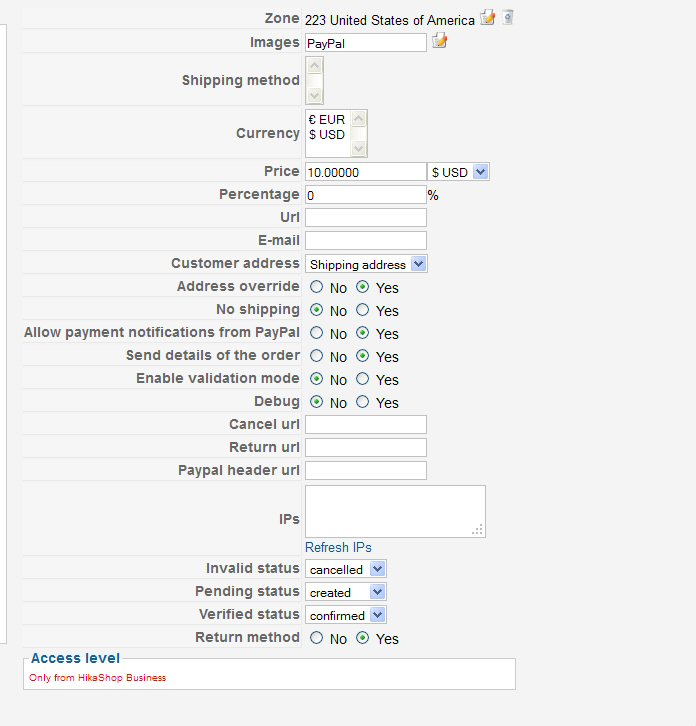
1) I do not understand the instructions for the PayPal "URL". In the plugin documentation, the image shows "PayPal API URL" however this simply shows as "URL" in my plugin administration panel (see attached image).
2) What URL is supposed to be inserted in this field? I have created a "Buy Now" button in my PayPal account, does this <form> </form> code go here or some other URL?
Please take a look: www.roundaboutstorage.com/index.php/roun...ut-storage-container
Re: PayPal plugin setup [Resolved] was created by jhcorsair
1) I do not understand the instructions for the PayPal "URL". In the plugin documentation, the image shows "PayPal API URL" however this simply shows as "URL" in my plugin administration panel (see attached image).
2) What URL is supposed to be inserted in this field? I have created a "Buy Now" button in my PayPal account, does this <form> </form> code go here or some other URL?
Please take a look: www.roundaboutstorage.com/index.php/roun...ut-storage-container
Last edit: 14 years 6 days ago by jhcorsair.
Please Log in or Create an account to join the conversation.
14 years 1 week ago #72178
by IamJim
Replied by IamJim on topic Re: PayPal plugin setup
re: I have created a "Buy Now" button in my PayPal account, does this <form> </form> code go here or some other URL?
No, you do not need to make a button at all.
No, you do not need to make a button at all.
Please Log in or Create an account to join the conversation.
14 years 1 week ago #72186
by suebardak
Replied by suebardak on topic Re: PayPal plugin setup
I am also confused by this. When my customer goes to the PayPal secure site to checkout, all that shows in the top left hand corner is my email address. I want a logo and my company name there. How do I do that? Sue
Please Log in or Create an account to join the conversation.
14 years 1 week ago #72187
by IamJim
Sue, that will be done in Paypal.. I am not sure, as it has been a long time but you can use Paypal's Help for "adding logo"
Jim
Replied by IamJim on topic Re: PayPal plugin setup
suebardak wrote: I am also confused by this. When my customer goes to the PayPal secure site to checkout, all that shows in the top left hand corner is my email address. I want a logo and my company name there. How do I do that? Sue
Sue, that will be done in Paypal.. I am not sure, as it has been a long time but you can use Paypal's Help for "adding logo"
Jim
The following user(s) said Thank You: suebardak
Please Log in or Create an account to join the conversation.
14 years 1 week ago #72188
by jhcorsair
Replied by jhcorsair on topic Re: PayPal plugin setup
If I don't have to make a button then what initializes the PayPal interface?
Please Log in or Create an account to join the conversation.
14 years 1 week ago #72190
by IamJim
Hikashop > System > Payment Methods [find] > HikaShop Paypal payment plugin
Left click on the name > Right side URL should be = www.paypal.com/cgi-bin/webscr
Enternt your paypal email..
Select Currency..
SAVE & CLOSE
Then "PUBLISH IT"
Replied by IamJim on topic Re: PayPal plugin setup
jhcorsair wrote: If I don't have to make a button then what initializes the PayPal interface?
Hikashop > System > Payment Methods [find] > HikaShop Paypal payment plugin
Left click on the name > Right side URL should be = www.paypal.com/cgi-bin/webscr
Enternt your paypal email..
Select Currency..
SAVE & CLOSE
Then "PUBLISH IT"
Please Log in or Create an account to join the conversation.
14 years 1 week ago #72201
by IamJim
jhcorsair, I am calling it a night soon...did you get your paypal working?
Jim
Replied by IamJim on topic Re: PayPal plugin setup
jhcorsair wrote: If I don't have to make a button then what initializes the PayPal interface?
jhcorsair, I am calling it a night soon...did you get your paypal working?
Jim
Please Log in or Create an account to join the conversation.

14 years 6 days ago #72468
by nicolas
Replied by nicolas on topic Re: PayPal plugin setup
For the company name instead of the email in PayPal, that will change automatically when you upgrade your paypal account to the business level.
Please Log in or Create an account to join the conversation.
14 years 6 days ago - 14 years 6 days ago #72532
by jhcorsair
Replied by jhcorsair on topic Re: PayPal plugin setup [Resolved]
Apologies for the late response ....... been getting ready for hurricane Sandy.
It was unclear to me that this line (The default URL for the production is: www.paypal.com/cgi-bin/webscr ) was the url to use. It's now working fine!
HikaShop is a fantastic plugin!
It was unclear to me that this line (The default URL for the production is: www.paypal.com/cgi-bin/webscr ) was the url to use. It's now working fine!
HikaShop is a fantastic plugin!
Last edit: 14 years 6 days ago by jhcorsair.
Please Log in or Create an account to join the conversation.
14 years 6 days ago #72549
by IamJim
Replied by IamJim on topic Re: PayPal plugin setup
Happy Hurricane and good luck down there. Also, could you rename [RESOLVED] > PayPal plugin setup for topic please? That way, people with same problem/search will have a clue.
Thanks...Jim
Thanks...Jim
The following user(s) said Thank You: jhcorsair
Please Log in or Create an account to join the conversation.
Time to create page: 0.102 seconds