
- Posts: 60
- Thank you received: 8
Required fields are not required
- parsanches
-
 Topic Author
- Offline
Less
More
13 years 11 months ago #72852
by parsanches
Required fields are not required was created by parsanches
Hi. Required fields "Country" and "region" are not required. But their setting is set that this is a required field. If nothing is selected in this fields on the next step there is no any delivery options. What to do?
Please Log in or Create an account to join the conversation.

13 years 11 months ago #73026
by Xavier
Replied by Xavier on topic Re: Required fields are not required
Hi,
By default in HikaShop, for the fields "Country" and "Region" there is default values, so it's not possible to let it empty.
Try to change the default values in HikaShop > Display > Custom fields.
By default in HikaShop, for the fields "Country" and "Region" there is default values, so it's not possible to let it empty.
Try to change the default values in HikaShop > Display > Custom fields.
Please Log in or Create an account to join the conversation.
- parsanches
-
Topic Author
- Offline
Less
More
- Posts: 60
- Thank you received: 8
13 years 11 months ago #73065
by parsanches
Replied by parsanches on topic Re: Required fields are not required
But in my case it is possible to let them empty and possible to press next button.
And on the next page i can see smth like - For your location there are no available methods of delivery.
And on the next page i can see smth like - For your location there are no available methods of delivery.
Please Log in or Create an account to join the conversation.
13 years 11 months ago #73307
by Xavier
Replied by Xavier on topic Re: Required fields are not required
Hi,
Do you have added a zone ? In the country dropdown there is en empty value ?
Could you give us a link to your website ?
I have not this problem on my end, I think that you should download the last version from our website and update, or wait for the next release (in beta version actually) which should be available before the end of the week.
Do you have added a zone ? In the country dropdown there is en empty value ?
Could you give us a link to your website ?
I have not this problem on my end, I think that you should download the last version from our website and update, or wait for the next release (in beta version actually) which should be available before the end of the week.
Please Log in or Create an account to join the conversation.
- parsanches
-
Topic Author
- Offline
Less
More
- Posts: 60
- Thank you received: 8
13 years 11 months ago #73325
by parsanches
Replied by parsanches on topic Re: Required fields are not required
By default while opening address page, in this fields has been shown the first value of Country and Region. But I need, when address page loads this fields was empty. So I decided to make new country without name (blank). Now it looks like this
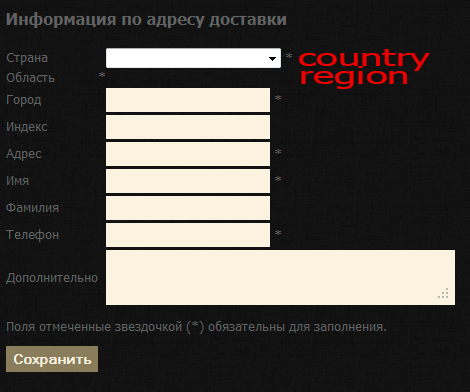
Please Log in or Create an account to join the conversation.
13 years 11 months ago #73333
by Xavier
Replied by Xavier on topic Re: Required fields are not required
Hi,
Ok so the field is not empty, the value is the zone created. For HikaShop something is selected, that's why you can go to the next step.
The next step display a notice because the zone is not recognize for the shipping method.
You can let it as it's actually and have the message displayed, or remove the created zone and have a default zone selected.
Ok so the field is not empty, the value is the zone created. For HikaShop something is selected, that's why you can go to the next step.
The next step display a notice because the zone is not recognize for the shipping method.
You can let it as it's actually and have the message displayed, or remove the created zone and have a default zone selected.
Please Log in or Create an account to join the conversation.
- parsanches
-
Topic Author
- Offline
Less
More
- Posts: 60
- Thank you received: 8
13 years 11 months ago #73335
by parsanches
Replied by parsanches on topic Re: Required fields are not required
Maybe it is possible to make that this fields will be empty and user selects the region he needs?
Please Log in or Create an account to join the conversation.

13 years 11 months ago #73604
by nicolas
Replied by nicolas on topic Re: Required fields are not required
The zone type of custom fields hasn't been made to be able to do what you want.
You should not use a custom field of the type "zone" and the subtype "country" but a custom field of the type "single dropdown" and enter yourself all the values with the first one having a blank "value". That will allow you to do what you want.
You should not use a custom field of the type "zone" and the subtype "country" but a custom field of the type "single dropdown" and enter yourself all the values with the first one having a blank "value". That will allow you to do what you want.
Please Log in or Create an account to join the conversation.
- parsanches
-
Topic Author
- Offline
Less
More
- Posts: 60
- Thank you received: 8
13 years 11 months ago #73824
by parsanches
Replied by parsanches on topic Re: Required fields are not required
If I understand correctly, I need to re-enter all the zones and states and start with a blank value?
Please Log in or Create an account to join the conversation.
13 years 11 months ago #73983
by Xavier
Replied by Xavier on topic Re: Required fields are not required
Yes.
Please Log in or Create an account to join the conversation.
Time to create page: 0.289 seconds