

- Posts: 1195
- Thank you received: 13
Change class to price
14 years 4 days ago #73657
by verzevoul
Change class to price was created by verzevoul
Hi! I need to change class for different pages for the price.
I have sceenshots to show you what I mean.
When I change the
span.hikashop_product_price
it changes in 1.jpg
but it changes also in 3.jpg.
I found how to correct this in 2.jpg
Thanks
I have sceenshots to show you what I mean.
When I change the
span.hikashop_product_price
it changes in 1.jpg
but it changes also in 3.jpg.
I found how to correct this in 2.jpg
Thanks
Please Log in or Create an account to join the conversation.

14 years 4 days ago #73823
by Xavier
Replied by Xavier on topic Re: Change class to price
Hi,
If you want to change the style only in the product page, you can apply the properties to:
If you want to change the style only in the product page, you can apply the properties to:
Code:
.hikashop_product_price_main .hikashop_product_price{
/* your css */
}
Please Log in or Create an account to join the conversation.
14 years 3 days ago #73961
by verzevoul
Replied by verzevoul on topic Re: Change class to price
ok it works but when I use more prices see prtscreen. Can we seperate prices with more classes?

Please Log in or Create an account to join the conversation.

14 years 2 days ago #74085
by nicolas
Replied by nicolas on topic Re: Change class to price
Sure. Each price has it's class too.
hikashop_product_price_for_at_least_1
hikashop_product_price_for_at_least_12
hikashop_product_price_for_at_least_24
or even:
hikashop_product_price_0
hikashop_product_price_1
hikashop_product_price_2
hikashop_product_price_for_at_least_1
hikashop_product_price_for_at_least_12
hikashop_product_price_for_at_least_24
or even:
hikashop_product_price_0
hikashop_product_price_1
hikashop_product_price_2
Please Log in or Create an account to join the conversation.
14 years 1 day ago #74123
by verzevoul
Replied by verzevoul on topic Re: Change class to price
Nice, but, one last but, if it can be done.
When I have 1 price the class is hikashop_product_price_0
When I have 2 prices and more, the first price takes the same class "hikashop_product_price_0", so its imposossible to move it as I want because it ll move the one with the 2-3 prices product.
Is it possible to have different class for the solo price?
When I have 1 price the class is hikashop_product_price_0
When I have 2 prices and more, the first price takes the same class "hikashop_product_price_0", so its imposossible to move it as I want because it ll move the one with the 2-3 prices product.
Is it possible to have different class for the solo price?
Please Log in or Create an account to join the conversation.
14 years 1 day ago #74194
by nicolas
Replied by nicolas on topic Re: Change class to price
You can use that class hikashop_product_several_prices which is only there when you have several prices.
Please Log in or Create an account to join the conversation.

13 years 9 months ago #87862
by colpc
Replied by colpc on topic Re: Change class to price
What would be the syntax ( if possible )
To tell the price to just look at ones Joomla Template to get the link color ?
To tell the price to just look at ones Joomla Template to get the link color ?
Please Log in or Create an account to join the conversation.
13 years 9 months ago #87928
by Xavier
Replied by Xavier on topic Re: Change class to price
You can edit the css property of:
.hikashop_product_several_prices .hikashop_product_price_0{
/* CSS property */
}
.hikashop_product_several_prices .hikashop_product_price_0{
/* CSS property */
}
Please Log in or Create an account to join the conversation.
12 years 11 months ago #134139
by carlomin
Replied by carlomin on topic Change class to price
in the cart module and in the last product module i have the same class:
hikashop_product_price_0
how i change this class for every different module?
for example change
hikashop_product_price_0 to hikashop_product_price_1
hikashop_product_price_0
how i change this class for every different module?
for example change
hikashop_product_price_0 to hikashop_product_price_1
Please Log in or Create an account to join the conversation.
12 years 11 months ago #134224
by Xavier
Replied by Xavier on topic Change class to price
Hi,
The best way is to add a suffix in the module class in the Joomla options.
Then in css combine the classes to edit the property in only one place, for example:
The best way is to add a suffix in the module class in the Joomla options.
Then in css combine the classes to edit the property in only one place, for example:
Code:
.your_module_suffix .hikashop_product_price_0{
/* your properties */
}
The following user(s) said Thank You: carlomin
Please Log in or Create an account to join the conversation.
12 years 11 months ago #134258
by carlomin
Replied by carlomin on topic Change class to price
if i add a suffix in the module,
the new class work only on the first div of the module
and it does not work on the class inside the module.
why?
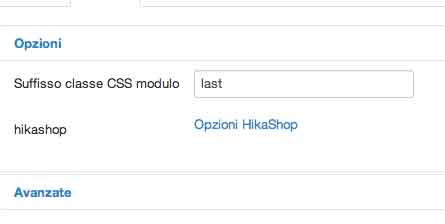
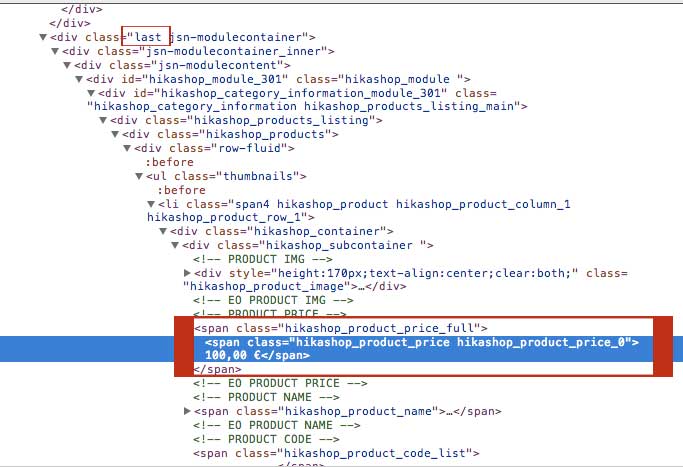
the new class work only on the first div of the module
and it does not work on the class inside the module.
why?
Please Log in or Create an account to join the conversation.
12 years 11 months ago #134320
by Xavier
Replied by Xavier on topic Change class to price
Hi,
No in your case:
should work. It can be applied on any class inside the previous class.
Check if there is no another css property which override this one thanks to your browser console.
You can too add !important in your properties to force the use of this property.
ex: color: #ccc !important;
No in your case:
Code:
.last .hikashop_product_price_0{
/* your properties */
}
Check if there is no another css property which override this one thanks to your browser console.
You can too add !important in your properties to force the use of this property.
ex: color: #ccc !important;
The following user(s) said Thank You: carlomin
Please Log in or Create an account to join the conversation.
12 years 11 months ago #134433
by carlomin
Replied by carlomin on topic Change class to price
Thank you now i have understood!
it works,if i have any other questions,i'll write to you.
You are a kind man
Carlo
it works,if i have any other questions,i'll write to you.
You are a kind man
Carlo
Please Log in or Create an account to join the conversation.
Time to create page: 0.132 seconds