
- Posts: 2
- Thank you received: 0
Change Text "Your Shoping Cart"
- mike chaplow
-
 Topic Author
- Offline
Less
More
14 years 4 days ago - 14 years 4 days ago #74354
by mike chaplow
Change Text "Your Shoping Cart" was created by mike chaplow
Hi there ,
just wondering where I would go to change this text as it is spelt incorrectly.
your Shopping Cart
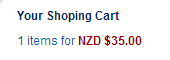
also.. in the payment methods "CHECK" is spelt incorrectly as well.
this should be Spelt "CHEQUE"
Thank you.
just wondering where I would go to change this text as it is spelt incorrectly.
your Shopping Cart
also.. in the payment methods "CHECK" is spelt incorrectly as well.
this should be Spelt "CHEQUE"
Thank you.
Last edit: 14 years 4 days ago by mike chaplow.
Please Log in or Create an account to join the conversation.

14 years 3 days ago #74461
by Xavier
Replied by Xavier on topic Re: Change Text "Your Shoping Cart"
Hi,
You can go in HikaShop > Configuration > Language, edit your language file and search for the texts "CHECK" and "Your Shopping Cart".
Then replace the translation (the text between the quotes).
You can go in HikaShop > Configuration > Language, edit your language file and search for the texts "CHECK" and "Your Shopping Cart".
Then replace the translation (the text between the quotes).
Please Log in or Create an account to join the conversation.
Time to create page: 0.042 seconds