

- Posts: 43
- Thank you received: 0
Manual shipping
14 years 1 week ago #74545
by Supah
Manual shipping was created by Supah
Hi,
i made 3 manual shipping options.
- Pickup from store
- send with defro order
- send by PostNL
They are all active, but i can't seem to select them when i'm placing an order...
Here is my shop: afvoerkanalen.nl/rookgasafvoer
I must be forgetting something, but i dont see what, please help me.
Thanks in advance.
i made 3 manual shipping options.
- Pickup from store
- send with defro order
- send by PostNL
They are all active, but i can't seem to select them when i'm placing an order...
Here is my shop: afvoerkanalen.nl/rookgasafvoer
I must be forgetting something, but i dont see what, please help me.
Thanks in advance.
Please Log in or Create an account to join the conversation.

14 years 1 week ago #74556
by Xavier
Replied by Xavier on topic Re: Manual shipping
Hi,
I just tried on your website and it seems to be working fine. I see the 3 shipping methods.
The product added in the cart is, HT-080.
If it doesn't work with the other products, check if you have entered a weight for it.
I just tried on your website and it seems to be working fine. I see the 3 shipping methods.
The product added in the cart is, HT-080.
If it doesn't work with the other products, check if you have entered a weight for it.
Please Log in or Create an account to join the conversation.
14 years 1 week ago #74558
by Supah
Replied by Supah on topic Re: Manual shipping
could it be that i have made an account before i added the shipping options ?
when i use that account i dont see those options
when i use that account i dont see those options
Please Log in or Create an account to join the conversation.
14 years 1 week ago - 14 years 1 week ago #74566
by Xavier
Replied by Xavier on topic Re: Manual shipping
I don't think that it come from an account created before.
It's maybe due to the zones, do you have set zones for your shipping methods ?
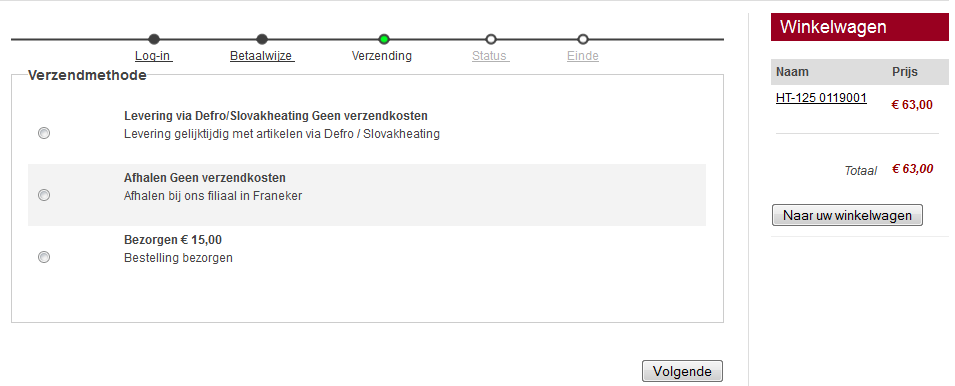
It's maybe due to the zones, do you have set zones for your shipping methods ?
Last edit: 14 years 1 week ago by Xavier.
The following user(s) said Thank You: Supah
Please Log in or Create an account to join the conversation.
14 years 1 week ago #74672
by Supah
Replied by Supah on topic Re: Manual shipping
i'm sorry, i got it working. it was still in the cache i guess, cause its working fine now.
I do have another question about the checkout.
there is a option 'fields' but where can i add those fields ? I would like a extra field for order comments.
I do have another question about the checkout.
there is a option 'fields' but where can i add those fields ? I would like a extra field for order comments.
Please Log in or Create an account to join the conversation.
14 years 1 week ago #74680
by Xavier
Replied by Xavier on topic Re: Manual shipping
Hi,
To add the fields you have to go in HikaShop > Display > Custom fields and then create a new field in the table "order".
This functionality is only available in the commercial editions of HikaShop
To add the fields you have to go in HikaShop > Display > Custom fields and then create a new field in the table "order".
This functionality is only available in the commercial editions of HikaShop
Please Log in or Create an account to join the conversation.

Less
More
- Posts: 90
- Thank you received: 1
9 years 10 months ago #258247
by langkatech
Replied by langkatech on topic Manual shipping
I am having this problem as well.
I have three shipping options set up under my manual shipping Plugin. one for USPS, UPS, and FedEx.
www.hawkcountry.com
When I get to the shipping option at checkout. I see the different shipping options but I can not see the select toggle, if I click on one it seems to select it and work. I just can see that that is the one I selected. It appears like nothing is happening.
I have a zone set up for each option, and this product has a weight.
Please advise.
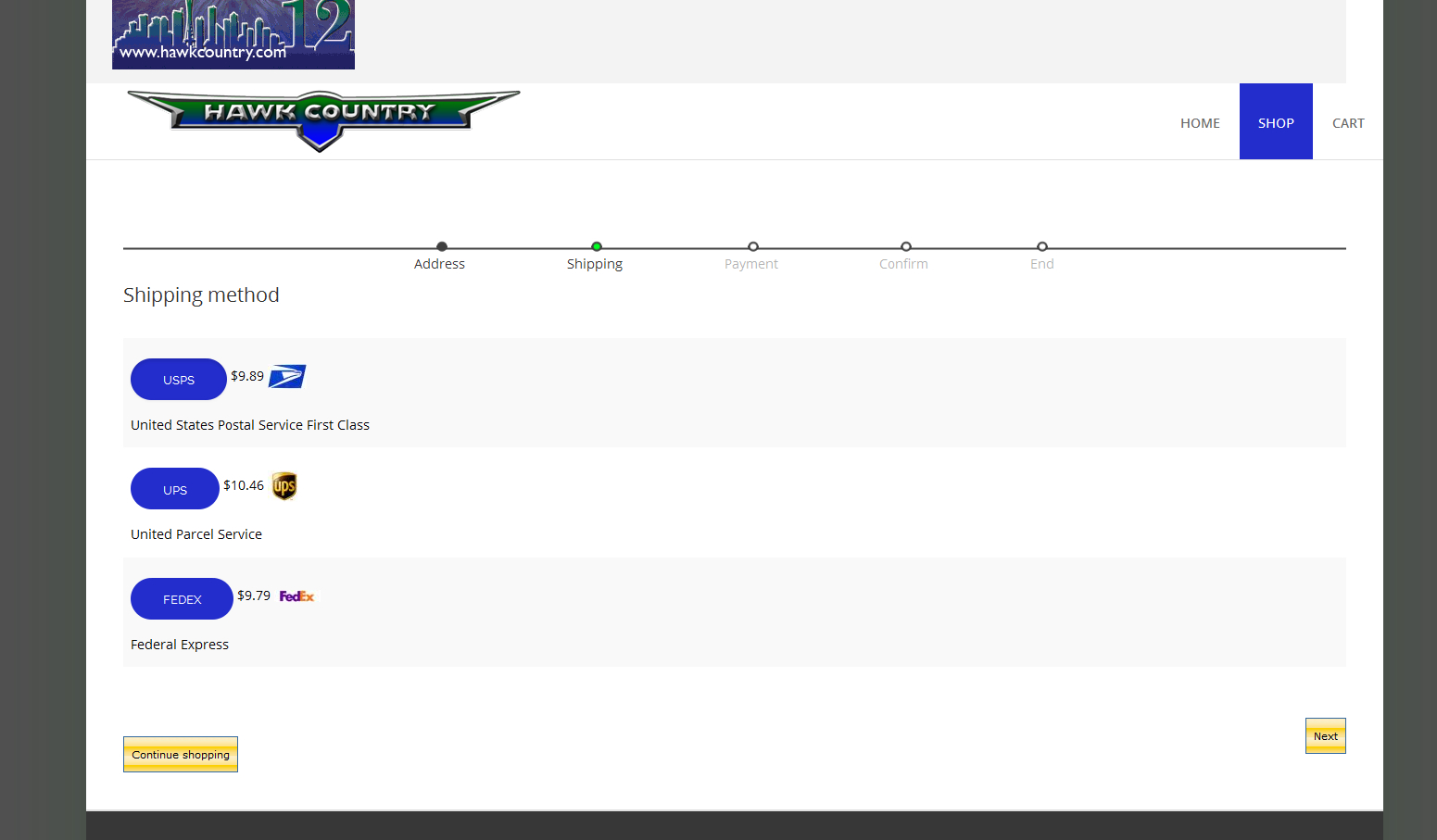
I have three shipping options set up under my manual shipping Plugin. one for USPS, UPS, and FedEx.
www.hawkcountry.com
When I get to the shipping option at checkout. I see the different shipping options but I can not see the select toggle, if I click on one it seems to select it and work. I just can see that that is the one I selected. It appears like nothing is happening.
I have a zone set up for each option, and this product has a weight.
Please advise.
Please Log in or Create an account to join the conversation.
Less
More
- Posts: 90
- Thank you received: 1
9 years 10 months ago #258249
by langkatech
Replied by langkatech on topic Manual shipping
I think this has something to do with my template. I changed the template to the default joomla template and it looks like the buttons on each shipping option are supposed to change color if they get selected. (this works on the default Joomla Template) Is there a way to change back to the previous version of Hikashop that had a little selection circle and not the button that changes color?
Please Log in or Create an account to join the conversation.

9 years 10 months ago #258256
by nicolas
Replied by nicolas on topic Manual shipping
Hi,
This indeed comes from the CSS of your template which implements bootstrap but misses some CSS to have the buttons work properly.
And this doesn't from updating your HikaShop. The little circle displays automatically when you turn off the "use bootstrap design" setting of the HikaShop configuration. If you turn off that option, you'll see that it will display like "the previous version" you're talking about.
To have the radio selection while keeping that option turned on, you would have to edit the file "shipping" of the view "checkout" via the menu Display>Views and change the code:
<?php if(!HIKASHOP_RESPONSIVE) { ?>
to:
<?php if(true) { ?>
This indeed comes from the CSS of your template which implements bootstrap but misses some CSS to have the buttons work properly.
And this doesn't from updating your HikaShop. The little circle displays automatically when you turn off the "use bootstrap design" setting of the HikaShop configuration. If you turn off that option, you'll see that it will display like "the previous version" you're talking about.
To have the radio selection while keeping that option turned on, you would have to edit the file "shipping" of the view "checkout" via the menu Display>Views and change the code:
<?php if(!HIKASHOP_RESPONSIVE) { ?>
to:
<?php if(true) { ?>
Please Log in or Create an account to join the conversation.
Time to create page: 0.064 seconds