

- Posts: 10
- Thank you received: 0
position of the asterix when a field is required
13 years 11 months ago #75618
by jeroenn
position of the asterix when a field is required was created by jeroenn
How can i change the position of the asterix in for example the registrationform? This seems to mess up a good lining. :silly:
Tried to make changes in the template but that doesn't seem to work.
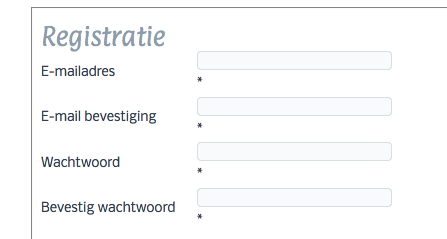
Tried to make changes in the template but that doesn't seem to work.
Please Log in or Create an account to join the conversation.

13 years 11 months ago #75840
by Eliot
Replied by Eliot on topic position of the asterix when a field is required
Hi,
The problem is probably coming form the css of your template. You should use firebug of something similar to check if there is some css making this happens.
If you can't figure where does the problem come from, just give me a link to the page so I can check it by myself
The problem is probably coming form the css of your template. You should use firebug of something similar to check if there is some css making this happens.
If you can't figure where does the problem come from, just give me a link to the page so I can check it by myself
Please Log in or Create an account to join the conversation.
13 years 11 months ago - 13 years 11 months ago #75855
by Eliot
Replied by Eliot on topic position of the asterix when a field is required
So it looks like in one of your css file. You have a width: 100%; to remove in these lines:
Code:
input[type="text"], input[type="password"], input[type="email"], input[type="url"], textarea
{
width: 100%;
padding: 1px 0;
font-size: 13px;
font-family: Nobile, Arial, 'Arial Unicode MS', Helvetica, Sans-Serif;
font-weight: normal;
font-style: normal;
}
Last edit: 13 years 11 months ago by Eliot.
The following user(s) said Thank You: jeroenn
Please Log in or Create an account to join the conversation.
13 years 11 months ago #76030
by jeroenn
Replied by jeroenn on topic position of the asterix when a field is required
Thanks! 
Please Log in or Create an account to join the conversation.
Time to create page: 0.310 seconds