
Display a contact button on the product page

15 years 8 months ago #7561
by hdracing
Display a contact button on the product page was created by hdracing
Nicolas,
I have installed the new version released just today on my development site and enabled the new "Display a contact button on the product page" feature, but do not see a contact button on any product pages. I chose the option "For all products".
Is there a companion setting that must be configured to make this work? (couldn't find any documentation on this feature yet) I'm using the standard Joomla contact component but also have Contact Enhanced installed although not currently being used.
Regards,
Ed
I have installed the new version released just today on my development site and enabled the new "Display a contact button on the product page" feature, but do not see a contact button on any product pages. I chose the option "For all products".
Is there a companion setting that must be configured to make this work? (couldn't find any documentation on this feature yet) I'm using the standard Joomla contact component but also have Contact Enhanced installed although not currently being used.
Regards,
Ed
Please Log in or Create an account to join the conversation.

15 years 8 months ago #7563
by nicolas
Replied by nicolas on topic Re: Display a contact button on the product page
Did you edit the file show of the view product ? Because if you did so, you won't see it as that feature was added in that view.
Please Log in or Create an account to join the conversation.
15 years 8 months ago #7564
by hdracing
Replied by hdracing on topic Re: Display a contact button on the product page
That was it. I did have to modify that view because the product_code was not being hidden with the template I'm using. There may have been other changes, but that's the obvious one that popped up when I switched to the lastest version.
The contact button and form now display, but there is a problem with the form.
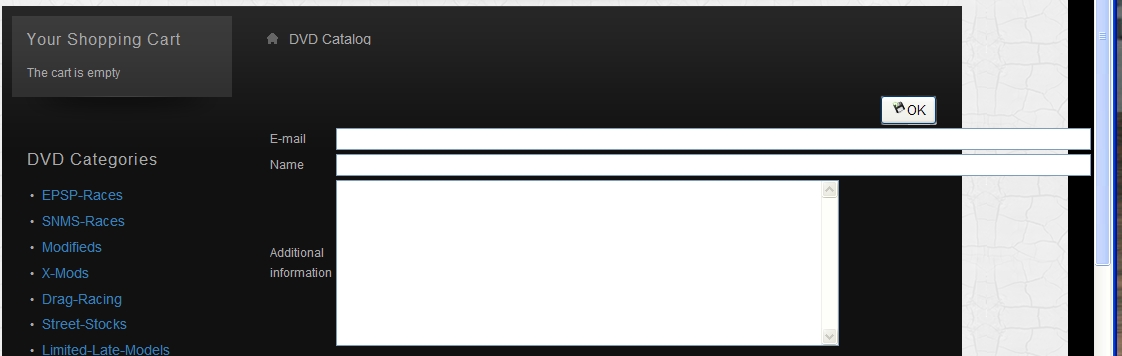
The contact button and form now display, but there is a problem with the form.
Please Log in or Create an account to join the conversation.
15 years 8 months ago #7572
by nicolas
Replied by nicolas on topic Re: Display a contact button on the product page
The width of the email and name fields are too big. We've reduced them and uploaded a new package of HikaShop. You can either update or edit the view to reduce their size.
Please Log in or Create an account to join the conversation.
15 years 8 months ago #7689
by hdracing
Replied by hdracing on topic Re: Display a contact button on the product page
Nicolas,
I just now downloaded the latest 1.4.5 zip file (Business Version) and the field lengths have indeed been fixed. The problem I see now is that no email is sent when using the Hikashop contact form. I get the following error when OK is clicked after filling the form fields.
Webpage error details
Message: Object expected
Line: 615
Char: 1
Code: 0
URI: xxxxx.com/xxxxx/dvd-catalog-new/product/contact/cid-2054
(Dev website and path replace with xxxx)
Regards,
Ed
I just now downloaded the latest 1.4.5 zip file (Business Version) and the field lengths have indeed been fixed. The problem I see now is that no email is sent when using the Hikashop contact form. I get the following error when OK is clicked after filling the form fields.
Webpage error details
Message: Object expected
Line: 615
Char: 1
Code: 0
URI: xxxxx.com/xxxxx/dvd-catalog-new/product/contact/cid-2054
(Dev website and path replace with xxxx)
Regards,
Ed
Please Log in or Create an account to join the conversation.
15 years 8 months ago #7691
by nicolas
Replied by nicolas on topic Re: Display a contact button on the product page
Would it be possible for us to test the problem ?
Please Log in or Create an account to join the conversation.
15 years 8 months ago #7693
by hdracing
Replied by hdracing on topic Re: Display a contact button on the product page
Certainly - Try
here
.
Please Log in or Create an account to join the conversation.
15 years 8 months ago - 15 years 8 months ago #7696
by hdracing
Replied by hdracing on topic Re: Display a contact button on the product page
Seems to work when logged in but not for unregistered visitor. At least I didn't get the error and Your Request Has Been Sent was returned.
Email received but with no reference to product information. Subject line - A contact request has been made for the product ''
Ed
Email received but with no reference to product information. Subject line - A contact request has been made for the product ''
Ed
Last edit: 15 years 8 months ago by hdracing.
Please Log in or Create an account to join the conversation.
15 years 8 months ago #7699
by nicolas
Replied by nicolas on topic Re: Display a contact button on the product page
I got the email A contact request has been made for the product '2010-08-20'
The problem though is that you should have been the one receiving the email
You need to change the line
$mailer->addRecipient(array($element->email));
to:
$mailer->addRecipient(array($config->get('from_email')));
in the file components/com_hikahsop/controllers/product.php
The problem though is that you should have been the one receiving the email
You need to change the line
$mailer->addRecipient(array($element->email));
to:
$mailer->addRecipient(array($config->get('from_email')));
in the file components/com_hikahsop/controllers/product.php
Please Log in or Create an account to join the conversation.
15 years 8 months ago #7705
by hdracing
Replied by hdracing on topic Re: Display a contact button on the product page
Well, I made the change and ran another test. When logged in, it works and the email returned did have the product name this time. I still get the same error and no email when not logged in. I tried with both IE and FF with the same results.
It worked for you without being logged in?
Ed
It worked for you without being logged in?
Ed
Please Log in or Create an account to join the conversation.
15 years 8 months ago #7707
by nicolas
Replied by nicolas on topic Re: Display a contact button on the product page
Yes. I'm not logged in and it worked.
Could you try to replace the text "submitbutton" to "submitform" in the file components/com_hikashop/views/product/tmpl/contact.php ?
Could you try to replace the text "submitbutton" to "submitform" in the file components/com_hikashop/views/product/tmpl/contact.php ?
Please Log in or Create an account to join the conversation.
15 years 8 months ago #7713
by hdracing
Replied by hdracing on topic Re: Display a contact button on the product page
That Fixed It! 
Thanks
Ed
Thanks
Ed
Please Log in or Create an account to join the conversation.
Time to create page: 0.374 seconds