

- Posts: 9
- Thank you received: 0
How to remove french products on the english page
13 years 11 months ago - 13 years 11 months ago #76770
by Sysgen
How to remove french products on the english page was created by Sysgen
I have Hikashop Pro on a biligual french/english website. Some of my products are french only and some english only.
If I create a product in english lets say, it automaticaly appears on the french site even if I delete the french translation in Joomfish or through the language tab in the product editor.
Is there any why to "hide" that product from the french site?
If I create a product in english lets say, it automaticaly appears on the french site even if I delete the french translation in Joomfish or through the language tab in the product editor.
Is there any why to "hide" that product from the french site?
Last edit: 13 years 11 months ago by Sysgen.
Please Log in or Create an account to join the conversation.

13 years 11 months ago #76893
by Eliot
Replied by Eliot on topic How to remove french products on the english page
Hi there,
Even if we are thinking about it, there is currently no option in Hikashop to do that kind of thing.
However, if you have some basis in php there is possibility:
You can first set a custom field to your product giving the language of the product and then try to code a plugin using the geolocation plugin of Hikashop which will determine according the geolocation of the customer and the custom field of the product if it has to be displayed or not.
I know it's not an easy solution but I don't see other option to do so
Even if we are thinking about it, there is currently no option in Hikashop to do that kind of thing.
However, if you have some basis in php there is possibility:
You can first set a custom field to your product giving the language of the product and then try to code a plugin using the geolocation plugin of Hikashop which will determine according the geolocation of the customer and the custom field of the product if it has to be displayed or not.
I know it's not an easy solution but I don't see other option to do so
Please Log in or Create an account to join the conversation.
13 years 11 months ago - 13 years 11 months ago #76999
by Sysgen
Replied by Sysgen on topic How to remove french products on the english page
Why would it need geolocation? The user makes his or her language selection from the start, from then on it should only display english content, if they switch to french then only french would display. A small check box in the product page to select on which language page it should be displayed would be a nice feature.
I have no php programing knowledge so I guess I'm out of luck.
How are others handling this?
I have no php programing knowledge so I guess I'm out of luck.
How are others handling this?
Last edit: 13 years 11 months ago by Sysgen.
Please Log in or Create an account to join the conversation.

13 years 11 months ago #77006
by Xavier
Replied by Xavier on topic How to remove french products on the english page
Hi,
I think that you can find your solution with the Joomla menu / modules options.
Create one menu by language, restrict this menu display to a certain language.
In the hikashop options of this menu, display only the available products for france, you can add a category france and add the products inside.
Do the same thing for the modules.
By this way, the customer will see only the menu and module available for his language, and the available products for his language.
I think that you can find your solution with the Joomla menu / modules options.
Create one menu by language, restrict this menu display to a certain language.
In the hikashop options of this menu, display only the available products for france, you can add a category france and add the products inside.
Do the same thing for the modules.
By this way, the customer will see only the menu and module available for his language, and the available products for his language.
Please Log in or Create an account to join the conversation.
13 years 11 months ago - 13 years 11 months ago #77023
by Sysgen
Hum not a bad idea! But how do you restrict to a specific language? I can't figure it out.
Replied by Sysgen on topic How to remove french products on the english page
Xavier wrote: Hi,
I think that you can find your solution with the Joomla menu / modules options.
Create one menu by language, restrict this menu display to a certain language.
In the hikashop options of this menu, display only the available products for france, you can add a category france and add the products inside.
Do the same thing for the modules.
By this way, the customer will see only the menu and module available for his language, and the available products for his language.
Hum not a bad idea! But how do you restrict to a specific language? I can't figure it out.
Last edit: 13 years 11 months ago by Sysgen.
Please Log in or Create an account to join the conversation.
13 years 11 months ago #77033
by Xavier
Replied by Xavier on topic How to remove french products on the english page
In the Joomla module option (Joomla > Extensions > Modules manager), in the "Details" part there is an option "Language"
Please Log in or Create an account to join the conversation.
13 years 11 months ago - 13 years 11 months ago #77056
by Sysgen
I'm sorry, I must be dumb but I don't see it. What module am I looking for in the modules manager? I checked under anything called Hika, or menu and there is no details page and even less the mention of language :blush:
Replied by Sysgen on topic How to remove french products on the english page
Xavier wrote: In the Joomla module option (Joomla > Extensions > Modules manager), in the "Details" part there is an option "Language"
I'm sorry, I must be dumb but I don't see it. What module am I looking for in the modules manager? I checked under anything called Hika, or menu and there is no details page and even less the mention of language :blush:
Last edit: 13 years 11 months ago by Sysgen.
Please Log in or Create an account to join the conversation.
13 years 11 months ago - 13 years 11 months ago #77061
by Sysgen
Replied by Sysgen on topic How to remove french products on the english page
Here's what I see under details, just found it by the way :blush: I"m running 1.5.25 by the way.
image missing http://img687.imageshack.us/img687/2768/image1zlj.jpg
image missing http://img687.imageshack.us/img687/2768/image1zlj.jpg
Last edit: 13 years 11 months ago by Sysgen.
Please Log in or Create an account to join the conversation.

13 years 11 months ago #77165
by Jerome
Jerome - Obsidev.com
HikaMarket & HikaSerial developer / HikaShop core dev team.
Replied by Jerome on topic How to remove french products on the english page
Hi,
Here a screenshot of a Joomla Module.
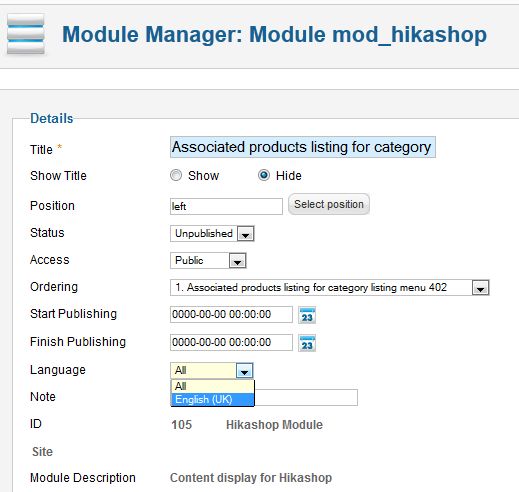
As you can see, there is a Language option.
Regards,
Here a screenshot of a Joomla Module.
As you can see, there is a Language option.
Regards,
Jerome - Obsidev.com
HikaMarket & HikaSerial developer / HikaShop core dev team.
Please Log in or Create an account to join the conversation.
Time to create page: 0.541 seconds