
- Posts: 37
- Thank you received: 0
Same product, two prices. - SOLVED
- yellowhousejake
-
 Topic Author
- Offline
Less
More
13 years 11 months ago - 13 years 11 months ago #76803
by yellowhousejake
Same product, two prices. - SOLVED was created by yellowhousejake
I am being asked if we can create a product that has one stock level, but two prices. For instance we have ten books, the books are all identical but if purchased by an adult cost $5, if purchased by a child cost $2.50. Either way, the stock level is decreased regardless of which price was paid.
I am unable to figure this one out. We are using 1.5.6 business version.
Thanks,
Dave
I am unable to figure this one out. We are using 1.5.6 business version.
Thanks,
Dave
Last edit: 13 years 11 months ago by yellowhousejake.
Please Log in or Create an account to join the conversation.

13 years 11 months ago #76890
by Xavier
Replied by Xavier on topic Same product, two prices.
Hi,
Yes it's possible with the business edition of HikaShop, in the product edition page, you can add as much prices as you want.
You can restrict them to a user group, or a currency.
Yes it's possible with the business edition of HikaShop, in the product edition page, you can add as much prices as you want.
You can restrict them to a user group, or a currency.
Please Log in or Create an account to join the conversation.
- yellowhousejake
-
Topic Author
- Offline
Less
More
- Posts: 37
- Thank you received: 0
13 years 11 months ago #76952
by yellowhousejake
Replied by yellowhousejake on topic Same product, two prices.
Yes, but I would need to create a child user group or something like it. I need to be able to have a customer adult and get a book at one price, select child and get the same book at another price. I don't think I can do that.
DAve
DAve
Please Log in or Create an account to join the conversation.
- yellowhousejake
-
Topic Author
- Offline
Less
More
- Posts: 37
- Thank you received: 0
13 years 11 months ago - 13 years 11 months ago #77010
by yellowhousejake
Replied by yellowhousejake on topic Same product, two prices.
I did get it to work! Once it thought about it differently the answer was pretty simple. I used characteristics to create two prices, and it works. Unfortunately it breaks the "Continue Shopping" button by replacing it with a second add to cart button.
DAve
DAve
Last edit: 13 years 11 months ago by yellowhousejake.
Please Log in or Create an account to join the conversation.

13 years 11 months ago #77159
by Jerome
Jerome - Obsidev.com
HikaMarket & HikaSerial developer / HikaShop core dev team.
Replied by Jerome on topic Same product, two prices.
Hi,
It breaks the "continue shopping" ?
Can you give us a screenshot ?
Best regards,
It breaks the "continue shopping" ?
Can you give us a screenshot ?
Best regards,
Jerome - Obsidev.com
HikaMarket & HikaSerial developer / HikaShop core dev team.
Please Log in or Create an account to join the conversation.
- yellowhousejake
-
Topic Author
- Offline
Less
More
- Posts: 37
- Thank you received: 0
13 years 11 months ago #77489
by yellowhousejake
Replied by yellowhousejake on topic Same product, two prices.
Sure, the first screen shot is the default that loads as the product comes up, Adult. The second one is the result of choosing the youth ticket or characteristic. You can see where the "Continue Shopping" button is replaced with a second "Add to Cart" selector.
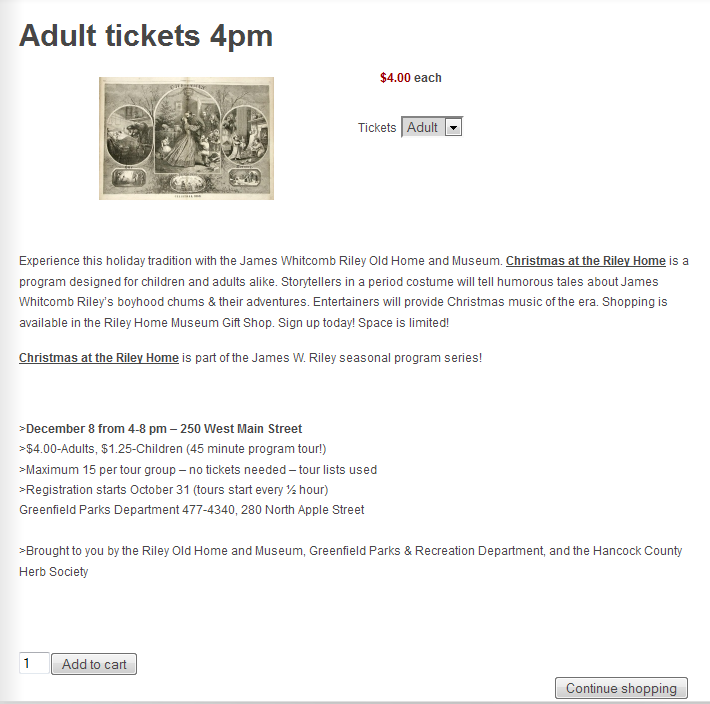
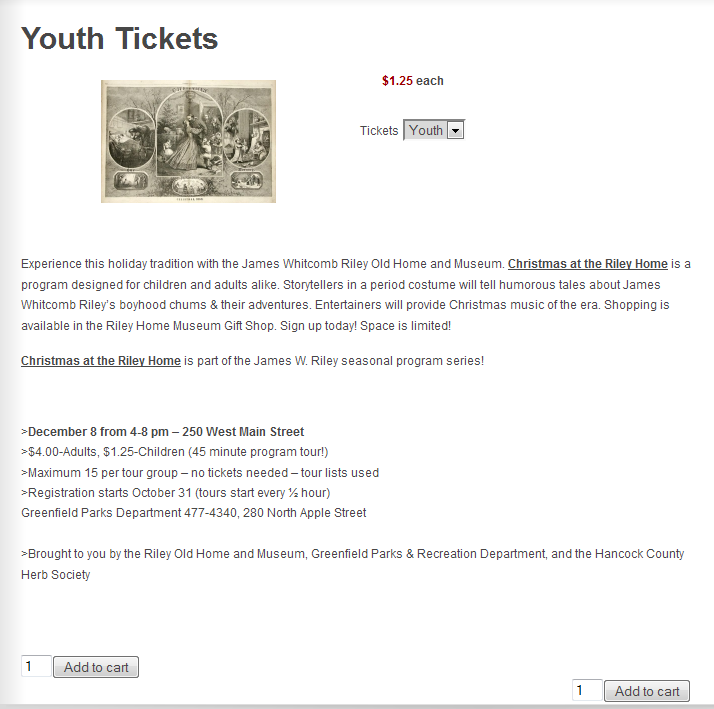
The div in question looks like this in the beginning.
<div id="hikashop_product_quantity_main" class="hikashop_product_quantity_main" style="float:right">
<input id="hikashop_checkout_shopping_button" class="button hikashop_cart_input_button" type="submit" onclick="var field=document.getElementById('hikashop_product_quantity_field_4');history.back();return false;" value="Continue shopping" name="continue_shopping">
</div>
And is replaced with the following.
<div id="hikashop_product_quantity_main" class="hikashop_product_quantity_main" style="float:right">
<div class="hikashop_product_stock">
<input id="hikashop_product_quantity_field_2" class="hikashop_product_quantity_field" type="text" onchange="hikashopCheckQuantityChange('hikashop_product_quantity_field_2',0,1);" name="quantity" value="1">
<input class="button hikashop_cart_input_button" type="submit" onclick="var field=document.getElementById('hikashop_product_quantity_field_2');if(hikashopCheckChangeForm('item','hikashop_product_form')){ return hikashopModifyQuantity('229',field,1,'hikashop_product_form'); } else { return false; }" value="Add to cart" name="add">
</div>
</div>
DAve
The div in question looks like this in the beginning.
<div id="hikashop_product_quantity_main" class="hikashop_product_quantity_main" style="float:right">
<input id="hikashop_checkout_shopping_button" class="button hikashop_cart_input_button" type="submit" onclick="var field=document.getElementById('hikashop_product_quantity_field_4');history.back();return false;" value="Continue shopping" name="continue_shopping">
</div>
And is replaced with the following.
<div id="hikashop_product_quantity_main" class="hikashop_product_quantity_main" style="float:right">
<div class="hikashop_product_stock">
<input id="hikashop_product_quantity_field_2" class="hikashop_product_quantity_field" type="text" onchange="hikashopCheckQuantityChange('hikashop_product_quantity_field_2',0,1);" name="quantity" value="1">
<input class="button hikashop_cart_input_button" type="submit" onclick="var field=document.getElementById('hikashop_product_quantity_field_2');if(hikashopCheckChangeForm('item','hikashop_product_form')){ return hikashopModifyQuantity('229',field,1,'hikashop_product_form'); } else { return false; }" value="Add to cart" name="add">
</div>
</div>
DAve
Please Log in or Create an account to join the conversation.
13 years 11 months ago #77553
by Jerome
Jerome - Obsidev.com
HikaMarket & HikaSerial developer / HikaShop core dev team.
Replied by Jerome on topic Same product, two prices.
Hi,
You should use the id "hikashop_product_quantity_main" for your template custmization.
Please change it with another (unique) id and the javascript won't update the div anymore.
Regards,
You should use the id "hikashop_product_quantity_main" for your template custmization.
Please change it with another (unique) id and the javascript won't update the div anymore.
Regards,
Jerome - Obsidev.com
HikaMarket & HikaSerial developer / HikaShop core dev team.
The following user(s) said Thank You: yellowhousejake
Please Log in or Create an account to join the conversation.
- yellowhousejake
-
Topic Author
- Offline
Less
More
- Posts: 37
- Thank you received: 0
13 years 11 months ago #77562
by yellowhousejake
Replied by yellowhousejake on topic Same product, two prices.
Well....... dang it. I changed it and everything is working. Thank you.
DAve
DAve
Please Log in or Create an account to join the conversation.
Time to create page: 0.144 seconds