

- Posts: 10
- Thank you received: 0
MouseOver Effect For Product Images for2.0hikashop
13 years 11 months ago #76851
by ousia2
MouseOver Effect For Product Images for2.0hikashop was created by ousia2
Dear hikashop support:
I wish can create move over effect on product images in hikashop2.0(we dont have to click on the image to see large image rather then when we point the mouse over the image it shows the large image instead of clicking it), i found this topic but it is for hikashop1.5.6( www.hikashop.com/en/forum/4-how-to/42708...ct-images.html#42708 ) now the code has been changed in2.0,please someone who can help me ?
I wish can create move over effect on product images in hikashop2.0(we dont have to click on the image to see large image rather then when we point the mouse over the image it shows the large image instead of clicking it), i found this topic but it is for hikashop1.5.6( www.hikashop.com/en/forum/4-how-to/42708...ct-images.html#42708 ) now the code has been changed in2.0,please someone who can help me ?
Please Log in or Create an account to join the conversation.

13 years 11 months ago #77083
by Jerome
Jerome - Obsidev.com
HikaMarket & HikaSerial developer / HikaShop core dev team.
Replied by Jerome on topic MouseOver Effect For Product Images for2.0hikashop
Hi,
I checked it and I can tell you that even if the popup management in HikaShop 2.0 has changed, the code from the other thread is still compatible.
Regards,
I checked it and I can tell you that even if the popup management in HikaShop 2.0 has changed, the code from the other thread is still compatible.
Regards,
Jerome - Obsidev.com
HikaMarket & HikaSerial developer / HikaShop core dev team.
Please Log in or Create an account to join the conversation.
13 years 11 months ago #77087
by ousia2
Replied by ousia2 on topic MouseOver Effect For Product Images for2.0hikashop
ok thank you very much Jerome!
but the the code is different from 1.5.6,did u saw it?
but the the code is different from 1.5.6,did u saw it?
Please Log in or Create an account to join the conversation.
13 years 11 months ago #77107
by Jerome
Jerome - Obsidev.com
HikaMarket & HikaSerial developer / HikaShop core dev team.
Replied by Jerome on topic MouseOver Effect For Product Images for2.0hikashop
Hi,
When I said that it's still compatible, I mean that the fix should still work.
You have to add the
in the function parameter
to add this html into the link.
Regards,
When I said that it's still compatible, I mean that the fix should still work.
You have to add the
Code:
onmouseover="SqueezeBox.fromElement(this,{parse: \'rel\'});return false;"
Code:
'id="hikashop_main_image_link"'
Regards,
Jerome - Obsidev.com
HikaMarket & HikaSerial developer / HikaShop core dev team.
Please Log in or Create an account to join the conversation.
13 years 11 months ago #77163
by ousia2
Replied by ousia2 on topic MouseOver Effect For Product Images for2.0hikashop
ok Jerome thank you very much it works ,but can it worked with the category / listing? i mean ,when create a menu link to a hikashop category,can the products image under the category have the same effect? i found the category / listing_img_desc.php, but didn't found a line like 'id="hikashop_main_image_link"'
Please Log in or Create an account to join the conversation.
13 years 11 months ago #77164
by ousia2
Replied by ousia2 on topic MouseOver Effect For Product Images for2.0hikashop
maybe is this file?product / listing_.php? add something to here?
<!-- PRODUCT IMG -->
<div style="height:<?php echo $this->image->main_thumbnail_y;?>px;text-align:center;clear:both;" class="hikashop_product_image">
<div style="position:relative;text-align:center;clear:both;width:<?php echo $this->image->main_thumbnail_x;?>px;margin: auto;" class="hikashop_product_image_subdiv">
<?php if($this->params->get('link_to_product_page',1)){ ?>
<a href="<?php echo $link;?>" title="<?php echo $this->escape($this->row->product_name); ?>">
<?php }
echo $this->image->display(@$this->row->file_path,false,$this->escape($this->row->file_name), '' , '' , $this->image->main_thumbnail_x, $this->image->main_thumbnail_y);
$main_thumb_x = $this->image->main_thumbnail_x;
$main_thumb_y = $this->image->main_thumbnail_y;
$horizontal = '0';
$vertical = '0';
$this->classbadge->placeBadges($this->image, $this->row->badges, $vertical, $horizontal);
$this->image->main_thumbnail_x = $main_thumb_x;
$this->image->main_thumbnail_y = $main_thumb_y;
if($this->params->get('link_to_product_page',1)){ ?>
</a>
<?php } ?>
</div>
</div>
<!-- EO PRODUCT IMG -->
i wish can MouseOver Effect on Product main_thumbnail
<!-- PRODUCT IMG -->
<div style="height:<?php echo $this->image->main_thumbnail_y;?>px;text-align:center;clear:both;" class="hikashop_product_image">
<div style="position:relative;text-align:center;clear:both;width:<?php echo $this->image->main_thumbnail_x;?>px;margin: auto;" class="hikashop_product_image_subdiv">
<?php if($this->params->get('link_to_product_page',1)){ ?>
<a href="<?php echo $link;?>" title="<?php echo $this->escape($this->row->product_name); ?>">
<?php }
echo $this->image->display(@$this->row->file_path,false,$this->escape($this->row->file_name), '' , '' , $this->image->main_thumbnail_x, $this->image->main_thumbnail_y);
$main_thumb_x = $this->image->main_thumbnail_x;
$main_thumb_y = $this->image->main_thumbnail_y;
$horizontal = '0';
$vertical = '0';
$this->classbadge->placeBadges($this->image, $this->row->badges, $vertical, $horizontal);
$this->image->main_thumbnail_x = $main_thumb_x;
$this->image->main_thumbnail_y = $main_thumb_y;
if($this->params->get('link_to_product_page',1)){ ?>
</a>
<?php } ?>
</div>
</div>
<!-- EO PRODUCT IMG -->
i wish can MouseOver Effect on Product main_thumbnail
Please Log in or Create an account to join the conversation.
13 years 11 months ago - 13 years 11 months ago #77178
by ousia2
Replied by ousia2 on topic MouseOver Effect For Product Images for2.0hikashop
(index.php?option=com_hikashop&view=category&layout=listing ) i mean open this link product's thumbnail can get that effect?
Last edit: 13 years 11 months ago by ousia2.
Please Log in or Create an account to join the conversation.
13 years 11 months ago #77183
by Jerome
Jerome - Obsidev.com
HikaMarket & HikaSerial developer / HikaShop core dev team.
Replied by Jerome on topic MouseOver Effect For Product Images for2.0hikashop
Hi,
The category does not have the same code but the function image->display use same parameters.
So you can put the code in the same argument (last text before width and height parameters).
So replace this :
By this:
Regards,
The category does not have the same code but the function image->display use same parameters.
So you can put the code in the same argument (last text before width and height parameters).
So replace this :
Code:
echo $this->image->display(@$this->row->file_path,false,$this->escape($this->row->file_name), '' , '' , $this->image->main_thumbnail_x, $this->image->main_thumbnail_y);
Code:
echo $this->image->display(@$this->row->file_path,false,$this->escape($this->row->file_name), '' , 'onmouseover="SqueezeBox.fromElement(this,{parse: \'rel\'});return false;"' , $this->image->main_thumbnail_x, $this->image->main_thumbnail_y);
Regards,
Jerome - Obsidev.com
HikaMarket & HikaSerial developer / HikaShop core dev team.
Please Log in or Create an account to join the conversation.
13 years 11 months ago #77188
by ousia2
Replied by ousia2 on topic MouseOver Effect For Product Images for2.0hikashop
hi jerome i do as you said but looks like it doesn't work (category / listing_img.php)
www.2yuju.com/themelist.html here is my site
www.2yuju.com/themelist.html here is my site
Please Log in or Create an account to join the conversation.
13 years 11 months ago #77194
by Jerome
Jerome - Obsidev.com
HikaMarket & HikaSerial developer / HikaShop core dev team.
Replied by Jerome on topic MouseOver Effect For Product Images for2.0hikashop
Hi,
Right, the category listing does not generate a link thanks to the image->display function. The link is just before.
But the link target is the category page, not the full size image. So the modification is a little bit different.
You have to extract the image from the main link, create another link to the fullsize category image and and the onmouseover to this link.
Regards,
Right, the category listing does not generate a link thanks to the image->display function. The link is just before.
But the link target is the category page, not the full size image. So the modification is a little bit different.
You have to extract the image from the main link, create another link to the fullsize category image and and the onmouseover to this link.
Regards,
Jerome - Obsidev.com
HikaMarket & HikaSerial developer / HikaShop core dev team.
Please Log in or Create an account to join the conversation.
13 years 11 months ago #77196
by ousia2
Replied by ousia2 on topic MouseOver Effect For Product Images for2.0hikashop
ok i see,but please can you tell me how to do this? extract the image from the main link, create another link to the fullsize category image and and the onmouseover to this link. please,it is hard to me to do this without your help
Please Log in or Create an account to join the conversation.
13 years 11 months ago - 13 years 11 months ago #77279
by Jerome
Jerome - Obsidev.com
HikaMarket & HikaSerial developer / HikaShop core dev team.
Replied by Jerome on topic MouseOver Effect For Product Images for2.0hikashop
Hi,
Here the code for listing_img_title view (for HikaShop 2.0)
Regards,
Here the code for listing_img_title view (for HikaShop 2.0)
Code:
<?php $link = hikashop_completeLink('category&task=listing&cid='.$this->row->category_id.'&name='.$this->row->alias.$this->menu_id);?>
<?php if($this->config->get('thumbnail',1)){ ?>
<div style="height:<?php echo $this->image->main_thumbnail_y;?>px;text-align:center;clear:both;" class="hikashop_category_image">
<a href="<?php echo $link;?>" rel="{handler: 'image'}" title="<?php echo $this->escape($this->row->category_name); ?>">
<?php
if(!isset($this->uploadFolder_url)) {
JHtml::_('behavior.modal');
$config =& hikashop_config();
$uploadFolder = ltrim(JPath::clean(html_entity_decode($config->get('uploadfolder'))),DS);
$uploadFolder = rtrim(JURI::base(true),'/').'/'.rtrim($uploadFolder,DS).DS;
$this->uploadFolder_url = str_replace(DS,'/',$uploadFolder);
}
echo $this->image->display(@$this->row->file_path,false,$this->escape($this->row->file_name), 'onmouseover="window.hikashop.openBox(this.parentNode,\''.$this->uploadFolder_url.@$this->row->file_path.'\');this.parentNode.href=\''.$link.'\';"' , '' , $this->image->main_thumbnail_x, $this->image->main_thumbnail_y);
?>
</a>
</div>
<?php } ?>
<br/>
<span class="hikashop_category_name">
<a href="<?php echo $link;?>">
<?php
echo $this->row->category_name;
if($this->params->get('number_of_products',0)){
echo ' ('.$this->row->number_of_products.')';
}
?>
</a>
</span>
Regards,
Jerome - Obsidev.com
HikaMarket & HikaSerial developer / HikaShop core dev team.
Last edit: 13 years 11 months ago by Jerome.
Please Log in or Create an account to join the conversation.
13 years 11 months ago - 13 years 11 months ago #77284
by ousia2
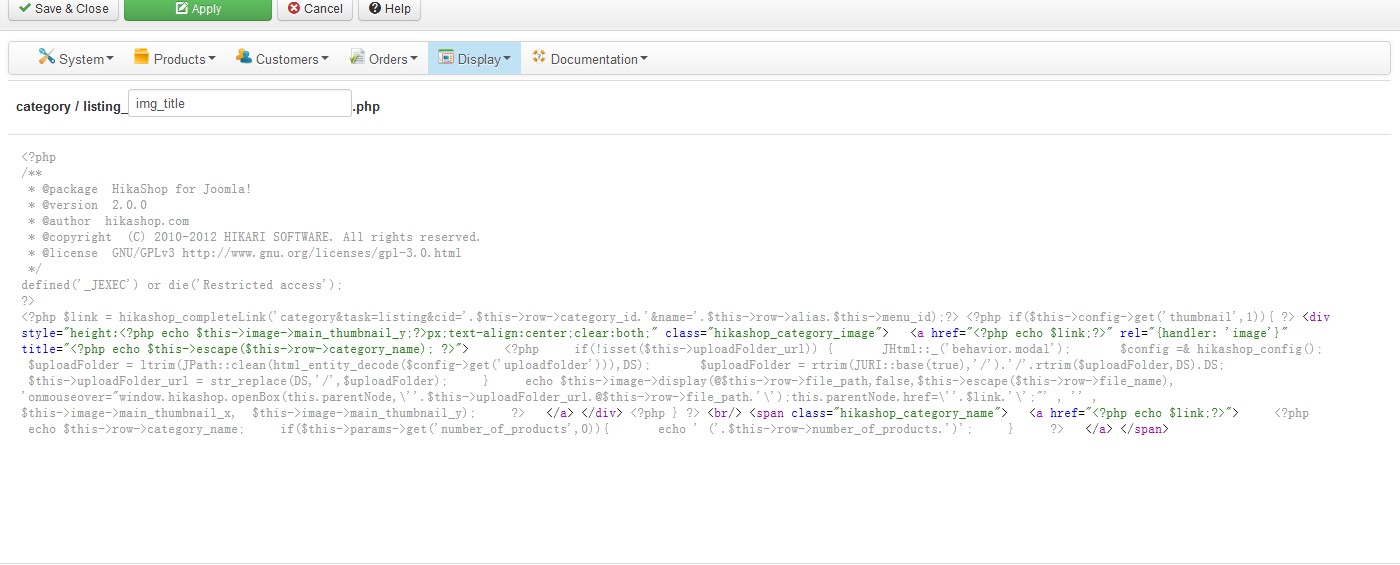
 ok my lord thanks very much for your code
i have copy and paste it to category / listing_img_title.php
but visit my site front-end still doesn't have the effect
www.2yuju.com/themelist.html
Replied by ousia2 on topic MouseOver Effect For Product Images for2.0hikashop
ok my lord thanks very much for your codei have copy and paste it to category / listing_img_title.php
but visit my site front-end still doesn't have the effect
www.2yuju.com/themelist.html
Last edit: 13 years 11 months ago by ousia2.
Please Log in or Create an account to join the conversation.
13 years 11 months ago #77301
by Jerome
Jerome - Obsidev.com
HikaMarket & HikaSerial developer / HikaShop core dev team.
Replied by Jerome on topic MouseOver Effect For Product Images for2.0hikashop
Hi,
Your page is not a category listing.
Regards,
Your page is not a category listing.
Regards,
Jerome - Obsidev.com
HikaMarket & HikaSerial developer / HikaShop core dev team.
Please Log in or Create an account to join the conversation.
Time to create page: 0.131 seconds