

- Posts: 35
- Thank you received: 0
Problem getting ordering and categories to work
13 years 11 months ago - 13 years 11 months ago #77101
by austio
Problem getting ordering and categories to work was created by austio
I have the following category structure:
I am trying to get the product listing show the order designated via the "ordering" fields. However, no matter what I do, I cannot get them to display in the order set, even though "ordering Field" is set correctly. I noticed if Synchronize OFF on the product listing module, then the order is correct, but clicking on a category from the cat listing module will not show its sub elements (products).
Example: default cat is "all", and all products are set to show in this cat, and the order is correct. But if you click "shirts", the shirt cat becomes active, but the product listing still shows "all". However, with sync turned on, as it should be, then the ordering is not used, no matter what the other options are (shirts should always be first, for example, when cat "all" is clicked). The only time things are ordered as set is when sync is off , but its obviously needed in this case!
I've read tons of forum suggestions related to this, but nothing seems work when I combine different suggestions to this issue.
Site is rockhartclothing dot com
- All
- Shirts
- Men's Tee
- Belts
- Goodies
- Buttons
- Stickers
- Shirts
I am trying to get the product listing show the order designated via the "ordering" fields. However, no matter what I do, I cannot get them to display in the order set, even though "ordering Field" is set correctly. I noticed if Synchronize OFF on the product listing module, then the order is correct, but clicking on a category from the cat listing module will not show its sub elements (products).
Example: default cat is "all", and all products are set to show in this cat, and the order is correct. But if you click "shirts", the shirt cat becomes active, but the product listing still shows "all". However, with sync turned on, as it should be, then the ordering is not used, no matter what the other options are (shirts should always be first, for example, when cat "all" is clicked). The only time things are ordered as set is when sync is off , but its obviously needed in this case!
I've read tons of forum suggestions related to this, but nothing seems work when I combine different suggestions to this issue.
Site is rockhartclothing dot com
Last edit: 13 years 11 months ago by austio. Reason: bad list
Please Log in or Create an account to join the conversation.

13 years 11 months ago #77228
by nicolas
Replied by nicolas on topic Problem getting ordering and categories to work
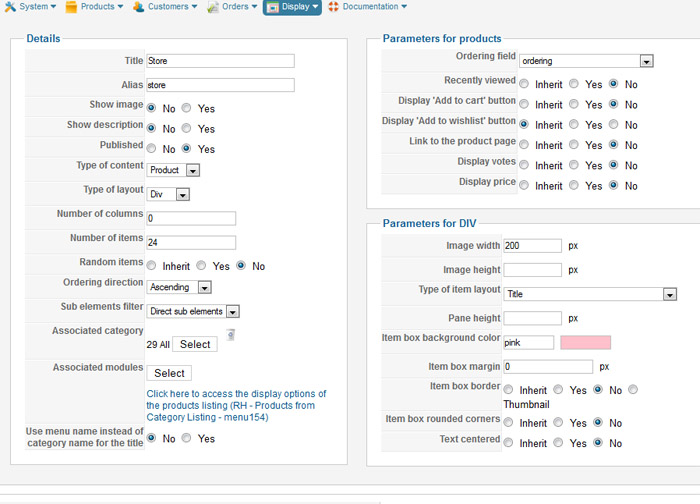
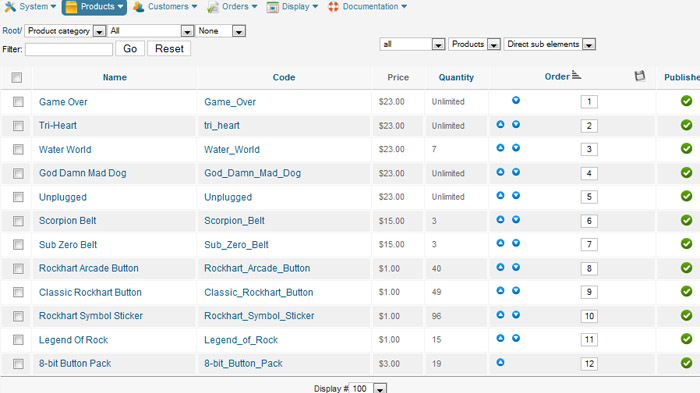
Please go in the menu Display->Content menus and edit the menu with the id 154. There, check that the ordering is correct and if that's the case, please give a screenshot of the options and a screenshot of the products listing of one of your categories on the backend.
Please Log in or Create an account to join the conversation.
13 years 11 months ago #77635
by austio
Replied by austio on topic Problem getting ordering and categories to work
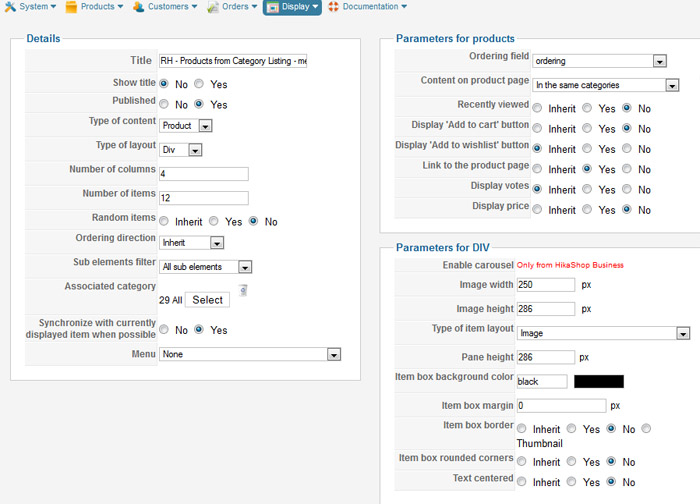
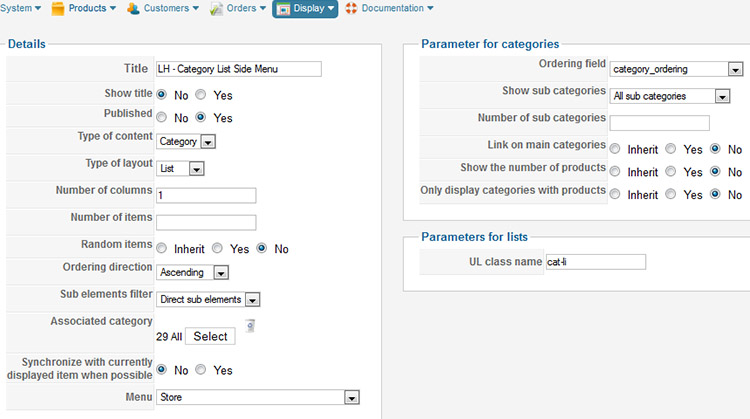
The ordering options are as you say. Here are the screenshots. I also attached the right side product module and the left side category list module (even though the category menu seems to work correctly, just not with the correct product ordering).
Please Log in or Create an account to join the conversation.

13 years 11 months ago #77705
by Jerome
Jerome - Obsidev.com
HikaMarket & HikaSerial developer / HikaShop core dev team.
Replied by Jerome on topic Problem getting ordering and categories to work
Hi,
Is there the configuration of your module 111 in your screenshots ?
Regards,
Is there the configuration of your module 111 in your screenshots ?
Regards,
Jerome - Obsidev.com
HikaMarket & HikaSerial developer / HikaShop core dev team.
Please Log in or Create an account to join the conversation.
13 years 11 months ago #77763
by austio
Replied by austio on topic Problem getting ordering and categories to work
Yes. It is the "RH Products from Category Listing", second one down. Sorry, I renamed them in an effort to help me keep track of all the features I am trying to learn.
"LH - Category List Side Menu" is 112.
"LH - Category List Side Menu" is 112.
Please Log in or Create an account to join the conversation.
13 years 11 months ago #77822
by Jerome
Jerome - Obsidev.com
HikaMarket & HikaSerial developer / HikaShop core dev team.
Replied by Jerome on topic Problem getting ordering and categories to work
Hi,
Regarding the source code of your page, the module 111 is used.
You can find a div which have the id "hikashop_category_information_module_111". It means that you have a "category" module with the id 111, and this module is used by the page for displaying the product and this module contains the listing options.
Regards,
Regarding the source code of your page, the module 111 is used.
You can find a div which have the id "hikashop_category_information_module_111". It means that you have a "category" module with the id 111, and this module is used by the page for displaying the product and this module contains the listing options.
Regards,
Jerome - Obsidev.com
HikaMarket & HikaSerial developer / HikaShop core dev team.
Please Log in or Create an account to join the conversation.
13 years 11 months ago #77832
by austio
Replied by austio on topic Problem getting ordering and categories to work
Thank you, yes, I know this. That is what the screenshots show. However, even with the correct settings for this module, the items do not show in the order set (shown in the third screenshot). Obviously I am missing something, but cannot figure it out no matter what I change.
Please Log in or Create an account to join the conversation.
13 years 11 months ago #77838
by austio
Replied by austio on topic Problem getting ordering and categories to work
I figured it out! I had the Product listing associated with my main menu item, and I need the category listing. Then it all worked.
However, I have noticed that the "active/current" css selector is not begin applied correctly to my category links, it is always stays on the wrong one.
However, I have noticed that the "active/current" css selector is not begin applied correctly to my category links, it is always stays on the wrong one.
Please Log in or Create an account to join the conversation.
13 years 11 months ago #77840
by Jerome
Jerome - Obsidev.com
HikaMarket & HikaSerial developer / HikaShop core dev team.
Replied by Jerome on topic Problem getting ordering and categories to work
Hi,
Good news !
Your "active/current" css selector ?
Regards,
Good news !
Your "active/current" css selector ?
Regards,
Jerome - Obsidev.com
HikaMarket & HikaSerial developer / HikaShop core dev team.
Please Log in or Create an account to join the conversation.
13 years 11 months ago #77841
by austio
Replied by austio on topic Problem getting ordering and categories to work
I'll explain better. On the category listing module, the li for "Mens" category has the classes "hikashop_category_list_item.current.active", but it stays there no matter what category I click on; shouldn't be applied to whichever category is currently displayed? Otherwise I am not sure how to style the current active link.
Please Log in or Create an account to join the conversation.

13 years 11 months ago #77892
by Xavier
Replied by Xavier on topic Problem getting ordering and categories to work
Hi,
It seems that you have solved you problem.
It seems that you have solved you problem.
Please Log in or Create an account to join the conversation.
13 years 11 months ago #77947
by austio
Replied by austio on topic [SOLVED]Problem getting ordering and categories...
Well, the original posted problem, yes. But now I see that the "active" class is only being applied to one of the categories, not to any of the others when you visit them. I'll start a new post for it...
Please Log in or Create an account to join the conversation.
Time to create page: 0.144 seconds