
- Posts: 10
- Thank you received: 1
Proceed to checkout doing weird things
- skydivetecumseh
-
 Topic Author
- Offline
Less
More
13 years 11 months ago #78046
by skydivetecumseh
Proceed to checkout doing weird things was created by skydivetecumseh
Sequence of events:
Go to my store: www.skydivetecumseh.com/gift-cards
Add an item to shopping cart.
Click "Proceed to checkout"
On a mac on latest version of Chrome: Checkout displayed normally.
On a PC on latest version of Chrome: Error message saying limit reached. Click proceed to checkout again on sidebar and it goes through to registration.
On mac running latest version of Safari: Cart gets emptied.
On PC running Explorer 8 : Cart gets emptied.
On iphone running dolphin: Checkout displayed normally.
Help please!!!
Go to my store: www.skydivetecumseh.com/gift-cards
Add an item to shopping cart.
Click "Proceed to checkout"
On a mac on latest version of Chrome: Checkout displayed normally.
On a PC on latest version of Chrome: Error message saying limit reached. Click proceed to checkout again on sidebar and it goes through to registration.
On mac running latest version of Safari: Cart gets emptied.
On PC running Explorer 8 : Cart gets emptied.
On iphone running dolphin: Checkout displayed normally.
Help please!!!
Please Log in or Create an account to join the conversation.
- skydivetecumseh
-
Topic Author
- Offline
Less
More
- Posts: 10
- Thank you received: 1
13 years 11 months ago #78048
by skydivetecumseh
Replied by skydivetecumseh on topic Proceed to checkout doing weird things
I just seemed to fix it by changing "After a product is added to the cart" to <Always stay on same page> from <Stay and display a popup notice> not exactly how I want it to behave but at least it works this way. Is there something configured incorrectly somewhere that caused this?
Please Log in or Create an account to join the conversation.

13 years 11 months ago #78066
by Jerome
Jerome - Obsidev.com
HikaMarket & HikaSerial developer / HikaShop core dev team.
Replied by Jerome on topic Proceed to checkout doing weird things
Hi,
I think you have some Cache activated.
Please disable the Joomla cache and any other cache extension.
Regards,
I think you have some Cache activated.
Please disable the Joomla cache and any other cache extension.
Regards,
Jerome - Obsidev.com
HikaMarket & HikaSerial developer / HikaShop core dev team.
Please Log in or Create an account to join the conversation.
- skydivetecumseh
-
Topic Author
- Offline
Less
More
- Posts: 10
- Thank you received: 1
13 years 11 months ago #78068
by skydivetecumseh
Replied by skydivetecumseh on topic Proceed to checkout doing weird things
Hi,
I have joomla Cache disabled.
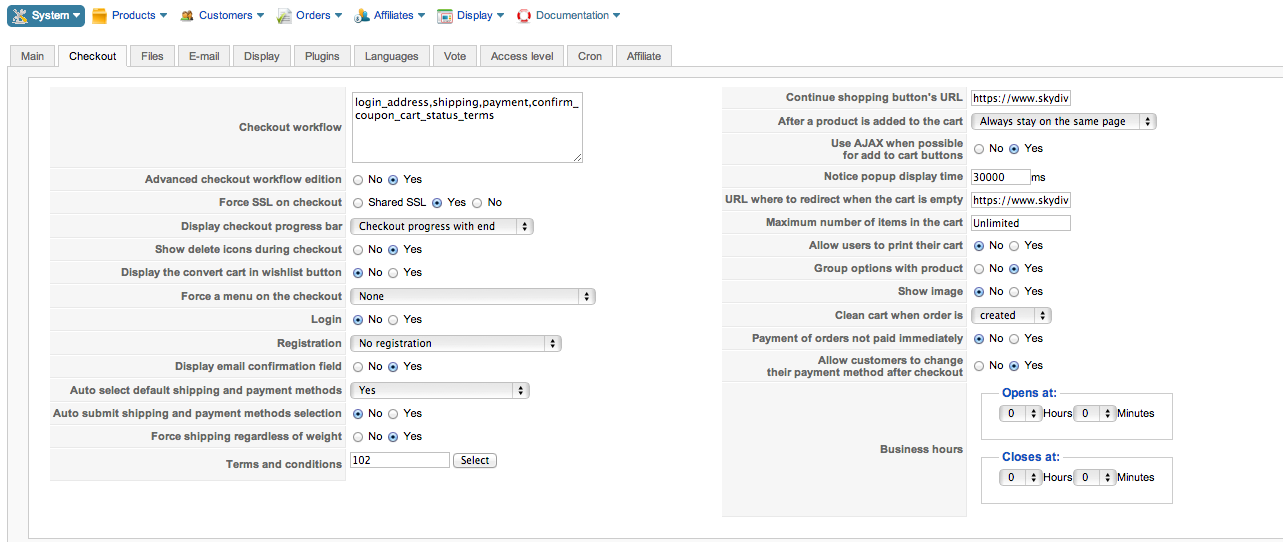
Another strange quirk is I have Registration set to no, but still get registration screen displayed on checkout.
I have joomla Cache disabled.
Another strange quirk is I have Registration set to no, but still get registration screen displayed on checkout.
Please Log in or Create an account to join the conversation.
13 years 11 months ago #78072
by Jerome
Jerome - Obsidev.com
HikaMarket & HikaSerial developer / HikaShop core dev team.
Replied by Jerome on topic Proceed to checkout doing weird things
Hi,
I have no such problem of "Error message saying limit reached" with PC and latest version of Chrome.
The cart is fine. Same thing with Firefox and Opera.
But, the "no registration" is a little bit weird.
Can you make a screenshot of your configuration ?
Regards,
I have no such problem of "Error message saying limit reached" with PC and latest version of Chrome.
The cart is fine. Same thing with Firefox and Opera.
But, the "no registration" is a little bit weird.
Can you make a screenshot of your configuration ?
Regards,
Jerome - Obsidev.com
HikaMarket & HikaSerial developer / HikaShop core dev team.
Please Log in or Create an account to join the conversation.
- skydivetecumseh
-
Topic Author
- Offline
Less
More
- Posts: 10
- Thank you received: 1
13 years 11 months ago #78073
by skydivetecumseh
Replied by skydivetecumseh on topic Proceed to checkout doing weird things
Please Log in or Create an account to join the conversation.
- skydivetecumseh
-
Topic Author
- Offline
Less
More
- Posts: 10
- Thank you received: 1
13 years 11 months ago #78076
by skydivetecumseh
Replied by skydivetecumseh on topic Proceed to checkout doing weird things
I am realizing now that in the workflow there is login,address which is creating this registration page.
I guess what I need is just the address but when I try to remove login it complains that address is not valid in the workflow on it's own!
I guess what I need is just the address but when I try to remove login it complains that address is not valid in the workflow on it's own!
Please Log in or Create an account to join the conversation.

13 years 11 months ago - 13 years 11 months ago #78097
by Xavier
Replied by Xavier on topic Proceed to checkout doing weird things
Hi,
To remove the login, you have to let it in the checkout workflow, but for the option "login" you can check "no".
Actually, there is no registration the customer just have to enter his address. You can change the translations to replace/remove the registration texts.
To do that go in HikaShop > Configuration > Language.
To remove the login, you have to let it in the checkout workflow, but for the option "login" you can check "no".
Actually, there is no registration the customer just have to enter his address. You can change the translations to replace/remove the registration texts.
To do that go in HikaShop > Configuration > Language.
Last edit: 13 years 11 months ago by Xavier.
The following user(s) said Thank You: skydivetecumseh
Please Log in or Create an account to join the conversation.
- skydivetecumseh
-
Topic Author
- Offline
Less
More
- Posts: 10
- Thank you received: 1
13 years 11 months ago #78101
by skydivetecumseh
Replied by skydivetecumseh on topic Proceed to checkout doing weird things
Perfect. Thanks a lot.
Please Log in or Create an account to join the conversation.
Time to create page: 0.120 seconds