
Product options as dropdown list
- cristianciocoi
-
 Topic Author
- Offline
Less
More
13 years 11 months ago #78297
by cristianciocoi
Product options as dropdown list was created by cristianciocoi
Hi, I would like to display my product options as a droptdown list (user must select one (only one) option for the product instead of having the entire options list on the product page and in the dropdownn the yes/no selection. Thanks
Please Log in or Create an account to join the conversation.

13 years 11 months ago #78312
by Xavier
Replied by Xavier on topic Product options as dropdown list
Hi,
By default in HikaShop, when you add an option to a product, then in the frontend a "Yes / No" dropdown is displayed.
You have maybe more values, because the product added as an option has variants.
By default in HikaShop, when you add an option to a product, then in the frontend a "Yes / No" dropdown is displayed.
You have maybe more values, because the product added as an option has variants.
Please Log in or Create an account to join the conversation.
- cristianciocoi
-
Topic Author
- Offline
13 years 11 months ago - 13 years 11 months ago #78384
by cristianciocoi
Replied by cristianciocoi on topic Product options as dropdown list
1. Hi, yes but that is not what i want, if my product has 4 options instead of displayng them like a list and next to each option the dropdown box whith the yes/no, i want the options themselves to be in a dropdown box, i will attach a picture and try to show you that way.
2. I want to buy HikaShop Business, but I need to solve 2 problems, the one above and create a payment plugin for MobilPay.
Thank you
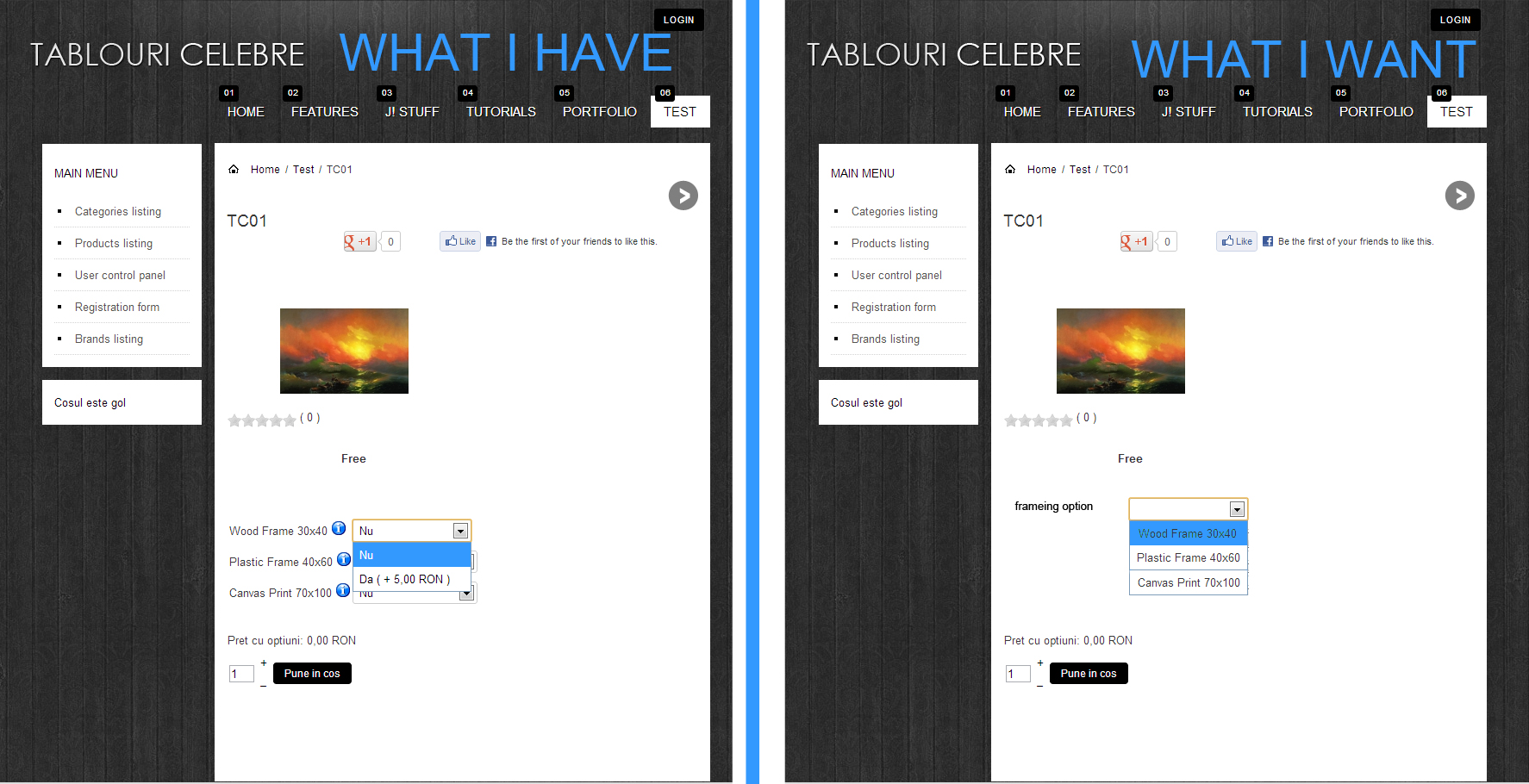
2. I want to buy HikaShop Business, but I need to solve 2 problems, the one above and create a payment plugin for MobilPay.
Thank you
Last edit: 13 years 11 months ago by cristianciocoi. Reason: Adding photo
Please Log in or Create an account to join the conversation.
13 years 11 months ago #78404
by Xavier
Replied by Xavier on topic Product options as dropdown list
Hi,
You shouldn't use the options, but the variants.
Create characteristics and then in your product edition page add these characteristic to have product variants.
For the MobilPay plugin, we actually have a lot of plugins or functionalities to develop, so we will not be able to develop it shortly.
I suggest you to ask to a third developer for that or post a request on the commercial jobs section of this forum, you can find some documentation here:
www.hikashop.com/en/support/documentatio...r-documentation.html
You shouldn't use the options, but the variants.
Create characteristics and then in your product edition page add these characteristic to have product variants.
For the MobilPay plugin, we actually have a lot of plugins or functionalities to develop, so we will not be able to develop it shortly.
I suggest you to ask to a third developer for that or post a request on the commercial jobs section of this forum, you can find some documentation here:
www.hikashop.com/en/support/documentatio...r-documentation.html
Please Log in or Create an account to join the conversation.
- cristianciocoi
-
Topic Author
- Offline
13 years 11 months ago #78428
by cristianciocoi
Replied by cristianciocoi on topic Product options as dropdown list
That is not viable, let me explain: My shop will sell paintings so I'll have 600 pictures as products with no price, and 25 frameing options with prices.
-> if I use product options I can create 25 products with prices and add them as options to the 600 pictures if I have a price change I'll change 25 prices.
-> if I use product characteristics I have to create 25 variants for each of the 600 pictures so if I have a price change I have to change 25x600=15000 prices so you can see how that could be a problem.
For the plugin I already posted in the commercial section.
Please advise...
Thank you.
-> if I use product options I can create 25 products with prices and add them as options to the 600 pictures if I have a price change I'll change 25 prices.
-> if I use product characteristics I have to create 25 variants for each of the 600 pictures so if I have a price change I have to change 25x600=15000 prices so you can see how that could be a problem.
For the plugin I already posted in the commercial section.
Please advise...
Thank you.
Please Log in or Create an account to join the conversation.
13 years 11 months ago #78442
by Xavier
Replied by Xavier on topic Product options as dropdown list
You can use the system option + variant.
Create an option product with variants, and add this option to your product.
By this way you will see all the options in the dropdown and have to change the price only one time.
It's possible to remove the "no" option in the dropdown, here is an example on our demo website:
demo.hikashop.com/index.php?option=com_h...ow&Itemid=91&lang=en
I suggest to see how it's configured in the backend.
Create an option product with variants, and add this option to your product.
By this way you will see all the options in the dropdown and have to change the price only one time.
It's possible to remove the "no" option in the dropdown, here is an example on our demo website:
demo.hikashop.com/index.php?option=com_h...ow&Itemid=91&lang=en
I suggest to see how it's configured in the backend.
Please Log in or Create an account to join the conversation.
- cristianciocoi
-
Topic Author
- Offline
13 years 11 months ago #78446
by cristianciocoi
Replied by cristianciocoi on topic Product options as dropdown list
That works, thank you for you help!
Please Log in or Create an account to join the conversation.
Time to create page: 0.063 seconds