
Order confirmation page
- mattdimmock@hotmail.com
-
 Topic Author
- Offline
Less
More
13 years 11 months ago #78520
by mattdimmock@hotmail.com
Order confirmation page was created by mattdimmock@hotmail.com
Hi,
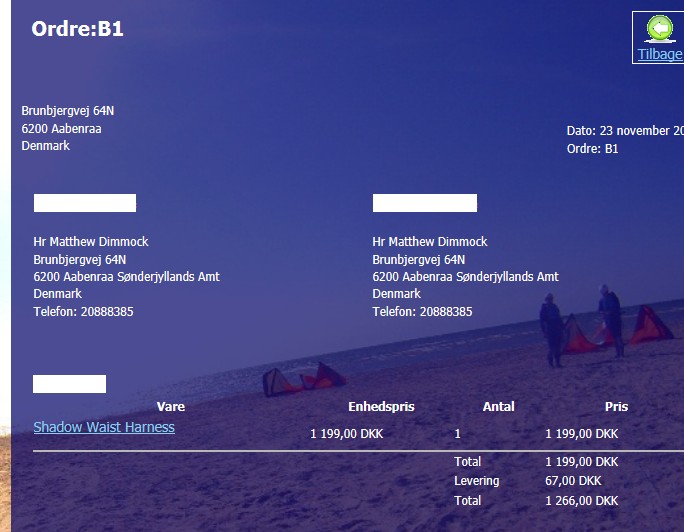
I have just created my first order and on the order confirmation page there are three white blocks, which I can only assume should be headings,
can you help me either remove them or identify to me what elemnts I should changed in the CSS fie?
regards,
Matt
I have just created my first order and on the order confirmation page there are three white blocks, which I can only assume should be headings,
can you help me either remove them or identify to me what elemnts I should changed in the CSS fie?
regards,
Matt
Please Log in or Create an account to join the conversation.

13 years 11 months ago #78545
by Jerome
Jerome - Obsidev.com
HikaMarket & HikaSerial developer / HikaShop core dev team.
Replied by Jerome on topic Order confirmation page
Hi,
Without a link, a screenshot, a test account in your shop with an order, we can't help you.
But our FAQ could give you some help about CSS and how found "class" and "id" of HTML elements.
Regards,
Without a link, a screenshot, a test account in your shop with an order, we can't help you.
But our FAQ could give you some help about CSS and how found "class" and "id" of HTML elements.
Regards,
Jerome - Obsidev.com
HikaMarket & HikaSerial developer / HikaShop core dev team.
Please Log in or Create an account to join the conversation.
- mattdimmock@hotmail.com
-
Topic Author
- Offline
13 years 11 months ago #78570
by mattdimmock@hotmail.com
Replied by mattdimmock@hotmail.com on topic Order confirmation page
Sorry about that I thought I had attached it, here is the screen shot
Please Log in or Create an account to join the conversation.
13 years 11 months ago #78582
by Jerome
Jerome - Obsidev.com
HikaMarket & HikaSerial developer / HikaShop core dev team.
Replied by Jerome on topic Order confirmation page
Hi,
Please read the CSS F.A.Q.
www.hikashop.com/en/support/documentation/faq.html#css
How can I change the Styling with CSS ?
On Firefox, you can use the Addon "Firebug", it allows you to see the CSS properties of the overred element.
You can find a tutorial here: www.tutorial9.net/tutorials/web-tutorial...opment-with-firebug/
You can do it with Google Chrome too
webdesign.tutsplus.com/tutorials/workflo...ome-developer-tools/
Or with Internet Explorer
msdn.microsoft.com/en-us/library/dd565627(v=vs.85).aspx
Or with Opera
www.opera.com/dragonfly/documentation/
You would see that, you have some white text with a white background.
Regards,
Please read the CSS F.A.Q.
www.hikashop.com/en/support/documentation/faq.html#css
How can I change the Styling with CSS ?
On Firefox, you can use the Addon "Firebug", it allows you to see the CSS properties of the overred element.
You can find a tutorial here: www.tutorial9.net/tutorials/web-tutorial...opment-with-firebug/
You can do it with Google Chrome too
webdesign.tutsplus.com/tutorials/workflo...ome-developer-tools/
Or with Internet Explorer
msdn.microsoft.com/en-us/library/dd565627(v=vs.85).aspx
Or with Opera
www.opera.com/dragonfly/documentation/
You would see that, you have some white text with a white background.
Regards,
Jerome - Obsidev.com
HikaMarket & HikaSerial developer / HikaShop core dev team.
Please Log in or Create an account to join the conversation.
Time to create page: 0.059 seconds