

- Posts: 79
- Thank you received: 1
change position of add to cart button
13 years 10 months ago #79257
by Georg
change position of add to cart button was created by Georg
Hi,
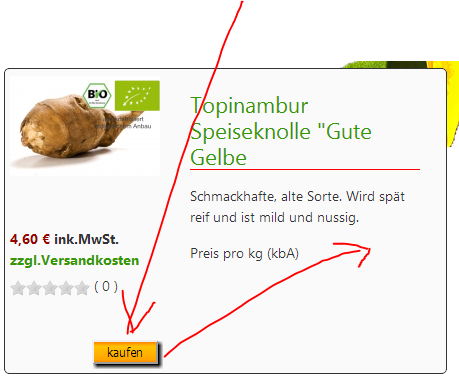
I would like to change the position of my add to cart button.
But whre do I do that. Is it just css or have I do it in php view.
If it is a php issue it would be nice to have a little hint for help
Happy to get help
greetings georg
I would like to change the position of my add to cart button.
But whre do I do that. Is it just css or have I do it in php view.
If it is a php issue it would be nice to have a little hint for help
Happy to get help
greetings georg
Please Log in or Create an account to join the conversation.

13 years 10 months ago #79268
by Xavier
Replied by Xavier on topic change position of add to cart button
Hi,
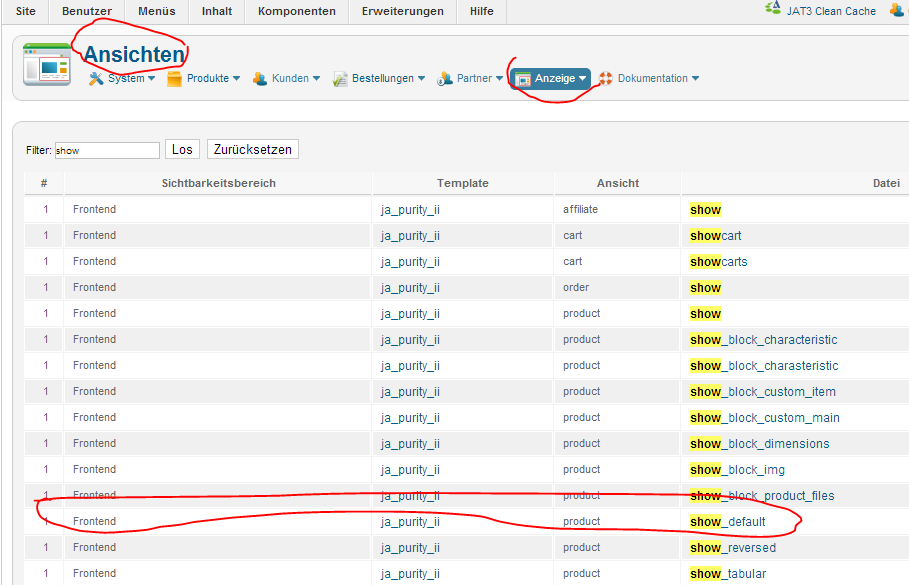
You will have to edit the view "product / show_default" to move the button part in the right part.
Else I think that it can be done too in CSS, you can find some documentation here:
www.hikashop.com/en/support/documentation/faq.html#css
You will have to edit the view "product / show_default" to move the button part in the right part.
Else I think that it can be done too in CSS, you can find some documentation here:
www.hikashop.com/en/support/documentation/faq.html#css
Please Log in or Create an account to join the conversation.

13 years 10 months ago - 13 years 10 months ago #79657
by djundi

Hi Xavier, how to i do dis?
Replied by djundi on topic change position of add to cart button
Xavier wrote: Hi,
You will have to edit the view "product / show_default" to move the button part in the right part.
Hi Xavier, how to i do dis?
Last edit: 13 years 10 months ago by Jerome.
Please Log in or Create an account to join the conversation.
13 years 10 months ago #79682
by Georg
Replied by Georg on topic change position of add to cart button
Hi Xavier
thank´s for the hint. I know the view section but I´m not in to php and haven´t realy got an idea what to change, even wher to look after. Is there any kind of documentation that I can understand and learn how to change those things?
thank´s for the hint. I know the view section but I´m not in to php and haven´t realy got an idea what to change, even wher to look after. Is there any kind of documentation that I can understand and learn how to change those things?
Please Log in or Create an account to join the conversation.
13 years 10 months ago #79684
by Georg
Replied by Georg on topic change position of add to cart button
Hi in case if you didn´t find the view. Here a picture from hikashop backend. But I guess you have the same issue than me not to know how to change this file
The following user(s) said Thank You: djundi
Please Log in or Create an account to join the conversation.
13 years 10 months ago #79685
by djundi

Replied by djundi on topic change position of add to cart button
Thanks, but i can't find "button part" in this php scriptGeorg wrote: Hi in case if you didn´t find the view. Here a picture from hikashop backend. But I guess you have the same issue than me not to know how to change this file
Please Log in or Create an account to join the conversation.

13 years 10 months ago #79693
by Jerome
Jerome - Obsidev.com
HikaMarket & HikaSerial developer / HikaShop core dev team.
Replied by Jerome on topic change position of add to cart button
Hi,
With links, we could give you more information.
The add to cart button is not display directly in the "show_default" view, it uses another template named "quantity".
This is this block that you have to move if you want to move the "add to cart" button in the page.
Regards,
With links, we could give you more information.
The add to cart button is not display directly in the "show_default" view, it uses another template named "quantity".
Code:
<div id="hikashop_product_quantity_main" class="hikashop_product_quantity_main">
<?php
$this->row = & $this->element;
$this->ajax = 'if(hikashopCheckChangeForm(\'item\',\'hikashop_product_form\')){ return hikashopModifyQuantity(\'' . $this->row->product_id . '\',field,1' . $form . ',\'cart\'); } else { return false; }';
$this->setLayout('quantity');
echo $this->loadTemplate();
?>
</div>
Regards,
Jerome - Obsidev.com
HikaMarket & HikaSerial developer / HikaShop core dev team.
The following user(s) said Thank You: djundi
Please Log in or Create an account to join the conversation.
13 years 10 months ago #79769
by djundi
Replied by djundi on topic change position of add to cart button
Hi again, Jerome
Thanks for the answer, i have another question, this time i want to move "add to cart" button and quantity filed to the right part but on the product page
Thanks for the answer, i have another question, this time i want to move "add to cart" button and quantity filed to the right part but on the product page
Please Log in or Create an account to join the conversation.

13 years 10 months ago #79831
by nicolas
Replied by nicolas on topic change position of add to cart button
That should already be the case actually. It must be a CSS issue. If you could give a link to that page, we could check your website CSS and tell you more.
The following user(s) said Thank You: djundi
Please Log in or Create an account to join the conversation.
13 years 10 months ago - 13 years 10 months ago #79897
by djundi
Replied by djundi on topic change position of add to cart button
Great thanks for the answer, but i did it on my own
my another question is, how to make border around quantity field and button "add to cart"
Something like this
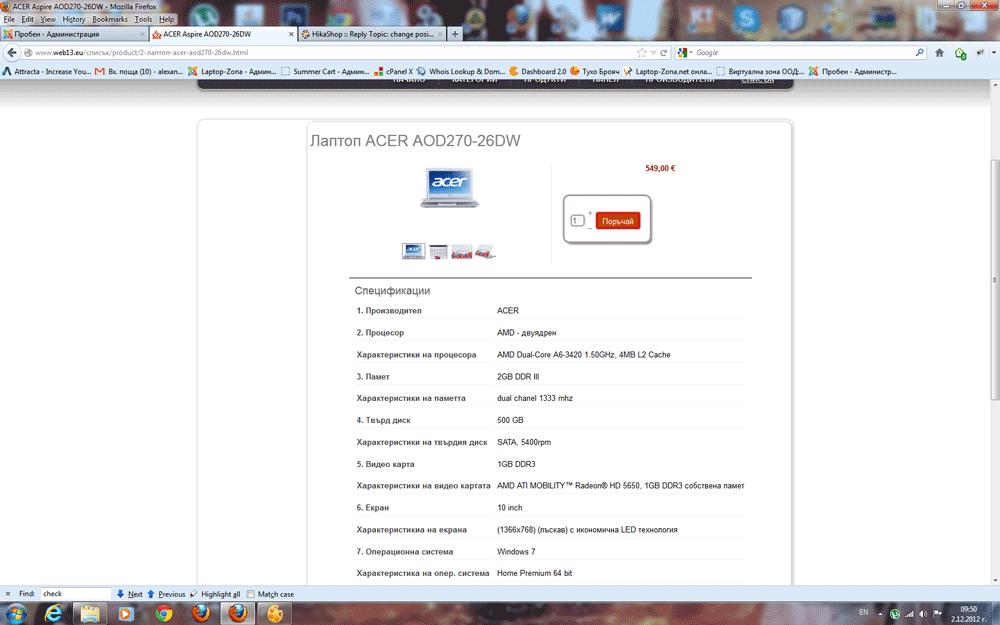
......this is just photo collage, how to make real
my another question is, how to make border around quantity field and button "add to cart"
Something like this
......this is just photo collage, how to make real
Last edit: 13 years 10 months ago by djundi.
Please Log in or Create an account to join the conversation.
13 years 10 months ago #79965
by nicolas
Replied by nicolas on topic change position of add to cart button
You can add for example that CSS on your website:
#hikashop_product_quantity_main
{
border: 1px solid black;
padding: 5px;
border-radius: 15px;
}
#hikashop_product_quantity_main
{
border: 1px solid black;
padding: 5px;
border-radius: 15px;
}
The following user(s) said Thank You: djundi
Please Log in or Create an account to join the conversation.
13 years 10 months ago - 13 years 10 months ago #80025
by djundi
Replied by djundi on topic change position of add to cart button
Thanks Nicolas, work stay perfect !
Last edit: 13 years 10 months ago by djundi. Reason: Aword mistake
Please Log in or Create an account to join the conversation.
13 years 10 months ago #80030
by djundi
Replied by djundi on topic change position of add to cart button
And again me.....
Have way to move products options, for example: " + Win 7", or another
in product characteristic fields ? and consumer make chose in options
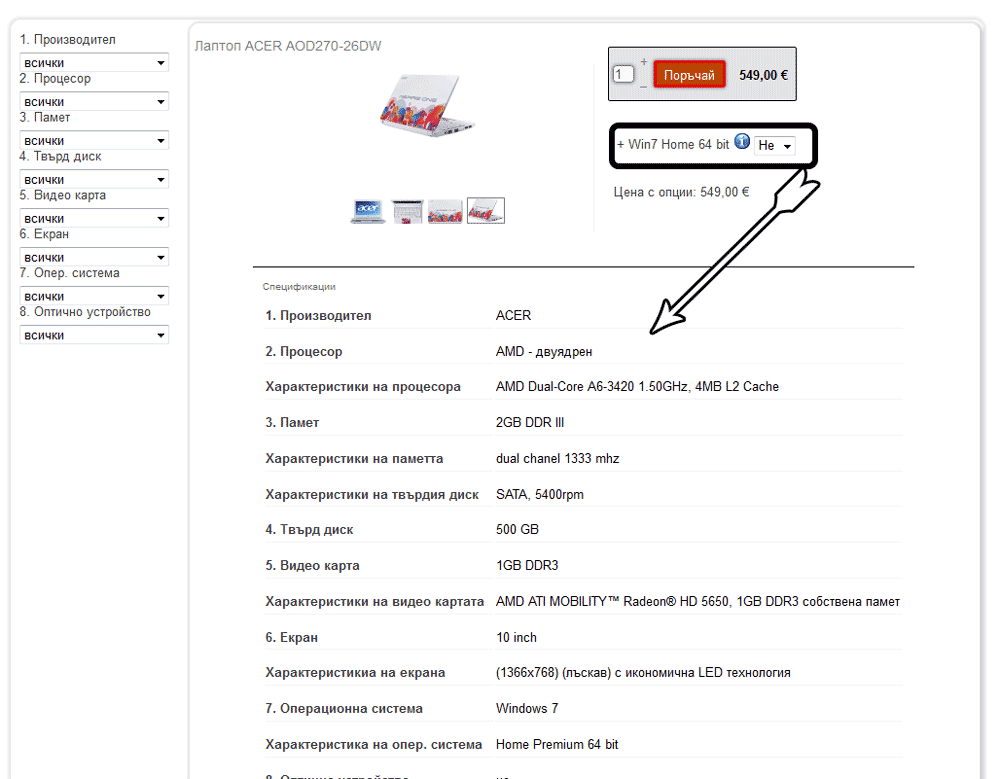
Have way to move products options, for example: " + Win 7", or another
in product characteristic fields ? and consumer make chose in options
Please Log in or Create an account to join the conversation.
13 years 10 months ago #80062
by Xavier
Replied by Xavier on topic change position of add to cart button
Hi,
You have to edit the view "product / show_default" and move the part:
Under the part:
You have to edit the view "product / show_default" and move the part:
Code:
if (hikashop_level(1) && !empty ($this->element->options)) {
?>
<div id="hikashop_product_options" class="hikashop_product_options">
<?php
//LAYOUT option
$this->setLayout('option');
echo $this->loadTemplate();
?>
</div>
<br />
<?php
$form = ',\'hikashop_product_form\'';
if ($this->config->get('redirect_url_after_add_cart', 'stay_if_cart') == 'ask_user') {
?>
<input type="hidden" name="popup" value="1"/>
<?php
}
}
Code:
if(!empty($this->fields)){
//LAYOUT show_block_custom_main
$this->setLayout('show_block_custom_main');
echo $this->loadTemplate();
}
The following user(s) said Thank You: djundi
Please Log in or Create an account to join the conversation.
13 years 10 months ago #80068
by djundi
Replied by djundi on topic change position of add to cart button
Thanks Xavier,
Is done fine
Is done fine
Please Log in or Create an account to join the conversation.
Time to create page: 0.346 seconds