

- Posts: 8
- Thank you received: 0
Placement of Go Back button
13 years 11 months ago #79929
by Flow
Placement of Go Back button was created by Flow
Hi,
To place an 'Go Back' link to easily navigate back to the product listing, I've pasted the code below into 'display ==> view ==> Product / show_default.php'(this is from a older topic).
Now this link is placed under the 'Title', see picture. I would like this link above the 'Title', is this possible?
Thanks in advance for a response.
Regards. Flow
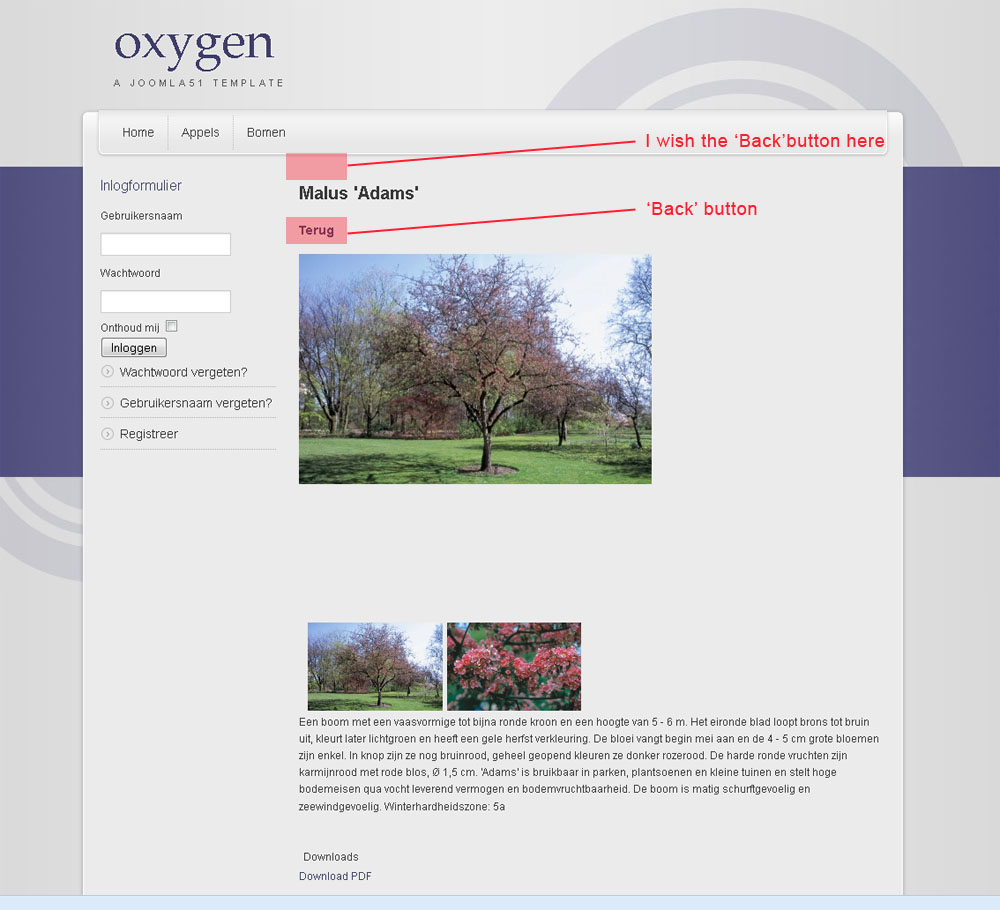
To place an 'Go Back' link to easily navigate back to the product listing, I've pasted the code below into 'display ==> view ==> Product / show_default.php'(this is from a older topic).
Code:
<a onclick="window.history.back(); return false;" href="#" >
<span class="icon-32-back" title="<?php echo JText::_('HIKA_BACK'); ?>">
</span>
<?php echo JText::_('HIKA_BACK'); ?>
</a>
Now this link is placed under the 'Title', see picture. I would like this link above the 'Title', is this possible?
Thanks in advance for a response.
Regards. Flow
Please Log in or Create an account to join the conversation.

Less
More
- Posts: 12953
- Thank you received: 1778
13 years 11 months ago #79938
by Mohamed Thelji
Replied by Mohamed Thelji on topic Placement of Go Back button
Hi,
I think that you should just put the code of your "go back" link in the "hikashop_product_top_part" div, so just after this line for exemple :
Hope this will help you.
I think that you should just put the code of your "go back" link in the "hikashop_product_top_part" div, so just after this line for exemple :
Code:
<div id="hikashop_product_top_part" class="hikashop_product_top_part">
Hope this will help you.
Please Log in or Create an account to join the conversation.
13 years 11 months ago #79943
by Flow
Replied by Flow on topic Placement of Go Back button
Hi Mohamed,
Thanks for your response. Where do I find the "hikashop_product_top_part"?
Regards, Flow
Thanks for your response. Where do I find the "hikashop_product_top_part"?
Regards, Flow
Please Log in or Create an account to join the conversation.
Less
More
- Posts: 12953
- Thank you received: 1778
13 years 11 months ago - 13 years 11 months ago #79944
by Mohamed Thelji
Replied by Mohamed Thelji on topic Placement of Go Back button
You'll find it through the show_default file of the product view of your front-end template.
Then, you should just put the code of your "go back" link after the line :
Then, you should just put the code of your "go back" link after the line :
Code:
<div id="hikashop_product_top_part" class="hikashop_product_top_part">
Last edit: 13 years 11 months ago by Mohamed Thelji.
The following user(s) said Thank You: Flow
Please Log in or Create an account to join the conversation.
Time to create page: 0.099 seconds