
- Posts: 6
- Thank you received: 0
Edit the listing view
- stickleback
-
 Topic Author
- Offline
Less
More
13 years 10 months ago #80504
by stickleback
Edit the listing view was created by stickleback
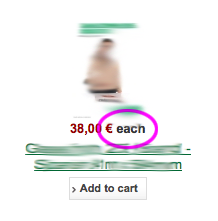
Hi - I want to remove the word "each" on the product listing view - ass it is causing some confusion with some of the products, but I cannot work out where that is coming from...
Can anyone help?
Thanks
Can anyone help?
Thanks
Please Log in or Create an account to join the conversation.
13 years 10 months ago #80507
by thorunn
Replied by thorunn on topic Edit the listing view
Hi
I solved it by creating an override line in the language sector with empty " " instead of "each". Worked for me
I solved it by creating an override line in the language sector with empty " " instead of "each". Worked for me
Please Log in or Create an account to join the conversation.
- stickleback
-
Topic Author
- Offline
Less
More
- Posts: 6
- Thank you received: 0
13 years 10 months ago #80520
by stickleback
Replied by stickleback on topic Edit the listing view
That's a good workaround!
Do you recall where the language file is?
Thanks
Do you recall where the language file is?
Thanks
Please Log in or Create an account to join the conversation.
13 years 10 months ago #80522
by thorunn
Replied by thorunn on topic Edit the listing view
component-hikashop-configuration-languages(tab)
then click to edit language - copy the line you want to override to the lower sectoin, change it and save
then click to edit language - copy the line you want to override to the lower sectoin, change it and save
Please Log in or Create an account to join the conversation.
Time to create page: 0.107 seconds