

- Posts: 131
- Thank you received: 3
How to Disable Recently Viewed Or Change
13 years 11 months ago #80649
by michael
How to Disable Recently Viewed Or Change was created by michael
Hello,
I have activated the recently viewed under bottom of product page, but it was too long on product display, so I have moved it to the right top and using 3rd party module to display. Please see below:
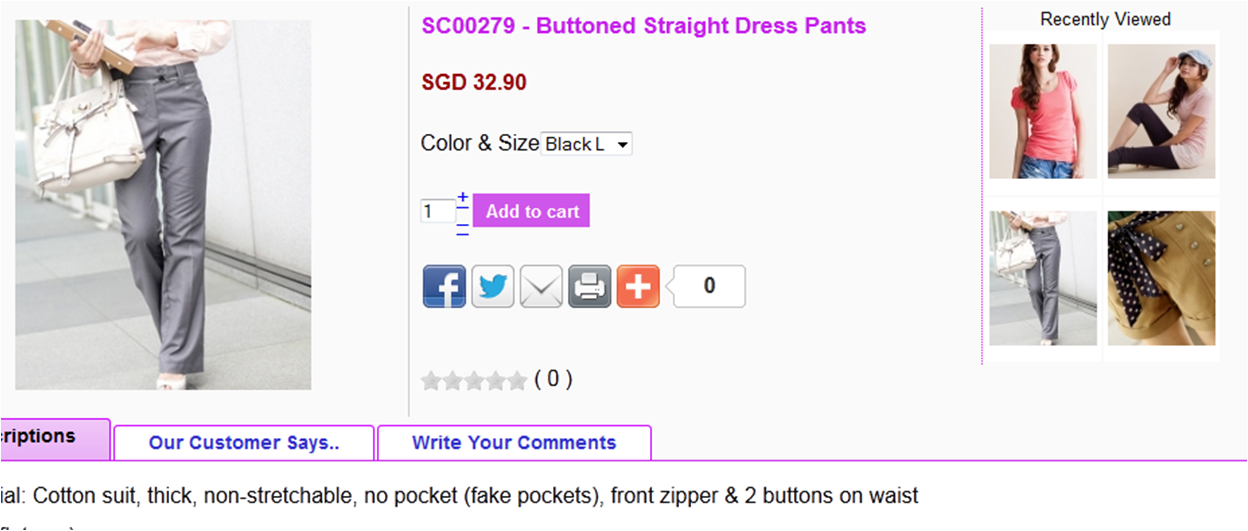
And, now I cannot disable the recently viewed at the bottom?
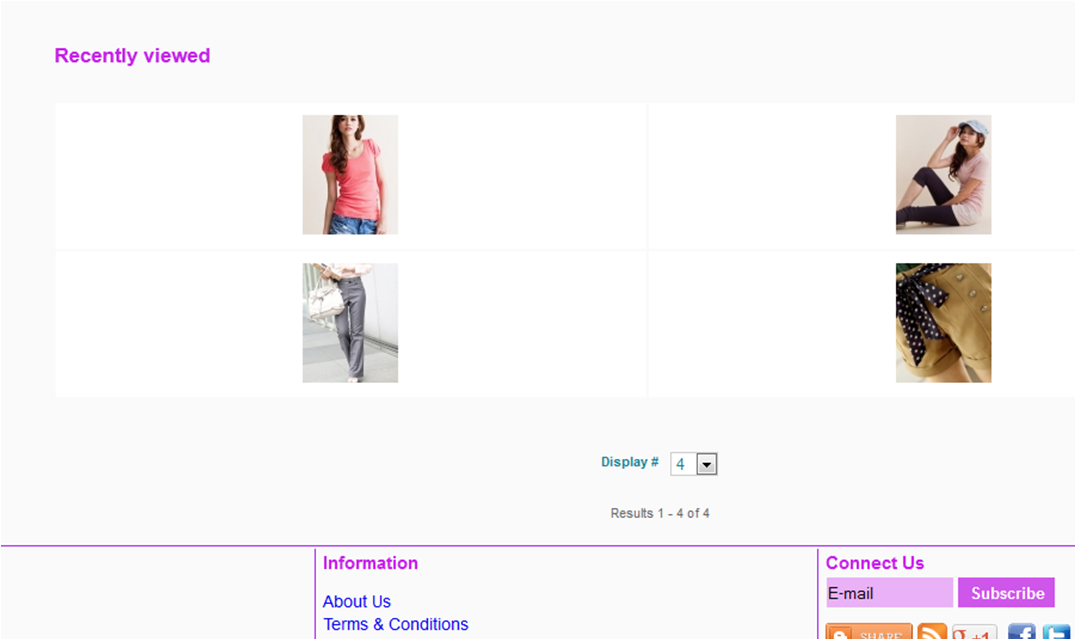
Any idea to disable it, or change to related product?
2) Another issue, is the recently viewed didn't display all items I have viewed. Example, clothing items all ok, but bag or skincare didn't show up when visited ? They are all under "product category".
Thank you very much!
I have activated the recently viewed under bottom of product page, but it was too long on product display, so I have moved it to the right top and using 3rd party module to display. Please see below:
And, now I cannot disable the recently viewed at the bottom?
Any idea to disable it, or change to related product?
2) Another issue, is the recently viewed didn't display all items I have viewed. Example, clothing items all ok, but bag or skincare didn't show up when visited ? They are all under "product category".
Thank you very much!
Please Log in or Create an account to join the conversation.
13 years 11 months ago #80669
by michael
Replied by michael on topic How to Disable Recently Viewed Or Change
Just found in (2), problem actually only occurred when using firefox, in IE or google chrome, no problem. Because I am using firefox all the times 
Thanks!
Thanks!
The following user(s) said Thank You: Xavier
Please Log in or Create an account to join the conversation.
13 years 11 months ago #80675
by michael
Replied by michael on topic How to Disable Recently Viewed Or Change
Ok, now was able to view all items under product category in recently view - in firefox
Thought menu not assigned properly ?
So just how to disable recently viewed on the bottom of product page and adding related product...hmmm... maybe solution will come out soon...but hope can get answer asap
Thanks!
Thought menu not assigned properly ?
So just how to disable recently viewed on the bottom of product page and adding related product...hmmm... maybe solution will come out soon...but hope can get answer asap
Thanks!
Please Log in or Create an account to join the conversation.

13 years 11 months ago #80709
by Xavier
Replied by Xavier on topic How to Disable Recently Viewed Or Change
Hi,
You can change the module displayed under the product page in the option "Modules under the product page" in hikaShop > Configuration > Display
You can change the module displayed under the product page in the option "Modules under the product page" in hikaShop > Configuration > Display
Please Log in or Create an account to join the conversation.
13 years 11 months ago - 13 years 11 months ago #80730
by michael
Replied by michael on topic How to Disable Recently Viewed Or Change
Thank you !
Almost done
But, when I removed item from checkout page, it show a blue bar which not look nice. How can I re-design it let say: "Your cart is empty !" and show a featured product module under it.

Redesign to example below, or you have any good suggestion:
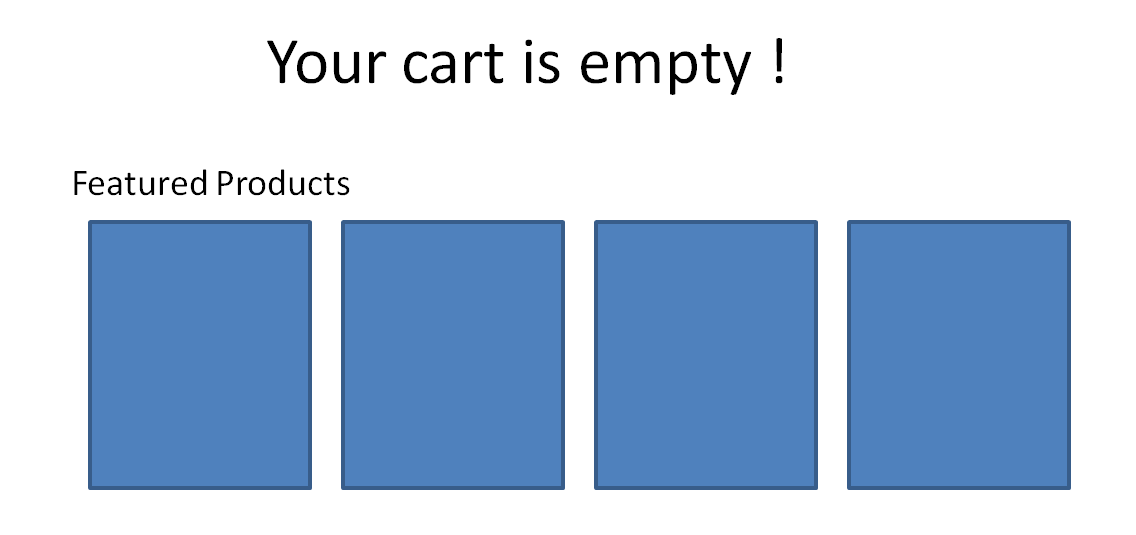
Currently, I direct the empty cart to the featured products page, which still show up the blue bar.
Thank you for your times !
Almost done
But, when I removed item from checkout page, it show a blue bar which not look nice. How can I re-design it let say: "Your cart is empty !" and show a featured product module under it.
Redesign to example below, or you have any good suggestion:
Currently, I direct the empty cart to the featured products page, which still show up the blue bar.
Thank you for your times !
Last edit: 13 years 11 months ago by michael. Reason: cropped the image to avoid see my shop link.
Please Log in or Create an account to join the conversation.
13 years 11 months ago #80782
by michael
Replied by michael on topic How to Disable Recently Viewed Or Change
I think this can change with language override, but how to formatting the blue bar with blue background to other style?
Thought after editing the language override, the texts should show in the bar. But just need to re-design the blue bar to a nicer looks.
Thanks!
Thought after editing the language override, the texts should show in the bar. But just need to re-design the blue bar to a nicer looks.
Thanks!
Please Log in or Create an account to join the conversation.
13 years 11 months ago #80829
by Xavier
Replied by Xavier on topic How to Disable Recently Viewed Or Change
Hi,
This blue bar is the bar used in Joomla (enqueueMessage), you have to change their css properties in your template css file.
You can find some documentation about customizing the css here:
www.hikashop.com/en/support/documentation/faq.html#css
This blue bar is the bar used in Joomla (enqueueMessage), you have to change their css properties in your template css file.
You can find some documentation about customizing the css here:
www.hikashop.com/en/support/documentation/faq.html#css
The following user(s) said Thank You: michael
Please Log in or Create an account to join the conversation.
13 years 11 months ago #80901
by michael
Replied by michael on topic How to Disable Recently Viewed Or Change
Great, I will explore for solution
However, found because I set my alignment to right, causing the blue bar look wired. Now I removed language overrides:

I think the texts show here has a relation to cart module language setting, can they formatted separately? For example,
Cart module : "<cart img> Your Cart (0)"
Cart empty message as in above picture: "Your cart is empty, continue shopping now ..."
Thank you for your time!
However, found because I set my alignment to right, causing the blue bar look wired. Now I removed language overrides:
I think the texts show here has a relation to cart module language setting, can they formatted separately? For example,
Cart module : "<cart img> Your Cart (0)"
Cart empty message as in above picture: "Your cart is empty, continue shopping now ..."
Thank you for your time!
Please Log in or Create an account to join the conversation.

13 years 11 months ago #81055
by nicolas
Replied by nicolas on topic How to Disable Recently Viewed Or Change
In the hikashop options of the cart module, you can change the empty cart message only for the cart module itself.
The following user(s) said Thank You: michael
Please Log in or Create an account to join the conversation.
13 years 11 months ago #81068
by michael
Replied by michael on topic How to Disable Recently Viewed Or Change
A bit disappointed, hope future version can see some improvement, allow put in something, so that customer will change their mind to continue shopping
Or this allow in business version?
Thank you for your time!
Or this allow in business version?
Thank you for your time!
Please Log in or Create an account to join the conversation.
13 years 11 months ago #81362
by nicolas
Replied by nicolas on topic How to Disable Recently Viewed Or Change
I don't understand why you're disappointed ?
We told you how to modify it, so of course it is allowed to change it, in the current version, and even in the Starter edition.
Maybe you didn't understand what we said ? Or maybe we didn't understand what you wanted ?
We told you how to modify it, so of course it is allowed to change it, in the current version, and even in the Starter edition.
Maybe you didn't understand what we said ? Or maybe we didn't understand what you wanted ?
Please Log in or Create an account to join the conversation.
13 years 11 months ago #81407
by michael
Replied by michael on topic How to Disable Recently Viewed Or Change
Oops! if it can be changed, surely very happy :woohoo:
But, What Xavier pointed about "enqueueMessage", I can't find in my template css file, mine is a [ck template creator], not a default jl template.
and, sorry! the link he given - www.hikashop.com/en/support/documentation/faq.html#css , I don't see any solution, or I have missed out?
Thanks, thanks, thanks !!
But, What Xavier pointed about "enqueueMessage", I can't find in my template css file, mine is a [ck template creator], not a default jl template.
and, sorry! the link he given - www.hikashop.com/en/support/documentation/faq.html#css , I don't see any solution, or I have missed out?
Thanks, thanks, thanks !!
Please Log in or Create an account to join the conversation.

13 years 11 months ago #81411
by Jerome
Jerome - Obsidev.com
HikaMarket & HikaSerial developer / HikaShop core dev team.
Replied by Jerome on topic How to Disable Recently Viewed Or Change
Hi,
Xavier said that the "blue bar" is not HikaShop, it's joomla.
But he said that you can override the design thanks to CSS too (that's the reason of the documentation about the CSS).
There is not generic/unique/miracle solution, you have to change the CSS rules for your specific design (and again, that's not HikaShop, it's joomla).
Regards,
Xavier said that the "blue bar" is not HikaShop, it's joomla.
But he said that you can override the design thanks to CSS too (that's the reason of the documentation about the CSS).
There is not generic/unique/miracle solution, you have to change the CSS rules for your specific design (and again, that's not HikaShop, it's joomla).
Regards,
Jerome - Obsidev.com
HikaMarket & HikaSerial developer / HikaShop core dev team.
Please Log in or Create an account to join the conversation.
13 years 11 months ago #81425
by michael
Replied by michael on topic How to Disable Recently Viewed Or Change
That's dosn't matter, just found a wonderful solution - create a customized article, put in something you needs and re-direct to it when the cart is empty, from the Config - Checkout.
Yesterday just learnt for creating a 404 redirect, similar solution can be done in this way, rather change the core file too much
Cheers!
Yesterday just learnt for creating a 404 redirect, similar solution can be done in this way, rather change the core file too much
Cheers!
Please Log in or Create an account to join the conversation.
13 years 11 months ago #81537
by Jerome
Jerome - Obsidev.com
HikaMarket & HikaSerial developer / HikaShop core dev team.
Replied by Jerome on topic How to Disable Recently Viewed Or Change
Hi,
Good tip/trick !
Regards,
Good tip/trick !
Regards,
Jerome - Obsidev.com
HikaMarket & HikaSerial developer / HikaShop core dev team.
The following user(s) said Thank You: michael
Please Log in or Create an account to join the conversation.
13 years 11 months ago #81620
by michael
Replied by michael on topic How to Disable Recently Viewed Or Change
Thanks Jerome!
In fact, I should apologies for using the word "disappointed" that makes Hikashop team and Nicolas feel stress, but actually I have no other intention - in fact I want to say that Hikashop is the MOST SATISFIED shopping cart I ever used before.
This is my 3rd times building this store (because of upgrading from J1.5 to J2.5), and I see much improvement now that make me really excited. I also learn a lots of knowledge from your team. I think HikaShop is the most "flexible" shopping cart program that's allow me to customized for my use and needs.
Keeps Up HikaShop
ps. I have another issue hope to get Hikashop's reply soon - www.hikashop.com/en/forum/4-how-to/76632...erseas-shipping.html .
Thank you for your time again !
In fact, I should apologies for using the word "disappointed" that makes Hikashop team and Nicolas feel stress, but actually I have no other intention - in fact I want to say that Hikashop is the MOST SATISFIED shopping cart I ever used before.
This is my 3rd times building this store (because of upgrading from J1.5 to J2.5), and I see much improvement now that make me really excited. I also learn a lots of knowledge from your team. I think HikaShop is the most "flexible" shopping cart program that's allow me to customized for my use and needs.
Keeps Up HikaShop
ps. I have another issue hope to get Hikashop's reply soon - www.hikashop.com/en/forum/4-how-to/76632...erseas-shipping.html .
Thank you for your time again !
Please Log in or Create an account to join the conversation.
Time to create page: 0.086 seconds