
- Posts: 19
- Thank you received: 0
File upload for customers
- webandsite
-
 Topic Author
- Offline
Less
More
13 years 10 months ago #81348
by webandsite
File upload for customers was created by webandsite
Hi,
For a shop for my client there's the wish to let his customers upload files (printing of images). I work with the business edition because this has the option. I've added a custom field but I can't seem to find out how to add this option to an article. Please advise.
Thanks,
Dimitri
For a shop for my client there's the wish to let his customers upload files (printing of images). I work with the business edition because this has the option. I've added a custom field but I can't seem to find out how to add this option to an article. Please advise.
Thanks,
Dimitri
Please Log in or Create an account to join the conversation.

13 years 10 months ago #81381
by Jerome
Jerome - Obsidev.com
HikaMarket & HikaSerial developer / HikaShop core dev team.
Replied by Jerome on topic File upload for customers
Hi,
You have to create an "item custom field" with the type "file".
At this moment, in the product page, your clients would be able to upload a file because adding the product to the cart.
Regards,
You have to create an "item custom field" with the type "file".
At this moment, in the product page, your clients would be able to upload a file because adding the product to the cart.
Regards,
Jerome - Obsidev.com
HikaMarket & HikaSerial developer / HikaShop core dev team.
Please Log in or Create an account to join the conversation.
- webandsite
-
Topic Author
- Offline
Less
More
- Posts: 19
- Thank you received: 0
13 years 10 months ago #81384
by webandsite
Replied by webandsite on topic File upload for customers
Hi,
Custom field was already created. Could you send me some screenshots of how its done? Within a product it still isn't possible to upload an image/file.
Where within the product do you activate this option?
Kind regards,
Dimitri
Custom field was already created. Could you send me some screenshots of how its done? Within a product it still isn't possible to upload an image/file.
Where within the product do you activate this option?
Kind regards,
Dimitri
Please Log in or Create an account to join the conversation.
13 years 10 months ago #81413
by Jerome
Jerome - Obsidev.com
HikaMarket & HikaSerial developer / HikaShop core dev team.
Replied by Jerome on topic File upload for customers
Hi,
Did you create an "item custom field" or a "product custom field" ?
Regards,
Did you create an "item custom field" or a "product custom field" ?
Regards,
Jerome - Obsidev.com
HikaMarket & HikaSerial developer / HikaShop core dev team.
Please Log in or Create an account to join the conversation.
- webandsite
-
Topic Author
- Offline
Less
More
- Posts: 19
- Thank you received: 0
13 years 10 months ago #81422
by webandsite
Replied by webandsite on topic File upload for customers
Hi Jerome,
Both, but no result. It shows on the site as a select list but not an upload option. Isn't it an option to write a small manual for this operation with screen shots because more users have this question?
btw good quick service!
Both, but no result. It shows on the site as a select list but not an upload option. Isn't it an option to write a small manual for this operation with screen shots because more users have this question?
btw good quick service!
Please Log in or Create an account to join the conversation.
13 years 10 months ago #81466
by Jerome
Jerome - Obsidev.com
HikaMarket & HikaSerial developer / HikaShop core dev team.
Replied by Jerome on topic File upload for customers
Hi,
The "problem" is that, a "file item custom field" is working. We have several websites which use it every days.
First, create a item custom field, with the type "file", like in this screen shot:
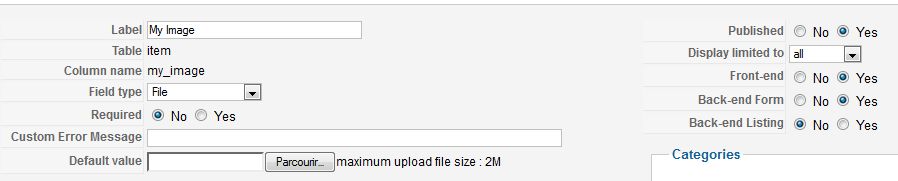
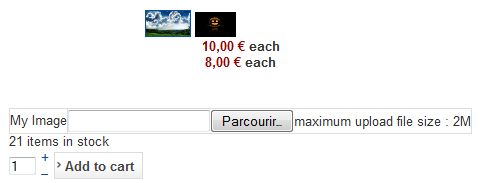
And after that, you would have the upload section in your product page, like in this screen shot:
Regards,
The "problem" is that, a "file item custom field" is working. We have several websites which use it every days.
First, create a item custom field, with the type "file", like in this screen shot:
And after that, you would have the upload section in your product page, like in this screen shot:
Regards,
Jerome - Obsidev.com
HikaMarket & HikaSerial developer / HikaShop core dev team.
The following user(s) said Thank You: webandsite
Please Log in or Create an account to join the conversation.
- webandsite
-
Topic Author
- Offline
Less
More
- Posts: 19
- Thank you received: 0
13 years 10 months ago #81475
by webandsite
Replied by webandsite on topic File upload for customers
Jerome, SUPER!
that works, but needs some customizing...
Problem was the dutch translations. In the dropdown it shows two article fields (?)
can you tell me after the upload how the thumbimage is visible for the customer? It says image in the checkout, but shows nothing...
kind regards,
Dimitri
that works, but needs some customizing...
Problem was the dutch translations. In the dropdown it shows two article fields (?)
can you tell me after the upload how the thumbimage is visible for the customer? It says image in the checkout, but shows nothing...
kind regards,
Dimitri
Please Log in or Create an account to join the conversation.
13 years 10 months ago #81493
by Jerome
Jerome - Obsidev.com
HikaMarket & HikaSerial developer / HikaShop core dev team.
Replied by Jerome on topic File upload for customers
Hi,
The file would be displayed as attachment in the checkout.
HikaShop would not check the attached file format and would not display it. But it is possible, thanks to view modifications to do it.
The default display would print a link which would point to the attached file.
Regards,
The file would be displayed as attachment in the checkout.
HikaShop would not check the attached file format and would not display it. But it is possible, thanks to view modifications to do it.
The default display would print a link which would point to the attached file.
Regards,
Jerome - Obsidev.com
HikaMarket & HikaSerial developer / HikaShop core dev team.
Please Log in or Create an account to join the conversation.
- webandsite
-
Topic Author
- Offline
Less
More
- Posts: 19
- Thank you received: 0
13 years 9 months ago #85024
by webandsite
Replied by webandsite on topic File upload for customers
Hi Jerome, can you tell me which modifications ill have to do so that the image will be shown?
Thanks!
Dimitri
Thanks!
Dimitri
Please Log in or Create an account to join the conversation.
13 years 9 months ago #85125
by Jerome
Jerome - Obsidev.com
HikaMarket & HikaSerial developer / HikaShop core dev team.
Replied by Jerome on topic File upload for customers
Hi,
After a little check, the custom field "image" should be more appropriated
Regards,
After a little check, the custom field "image" should be more appropriated
Regards,
Jerome - Obsidev.com
HikaMarket & HikaSerial developer / HikaShop core dev team.
Please Log in or Create an account to join the conversation.
- webandsite
-
Topic Author
- Offline
Less
More
- Posts: 19
- Thank you received: 0
13 years 9 months ago #85153
by webandsite
Replied by webandsite on topic File upload for customers
Hi Jerome, thats fine, except the image will show now in it´s full size. As my client expects huge files the whole site layout will be broken. Where and how can I change the dimensions of the upload image that is shown in the cart so that i can set it to a default size like 320x240px or even just one dimension like width?
Please reply with view name and the code!
Thanks a lot,
Dimitri
Please reply with view name and the code!
Thanks a lot,
Dimitri
Please Log in or Create an account to join the conversation.
- webandsite
-
Topic Author
- Offline
Less
More
- Posts: 19
- Thank you received: 0
13 years 9 months ago - 13 years 9 months ago #85156
by webandsite
Replied by webandsite on topic File upload for customers
Hi Jerome,
Maybe it's good to show you what I need with an example:
* Customers should be able to upload their own file
* After the upload the file and the options should be added to the cart
* The cart should show like this then (per item)
Attaching an image is not possible. Where can I send it?
kind regards,
Dimitri
Maybe it's good to show you what I need with an example:
* Customers should be able to upload their own file
* After the upload the file and the options should be added to the cart
* The cart should show like this then (per item)
Attaching an image is not possible. Where can I send it?
kind regards,
Dimitri
Last edit: 13 years 9 months ago by webandsite. Reason: attach image
Please Log in or Create an account to join the conversation.

13 years 9 months ago #85259
by nicolas
Replied by nicolas on topic File upload for customers
Hi,
You can simply force the size of the image with CSS on your website:
.hikashop_custom_image_link{ width: 100px !important; }
You can potentially add that CSS in the frontend CSS file of HikaShop via the Display tab of the configuration.
You can simply force the size of the image with CSS on your website:
.hikashop_custom_image_link{ width: 100px !important; }
You can potentially add that CSS in the frontend CSS file of HikaShop via the Display tab of the configuration.
Please Log in or Create an account to join the conversation.
- webandsite
-
Topic Author
- Offline
Less
More
- Posts: 19
- Thank you received: 0
13 years 8 months ago #91756
by webandsite
Replied by webandsite on topic File upload for customers
Hi Jerome,
That doesn't work. Image will be shown in full size instead of just a nice thumbnail.
Any other options?
Kind regards
That doesn't work. Image will be shown in full size instead of just a nice thumbnail.
Any other options?
Kind regards
Please Log in or Create an account to join the conversation.
13 years 8 months ago #92039
by nicolas
Replied by nicolas on topic File upload for customers
I don't see how that's possible with the CSS I gave.
Maybe we're not talking about the same thing ?
You can attach images in the forum. Please make sure that they are either jpg or png.
Please provide a link to the product page so that we can see that.
Maybe we're not talking about the same thing ?
You can attach images in the forum. Please make sure that they are either jpg or png.
Please provide a link to the product page so that we can see that.
Please Log in or Create an account to join the conversation.
- webandsite
-
Topic Author
- Offline
Less
More
- Posts: 19
- Thank you received: 0
13 years 7 months ago #92185
by webandsite
Replied by webandsite on topic File upload for customers
Hi, I want an image upload in the cart in the right dimensions. So the custom field is show not in its full size. see attached image
Where can i edit the dimensions?
Where can i edit the dimensions?
Please Log in or Create an account to join the conversation.
13 years 7 months ago #92407
by nicolas
Replied by nicolas on topic File upload for customers
Hi,
The dimensions can be changed with the CSS I already gave.
Please provide a link to the product page so that we can see that.
The dimensions can be changed with the CSS I already gave.
Please provide a link to the product page so that we can see that.
Please Log in or Create an account to join the conversation.
13 years 7 months ago #92420
by nicolas
Replied by nicolas on topic File upload for customers
Ok, please add the lines:
if(empty($class)){
$class='hikashop_custom_image_link';
}
before the line:
return '<img class="'.$class.'" src="'.hikashop_completeLink('order&task=download&field_table='.$field->field_table.'&field_namekey='.urlencode(base64_encode($field->field_namekey)).'&name='.urlencode(base64_encode($value))).'" alt="'.htmlspecialchars($value, ENT_COMPAT, 'UTF-8').'" />';
in the file administrator/components/com_hikashop/classes/field.php and that should help.
if(empty($class)){
$class='hikashop_custom_image_link';
}
before the line:
return '<img class="'.$class.'" src="'.hikashop_completeLink('order&task=download&field_table='.$field->field_table.'&field_namekey='.urlencode(base64_encode($field->field_namekey)).'&name='.urlencode(base64_encode($value))).'" alt="'.htmlspecialchars($value, ENT_COMPAT, 'UTF-8').'" />';
in the file administrator/components/com_hikashop/classes/field.php and that should help.
The following user(s) said Thank You: webandsite
Please Log in or Create an account to join the conversation.
- webandsite
-
Topic Author
- Offline
Less
More
- Posts: 19
- Thank you received: 0
13 years 7 months ago #92434
by webandsite
Replied by webandsite on topic File upload for customers
Nicola, you're a genius!
Please Log in or Create an account to join the conversation.
- webandsite
-
Topic Author
- Offline
Less
More
- Posts: 19
- Thank you received: 0
13 years 7 months ago #92435
by webandsite
Replied by webandsite on topic File upload for customers
i mean Nicolas ofcourse! 
Please Log in or Create an account to join the conversation.
Time to create page: 0.553 seconds