

- Posts: 13
- Thank you received: 0
Category Layout
13 years 10 months ago #82295
by tgotch
Category Layout was created by tgotch
I am trying to change the number of columns and add description to the categories.
When I go to menu-products-categories, and click the edit option, I add text, but nothing appears.
I also go to menu-display-content modules, and change the columns, but nothing changes.
Any ideas?
When I go to menu-products-categories, and click the edit option, I add text, but nothing appears.
I also go to menu-display-content modules, and change the columns, but nothing changes.
Any ideas?
Please Log in or Create an account to join the conversation.

13 years 10 months ago #82385
by Xavier
Replied by Xavier on topic Category Layout
Are you sure that you are editing the good module ?
In the module options, you can enable the "show description" of the category.
In the module options, you can enable the "show description" of the category.
Please Log in or Create an account to join the conversation.
13 years 10 months ago #82433
by tgotch
Replied by tgotch on topic Category Layout
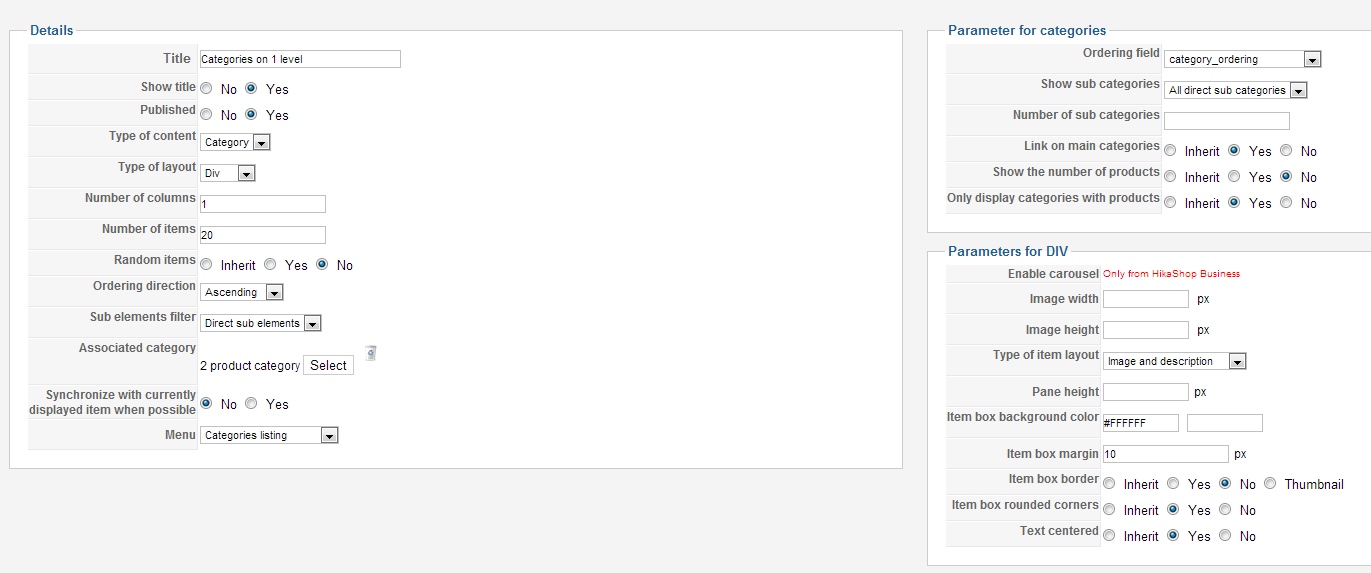
Here is what I have:
Please Log in or Create an account to join the conversation.
13 years 10 months ago - 13 years 10 months ago #82543
by Xavier
Replied by Xavier on topic Category Layout
You have to edit the parameters of the categories listing menu, and the parameters of the associated module of this menu.
Could you give us a link to your website ?
Could you give us a link to your website ?
Last edit: 13 years 10 months ago by Xavier.
Please Log in or Create an account to join the conversation.
13 years 10 months ago #82594
by tgotch
Replied by tgotch on topic Category Layout
Please Log in or Create an account to join the conversation.
13 years 10 months ago #82861
by tgotch
Could you possibly explain this to me a little further? New to Hikashop, and I am not sure what you are telling me to do.
Thanks
Replied by tgotch on topic Category Layout
Xavier wrote: You have to edit the parameters of the categories listing menu, and the parameters of the associated module of this menu.
Could you give us a link to your website ?
Could you possibly explain this to me a little further? New to Hikashop, and I am not sure what you are telling me to do.
Thanks
Please Log in or Create an account to join the conversation.
13 years 10 months ago #82905
by Xavier
Replied by Xavier on topic Category Layout
Hi,
Have you read this tutorial: www.hikashop.com/fr/support/documentatio...splay-front-end.html ?
Try to go in HikaShop > Display > Content menu, edit the menu "Category Listing" then in this page click on the associated module link (left part), then in this module options, change the number of columns.
Have you read this tutorial: www.hikashop.com/fr/support/documentatio...splay-front-end.html ?
Try to go in HikaShop > Display > Content menu, edit the menu "Category Listing" then in this page click on the associated module link (left part), then in this module options, change the number of columns.
Please Log in or Create an account to join the conversation.
13 years 10 months ago - 13 years 10 months ago #82937
by tgotch
This is what I am editing (see my image above), and no changes appear.
Replied by tgotch on topic Category Layout
Xavier wrote: Hi,
Try to go in HikaShop > Display > Content menu, edit the menu "Category Listing" then in this page click on the associated module link (left part), then in this module options, change the number of columns.
This is what I am editing (see my image above), and no changes appear.
Last edit: 13 years 10 months ago by tgotch.
Please Log in or Create an account to join the conversation.

13 years 10 months ago #83017
by nicolas
Replied by nicolas on topic Category Layout
Go in the menu Display->Content menus. Edit the menu with the id 177 and change the number of columns there.
The following user(s) said Thank You: tgotch
Please Log in or Create an account to join the conversation.
13 years 10 months ago #83139
by tgotch
Replied by tgotch on topic Category Layout
ahhh...I was editing the "categories listing - id 163" instead of id 177
Thanks!
Thanks!
Please Log in or Create an account to join the conversation.
Time to create page: 0.096 seconds