

- Posts: 11
- Thank you received: 0
Recently Viewed - Items do not change.
13 years 10 months ago - 13 years 10 months ago #83078
by Piotr
Recently Viewed - Items do not change. was created by Piotr
Hello,
I have a problem with "Recently Viewed" module. This module displays properly, but it shows only the first 3 products displayed in the session. The rest of the "watching" products are not visible. Just after watching the first 3 items, the next are no longer visible. I have chosen in the settings module that is designed to show only 3 products, but for some reason it does not work properly. Please tell me what I'm doing wrong?
These are my settings for the "Recently Viewed" module
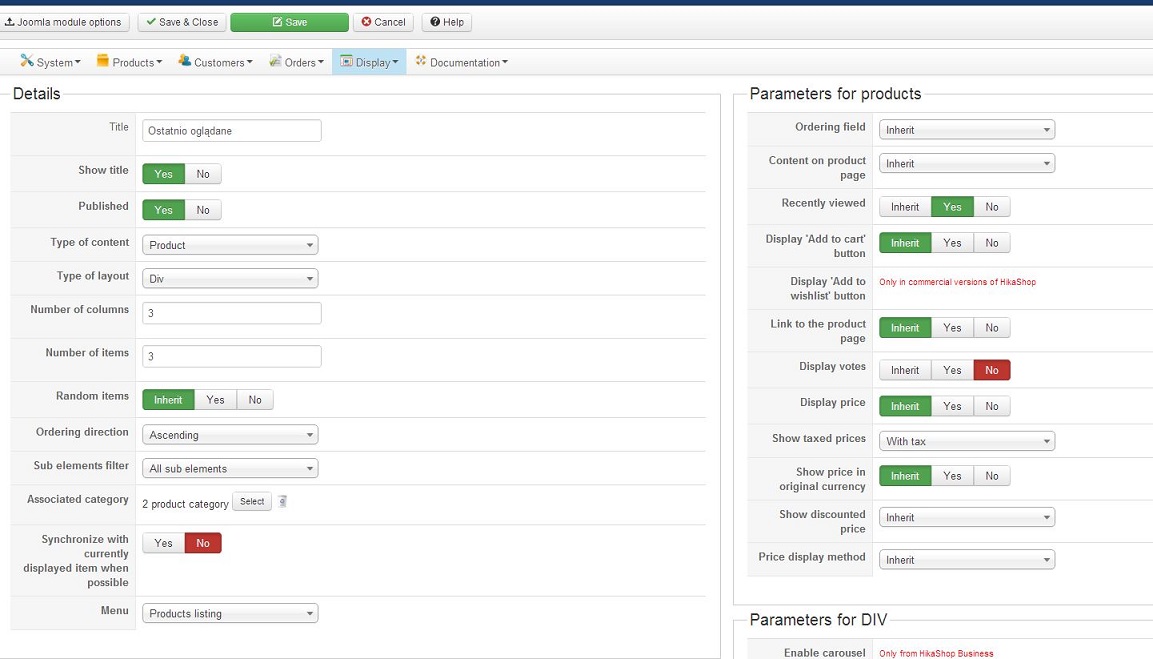
and the address of the page: www.dziuchnogrod.pl
To see recently viewed items, you must select one of the categories (Kategorie) on the left side.
I have a problem with "Recently Viewed" module. This module displays properly, but it shows only the first 3 products displayed in the session. The rest of the "watching" products are not visible. Just after watching the first 3 items, the next are no longer visible. I have chosen in the settings module that is designed to show only 3 products, but for some reason it does not work properly. Please tell me what I'm doing wrong?
These are my settings for the "Recently Viewed" module
and the address of the page: www.dziuchnogrod.pl
To see recently viewed items, you must select one of the categories (Kategorie) on the left side.
Last edit: 13 years 10 months ago by Piotr.
Please Log in or Create an account to join the conversation.

13 years 10 months ago #83108
by Xavier
Replied by Xavier on topic Recently Viewed - Items do not change.
Hi,
To see more than 3 recently viewed products, you can set the number of items to 6 or more, but it will be displayed in two row.
If you wan't to see more than 3 products on one row, you have to enable the carousel. With it you can see as many products as you want, and displayed in 1 row and 3 columns.
It's available in the commercial version of HikaShop.
To see more than 3 recently viewed products, you can set the number of items to 6 or more, but it will be displayed in two row.
If you wan't to see more than 3 products on one row, you have to enable the carousel. With it you can see as many products as you want, and displayed in 1 row and 3 columns.
It's available in the commercial version of HikaShop.
Please Log in or Create an account to join the conversation.
13 years 10 months ago #83117
by Piotr
Replied by Piotr on topic Recently Viewed - Items do not change.
Thank you Xavier for the quick response,
I want to see only 3 recently viewed products in 1 row. Do I well understand that I need to have a commercial version of HikaShop to do that?
I want to see only 3 recently viewed products in 1 row. Do I well understand that I need to have a commercial version of HikaShop to do that?
Please Log in or Create an account to join the conversation.

13 years 10 months ago #83127
by Jerome
Jerome - Obsidev.com
HikaMarket & HikaSerial developer / HikaShop core dev team.
Replied by Jerome on topic Recently Viewed - Items do not change.
Hi,
The caroussel, which would slides your products like explain in our demo website ( demo.hikashop.com/index.php?option=com_c...5&Itemid=103&lang=en ) is only in the Business version of HikaShop.
Your configuration would just display 3 products in 3 columns.
It means that, you would just have one row (because you don't have more than 3 columns with your 3 products).
If you want to display more than 3 products, you can change the limitation on the products (Number of items). But because you have "Number of columns : 3", the next items would be displayed below, in another rows.
Regards,
The caroussel, which would slides your products like explain in our demo website ( demo.hikashop.com/index.php?option=com_c...5&Itemid=103&lang=en ) is only in the Business version of HikaShop.
Your configuration would just display 3 products in 3 columns.
It means that, you would just have one row (because you don't have more than 3 columns with your 3 products).
If you want to display more than 3 products, you can change the limitation on the products (Number of items). But because you have "Number of columns : 3", the next items would be displayed below, in another rows.
Regards,
Jerome - Obsidev.com
HikaMarket & HikaSerial developer / HikaShop core dev team.
Please Log in or Create an account to join the conversation.
13 years 10 months ago #83129
by Piotr
Replied by Piotr on topic Recently Viewed - Items do not change.
Thank You Jerome,
I think we do not understand well. I want to show only 3 last viewed products in 1 row. Configuration which I presented to you is doing exactly what I want. Displays 3 products but they do not change dynamically. Module shows only the first 3 viewed products. When I click on a fourth product, the module does not refresh the view and does not show this new items. Still shows the first 3 viewed products.
Do I need The caroussel to change that??
I think we do not understand well. I want to show only 3 last viewed products in 1 row. Configuration which I presented to you is doing exactly what I want. Displays 3 products but they do not change dynamically. Module shows only the first 3 viewed products. When I click on a fourth product, the module does not refresh the view and does not show this new items. Still shows the first 3 viewed products.
Do I need The caroussel to change that??
Please Log in or Create an account to join the conversation.
13 years 10 months ago #83131
by Jerome
Jerome - Obsidev.com
HikaMarket & HikaSerial developer / HikaShop core dev team.
Replied by Jerome on topic Recently Viewed - Items do not change.
Hi,
So you have to change the "ordering field". Change it from "inherit" to "product_last_seen_date".
Regards,
So you have to change the "ordering field". Change it from "inherit" to "product_last_seen_date".
Regards,
Jerome - Obsidev.com
HikaMarket & HikaSerial developer / HikaShop core dev team.
Please Log in or Create an account to join the conversation.
13 years 10 months ago #83150
by Piotr
Replied by Piotr on topic Recently Viewed - Items do not change.
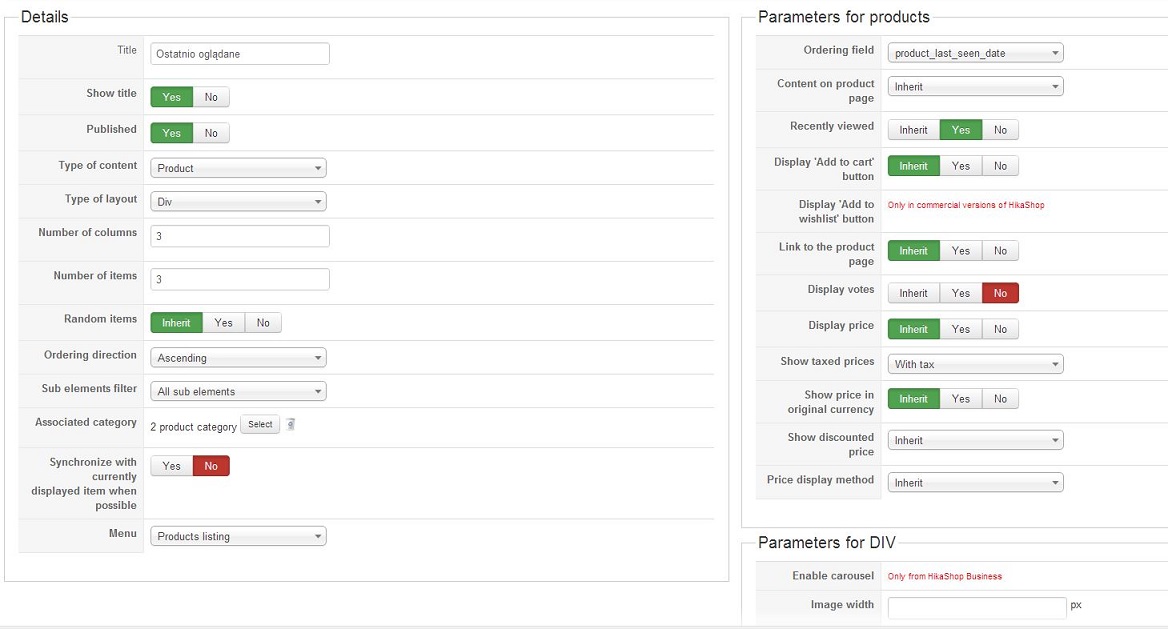
I changed the option "ordering field" to "product_last_seen_date" and of course I save the changes, but it still does not work properly.
My current settings
My current settings
Please Log in or Create an account to join the conversation.

Less
More
- Posts: 12953
- Thank you received: 1778
13 years 10 months ago #83356
by Mohamed Thelji
Replied by Mohamed Thelji on topic Recently Viewed - Items do not change.
Hi Piotr,
Can you give us a temporary access to your back-end, then we will maybe be able to find what the problem really is ?
Thanks.
Can you give us a temporary access to your back-end, then we will maybe be able to find what the problem really is ?
Thanks.
Please Log in or Create an account to join the conversation.
13 years 10 months ago #83521
by Piotr
Replied by Piotr on topic Recently Viewed - Items do not change.
Hello Mohamed,
Yesterday I sent you a private message with the data needed to log on to my back-end. Did you get my message?
Piotr
Yesterday I sent you a private message with the data needed to log on to my back-end. Did you get my message?
Piotr
Please Log in or Create an account to join the conversation.
13 years 9 months ago #83916
by Jerome
Jerome - Obsidev.com
HikaMarket & HikaSerial developer / HikaShop core dev team.
Replied by Jerome on topic Recently Viewed - Items do not change.
Hi,
Sorry for the delay.
We see that the "recently view" works but the products are not displayed or stored in the right order.
It means that the most recent product would be display in the last position and not the first one.
We would see to reproduce the problem in local website and fix it.
Regards,
Sorry for the delay.
We see that the "recently view" works but the products are not displayed or stored in the right order.
It means that the most recent product would be display in the last position and not the first one.
We would see to reproduce the problem in local website and fix it.
Regards,
Jerome - Obsidev.com
HikaMarket & HikaSerial developer / HikaShop core dev team.
Please Log in or Create an account to join the conversation.
13 years 9 months ago #83943
by Piotr
Replied by Piotr on topic Recently Viewed - Items do not change.
Hello,
Thank you very much for the diagnosis. In that case I'm waiting patiently for a fix.
Piotr
Thank you very much for the diagnosis. In that case I'm waiting patiently for a fix.
Piotr
Please Log in or Create an account to join the conversation.

13 years 9 months ago #85184
by nicolas
Replied by nicolas on topic Recently Viewed - Items do not change.
Hi,
I don't think that there is any bug.
You set the ordering field to the "product_last_seen_date" field. But the "ordering direction" is set to "ascending". So it displays first the products with the "smallest" last seen date ie. the first seen products. You should change that ordering direction option to descending in order to see first the last seen products in your module.
I don't think that there is any bug.
You set the ordering field to the "product_last_seen_date" field. But the "ordering direction" is set to "ascending". So it displays first the products with the "smallest" last seen date ie. the first seen products. You should change that ordering direction option to descending in order to see first the last seen products in your module.
Please Log in or Create an account to join the conversation.
13 years 9 months ago #85295
by Piotr
Replied by Piotr on topic Recently Viewed - Items do not change.
I thank you for your response Nicolas,
I checked it, but it still does not work properly.
I attach a screenshot of my current settings.
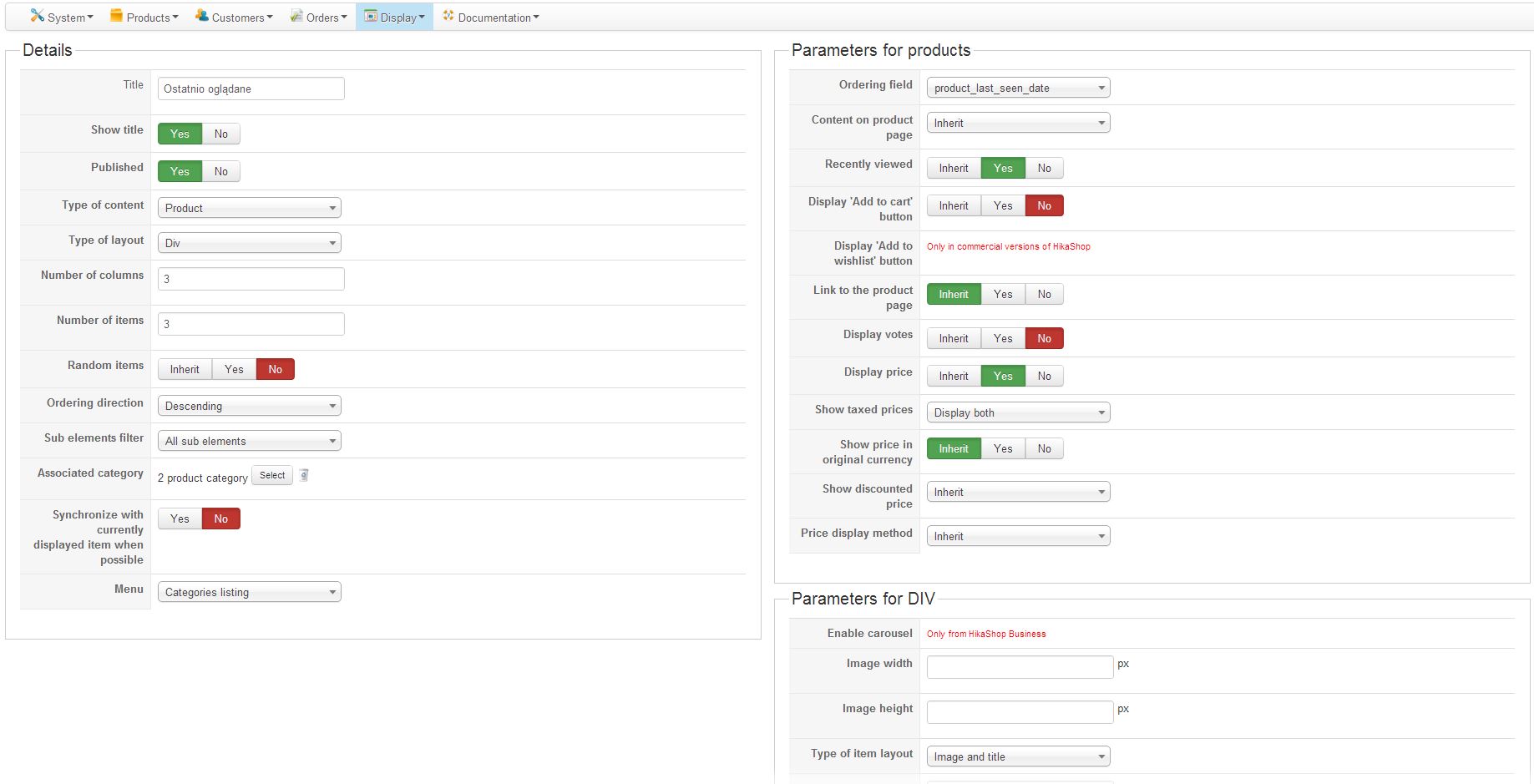
I checked it, but it still does not work properly.
I attach a screenshot of my current settings.
Please Log in or Create an account to join the conversation.
13 years 9 months ago #85398
by nicolas
Replied by nicolas on topic Recently Viewed - Items do not change.
Hi,
Ok, thank you for sticking with us. We found the problem. As a temporary fix, you can change the code:
to:
in the file components/com_hikashop/views/product/view.html.php
We'll have a more complex fix in next release in order to have a definitive working solution.
Ok, thank you for sticking with us. We found the problem. As a temporary fix, you can change the code:
Code:
$a = hikashop_table('product').' AS b';
$pageInfo->filter->order->value ='';
Code:
$a = hikashop_table('product').' AS b';
$pageInfo->filter->order->value ='b.product_last_seen_date';
$pageInfo->filter->order->dir = 'DESC';
We'll have a more complex fix in next release in order to have a definitive working solution.
The following user(s) said Thank You: Piotr
Please Log in or Create an account to join the conversation.
13 years 9 months ago #85420
by Piotr
Replied by Piotr on topic Recently Viewed - Items do not change.
Hello Nicolas,
Now everything works fine, thank you.
Piotr
Now everything works fine, thank you.
Piotr
Please Log in or Create an account to join the conversation.

12 years 11 months ago #133153
by river
Replied by river on topic Recently Viewed - Items do not change.
Joomla 2.5.15
Hikashop Business latest version
The Hikashop content module with Recently view works perfect.
But there is one thing.
When I click on a product the Recently view module displays the current product first.
But I don't want the module to display the current product, I want it to display the second product first, which in reality is the product that was recently viewed.
Any solution how to fix this ?
Please see attached picture to see what I mean.
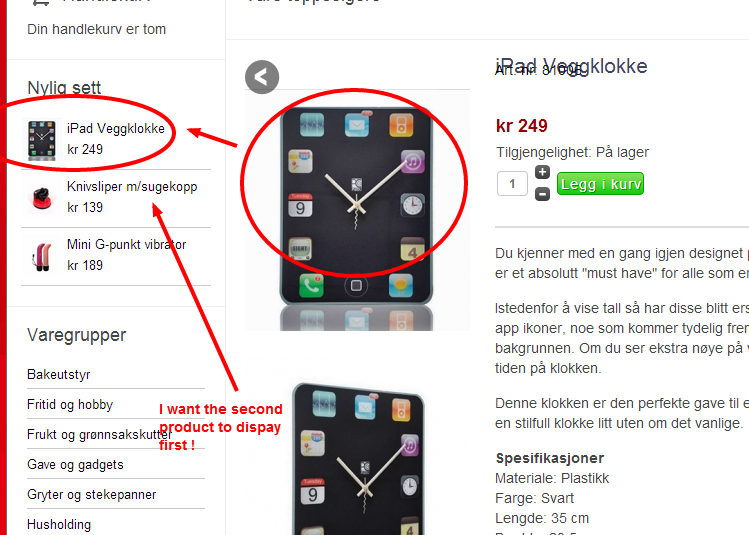
Hikashop Business latest version
The Hikashop content module with Recently view works perfect.
But there is one thing.
When I click on a product the Recently view module displays the current product first.
But I don't want the module to display the current product, I want it to display the second product first, which in reality is the product that was recently viewed.
Any solution how to fix this ?
Please see attached picture to see what I mean.
Please Log in or Create an account to join the conversation.
12 years 11 months ago #133154
by Jerome
Jerome - Obsidev.com
HikaMarket & HikaSerial developer / HikaShop core dev team.
Replied by Jerome on topic Recently Viewed - Items do not change.
Hi,
The module is displayed after the page. So the product that you are currently seeing has just been see by the user. So it is logical for the module (which is displayed just after) to be set as the last seen product, because it really is.
So, basically, it's not really possible except if you exclude the current product from the list. At this moment the display will be logical all the time, it will display the recently viewed products except the product that the user is viewing currently.
It requires some PHP/Development skills to do such kind of modification.
Regards,
The module is displayed after the page. So the product that you are currently seeing has just been see by the user. So it is logical for the module (which is displayed just after) to be set as the last seen product, because it really is.
So, basically, it's not really possible except if you exclude the current product from the list. At this moment the display will be logical all the time, it will display the recently viewed products except the product that the user is viewing currently.
It requires some PHP/Development skills to do such kind of modification.
Regards,
Jerome - Obsidev.com
HikaMarket & HikaSerial developer / HikaShop core dev team.
Please Log in or Create an account to join the conversation.
12 years 11 months ago #133157
by nicolas
Replied by nicolas on topic Recently Viewed - Items do not change.
Hi,
It's actually not too complex.
Add the code:
after the code
in components/com_hikashop/views/product/view.html.php and that should do it.
We'll add that to the next version.
It's actually not too complex.
Add the code:
Code:
if(JRequest::getString('option','')==HIKASHOP_COMPONENT && JRequest::getString('ctrl','category')=='product'){
//if we are on a product page, we don't display the current product in the recently viewed module
$product_id = hikashop_getCID('product_id');
if(isset($viewed_products_ids[$product_id])){
unset($viewed_products_ids[$product_id]);
}
}
Code:
$viewed_products_ids = $_SESSION['hikashop_viewed_products'];
We'll add that to the next version.
The following user(s) said Thank You: river
Please Log in or Create an account to join the conversation.
12 years 11 months ago #133453
by river
Replied by river on topic Recently Viewed - Items do not change.
Tnx it works ! Excellent 
Please Log in or Create an account to join the conversation.
Time to create page: 0.121 seconds