

- Posts: 48
- Thank you received: 0
moving hikashop
13 years 10 months ago - 13 years 10 months ago #83677
by guido
moving hikashop was created by guido
I have hikashop running on a website, but now i want that same shop also on another website does anybody know how to arrange this.
So all custum fields and custom code in the views are taken over to the other website. And all articles and images.
I have the same version hikashop business on both sites.
Both sites are joomla 2.5.8
Except both sites have a different prefix in the database.
Any tip would be appreciated.
Guido
So all custum fields and custom code in the views are taken over to the other website. And all articles and images.
I have the same version hikashop business on both sites.
Both sites are joomla 2.5.8
Except both sites have a different prefix in the database.
Any tip would be appreciated.
Guido
Last edit: 13 years 10 months ago by guido.
Please Log in or Create an account to join the conversation.

13 years 10 months ago #83939
by nicolas
Replied by nicolas on topic moving hikashop
Hi,
If you want to simply duplicate all your website including HikaShop's stuff, you can do a backup with akeeba backup and restore it on your new server with kickstarter.
If you only want to migrate the data and files modifications of HikaShop that's more complex.
First, you need to get all the table of HikaShop in the database of your first website by exporting them via phpmyadmin. You'll get a SQL file that you can open with notepad and change the prefix of the tables to the new prefix and then import that SQL file on your new server's phpmyadmin, after deleting the table of HikaShop from it.
Then, you need to also copy over the media/com_hikashop folders and files which contains the CSS overrides, emails overrides, images, thumbnails and files; and copy the templates/YOUR_TEMPLATE/html/com_hikashop folder to your new website's templates/YOUR_TEMPLATE/html/com_hikashop folder in order to get the view files overrides.
If you want to simply duplicate all your website including HikaShop's stuff, you can do a backup with akeeba backup and restore it on your new server with kickstarter.
If you only want to migrate the data and files modifications of HikaShop that's more complex.
First, you need to get all the table of HikaShop in the database of your first website by exporting them via phpmyadmin. You'll get a SQL file that you can open with notepad and change the prefix of the tables to the new prefix and then import that SQL file on your new server's phpmyadmin, after deleting the table of HikaShop from it.
Then, you need to also copy over the media/com_hikashop folders and files which contains the CSS overrides, emails overrides, images, thumbnails and files; and copy the templates/YOUR_TEMPLATE/html/com_hikashop folder to your new website's templates/YOUR_TEMPLATE/html/com_hikashop folder in order to get the view files overrides.
Please Log in or Create an account to join the conversation.
13 years 10 months ago #84020
by guido
Replied by guido on topic moving hikashop
Hello Nicolas,
I made an export of all prefix_hikashop***** tables.
I got a sql file.
Edited with notepad+ changed the prefix to the prefix of the site where i want to import.
Deleted all the tables on the new site prefix_hikashop*******
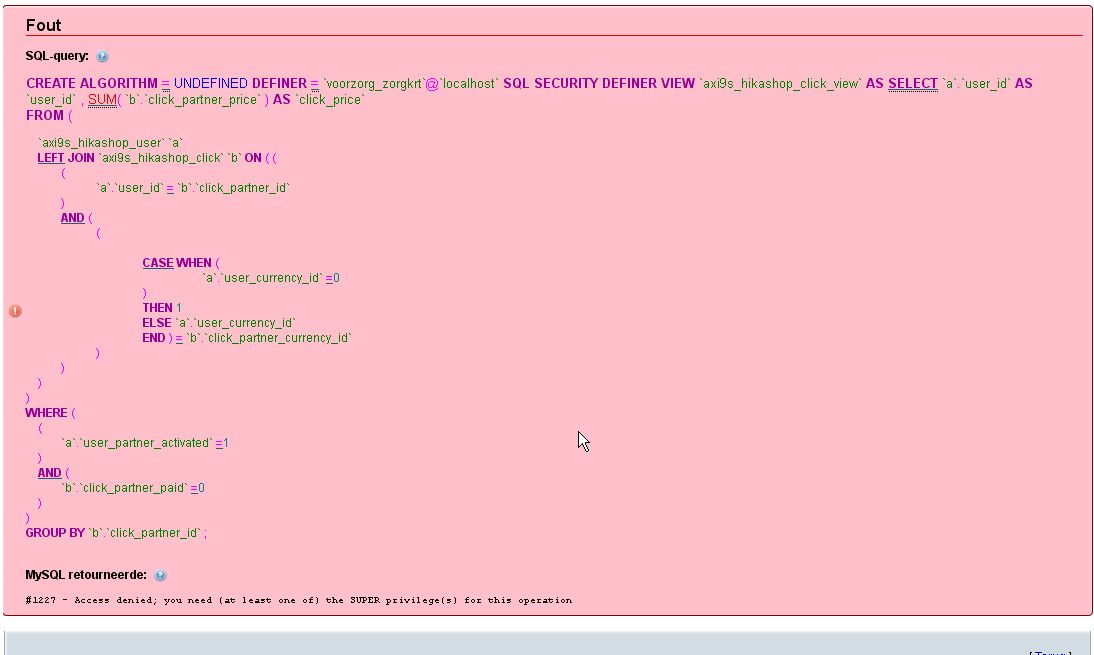
Then i did an import, ??????? i got the following error in phpmyadmin.
see the attachment.
Any help would be appreciated.
Guido
I made an export of all prefix_hikashop***** tables.
I got a sql file.
Edited with notepad+ changed the prefix to the prefix of the site where i want to import.
Deleted all the tables on the new site prefix_hikashop*******
Then i did an import, ??????? i got the following error in phpmyadmin.
see the attachment.
Any help would be appreciated.
Guido
Please Log in or Create an account to join the conversation.
13 years 10 months ago #84057
by nicolas
Replied by nicolas on topic moving hikashop
It seems that your hosting does not allow your MYSQL user to import views. Just remove them from the import SQL file and try again. There are not necessary as they are created dynamically by HikaShop.
Please Log in or Create an account to join the conversation.
Time to create page: 0.071 seconds