
- Posts: 40
- Thank you received: 0
How to Add Proceed to Cart Button
- DShapiroNaples
-
 Topic Author
- Offline
Less
More
15 years 7 months ago #7711
by DShapiroNaples
How to Add Proceed to Cart Button was created by DShapiroNaples
I would like to add a "Proceed to Checkout" button on the category page and the product page so if the user has not had a chance to click the pop up in time they have a way of getting to the checkout from these pages.
How can this be done?
How can this be done?
Please Log in or Create an account to join the conversation.

15 years 7 months ago #7712
by nicolas
Replied by nicolas on topic Re: How to Add Proceed to Cart Button
Usually, users either create a menu via the joomla menu manager of the type hikashop checkout. That menu will direct to the checkout.
Or, they publish the hikashop cart module via the joomla module manager. In the hikashop options of that module, you can activate the "proceed to checkout" button (though it should already be activated by default).
Or, they publish the hikashop cart module via the joomla module manager. In the hikashop options of that module, you can activate the "proceed to checkout" button (though it should already be activated by default).
Please Log in or Create an account to join the conversation.
- DShapiroNaples
-
Topic Author
- Offline
Less
More
- Posts: 40
- Thank you received: 0
15 years 7 months ago #7714
by DShapiroNaples
Replied by DShapiroNaples on topic Re: How to Add Proceed to Cart Button
Thanks. When I put the menu option in and use the Hikashop -> Checkout and I click on the option. It brings up a category page. Where can I control the options (Number of items, etc) for this page that is displayed?
Please Log in or Create an account to join the conversation.
15 years 7 months ago #7716
by nicolas
Replied by nicolas on topic Re: How to Add Proceed to Cart Button
There is no such options in the menu options.
Are you sure that you are creating your checkout menu via the joomla menu manager ?
Are you sure that you are creating your checkout menu via the joomla menu manager ?
Please Log in or Create an account to join the conversation.
- DShapiroNaples
-
Topic Author
- Offline
Less
More
- Posts: 40
- Thank you received: 0
15 years 7 months ago #7719
by DShapiroNaples
Replied by DShapiroNaples on topic Re: How to Add Proceed to Cart Button
Yes I use the menu module
Please Log in or Create an account to join the conversation.
15 years 7 months ago #7722
by nicolas
Replied by nicolas on topic Re: How to Add Proceed to Cart Button
Could you post some screenshots ?
Please Log in or Create an account to join the conversation.
- DShapiroNaples
-
Topic Author
- Offline
Less
More
- Posts: 40
- Thank you received: 0
15 years 7 months ago #7723
by DShapiroNaples
Replied by DShapiroNaples on topic Re: How to Add Proceed to Cart Button
I did notice shopping cart module is not enabled. Could that do it?
Please Log in or Create an account to join the conversation.
15 years 7 months ago #7724
by nicolas
Replied by nicolas on topic Re: How to Add Proceed to Cart Button
Well, you could publish it... You would get a proceed to checkout button without messing with the menus 
Please Log in or Create an account to join the conversation.
- DShapiroNaples
-
Topic Author
- Offline
Less
More
- Posts: 40
- Thank you received: 0
15 years 7 months ago #7743
by DShapiroNaples
Replied by DShapiroNaples on topic Re: How to Add Proceed to Cart Button
I gugess I am confised. I enabled the Hikashop Cart Module and it showed items that were added on the bottom left. I did not see a "Proceed to Checkout" button.
The two url at issue are:
Shopping cart:
www.fitsolutionsnaples.com/index.php?opt...sk=listing&Itemid=73
and
Sign Up Now:
www.fitsolutionsnaples.com/index.php?opt...ut=listing&Itemid=72
When I click on the Shopping cart link when the cart is empty it has a diffent look then the Sign Up Now link. I would like to be able to either add a "Proceed to Checkout" button on the Category and Product pages or have better control on the look of the Shopping Cart link so it appears just like the Sign up Now link when there is nothing in the cart.
The two url at issue are:
Shopping cart:
www.fitsolutionsnaples.com/index.php?opt...sk=listing&Itemid=73
and
Sign Up Now:
www.fitsolutionsnaples.com/index.php?opt...ut=listing&Itemid=72
When I click on the Shopping cart link when the cart is empty it has a diffent look then the Sign Up Now link. I would like to be able to either add a "Proceed to Checkout" button on the Category and Product pages or have better control on the look of the Shopping Cart link so it appears just like the Sign up Now link when there is nothing in the cart.
Please Log in or Create an account to join the conversation.
15 years 7 months ago #7750
by nicolas
Replied by nicolas on topic Re: How to Add Proceed to Cart Button
Yes, you need to set the sign up now URL in the option "URL where to redirect when the cart is empty" in the configuration of HikaShop (Checkout or Display tab depending on your version of HikaShop).
Please Log in or Create an account to join the conversation.
- DShapiroNaples
-
Topic Author
- Offline
Less
More
- Posts: 40
- Thank you received: 0
15 years 7 months ago #7766
by DShapiroNaples
Replied by DShapiroNaples on topic Re: How to Add Proceed to Cart Button
I added the url but the url I used "
www.fitsolutionsnaples.com/index.php?opt...egory&layout=listing
" still shows an incorrect page title and the configuration is different (It only shows 1 up instead of two).
Also, is there a way to increase the timeout on the "Continue Shopping or Porceed to Cart" popup?
Also, is there a way to increase the timeout on the "Continue Shopping or Porceed to Cart" popup?
Please Log in or Create an account to join the conversation.
15 years 7 months ago #7767
by nicolas
Replied by nicolas on topic Re: How to Add Proceed to Cart Button
the URL of your sign up menu is not that one...You gave it in your previous post. It's:
www.fitsolutionsnaples.com/index.php?opt...ut=listing&Itemid=72
You're missing the &Itemid=72 at the end which is why it doesn't display the same thing
You can go in the config under the tab checkout and change the option "Notice popup display time". If you don't have that tab because you use an older version of HikaShop, you will have to go in the menu Display->Views and edit the file notice of the view checkout and increase the timeout there in the javascript code.
You're missing the &Itemid=72 at the end which is why it doesn't display the same thing
You can go in the config under the tab checkout and change the option "Notice popup display time". If you don't have that tab because you use an older version of HikaShop, you will have to go in the menu Display->Views and edit the file notice of the view checkout and increase the timeout there in the javascript code.
Please Log in or Create an account to join the conversation.
- DShapiroNaples
-
Topic Author
- Offline
Less
More
- Posts: 40
- Thank you received: 0
15 years 7 months ago #7770
by DShapiroNaples
Replied by DShapiroNaples on topic Re: How to Add Proceed to Cart Button
Thanks. That worked.
I have just updated to the latest version so I can see the checkout tab.
But, after the update all of my thumbnail (both category and product) imeages are not showing.
I have just updated to the latest version so I can see the checkout tab.
But, after the update all of my thumbnail (both category and product) imeages are not showing.
Please Log in or Create an account to join the conversation.
15 years 7 months ago #7775
by nicolas
Replied by nicolas on topic Re: How to Add Proceed to Cart Button
If you updated from an old version of HikaShop, and that your access rights are not configured properly on your server, hikashop might have been unable to move your image folder around.
Please check that you have your images in the folder media/com_hikashop/upload
If you don't, get them from the folder components/com_hikashop/upload and move them to that new folder via FTP.
Please check that you have your images in the folder media/com_hikashop/upload
If you don't, get them from the folder components/com_hikashop/upload and move them to that new folder via FTP.
Please Log in or Create an account to join the conversation.
- DShapiroNaples
-
Topic Author
- Offline
Less
More
- Posts: 40
- Thank you received: 0
15 years 7 months ago #7778
by DShapiroNaples
Replied by DShapiroNaples on topic Re: How to Add Proceed to Cart Button
I was on 1.4.3 and my media folder had already been moved. I went ahead and deleted all the images and re-uploaded. Still no images for categories or products
Please Log in or Create an account to join the conversation.
15 years 7 months ago #7781
by nicolas
Replied by nicolas on topic Re: How to Add Proceed to Cart Button
Could you do some screenshots ?
When you means that you don't have thumbnails, do you mean that you have the images in full size but the thumbnail is not generated ? Or you don't get anything ? Do you get some kind of errors ?
When you means that you don't have thumbnails, do you mean that you have the images in full size but the thumbnail is not generated ? Or you don't get anything ? Do you get some kind of errors ?
Please Log in or Create an account to join the conversation.
- DShapiroNaples
-
Topic Author
- Offline
Less
More
- Posts: 40
- Thank you received: 0
15 years 7 months ago - 15 years 7 months ago #7786
by DShapiroNaples
Replied by DShapiroNaples on topic Re: How to Add Proceed to Cart Button
Using this url
www.fitsolutionsnaples.com/index.php?opt...ut=listing&Itemid=72
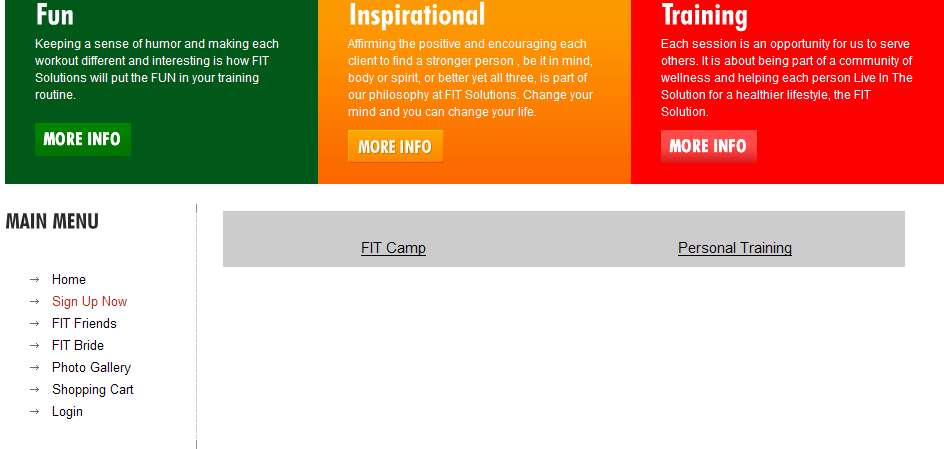
prior to the new release the thumbnails would appear above the catgeory name. Now it just has the hyperlink category. No errors are showing
www.fitsolutionsnaples.com/index.php?opt...ut=listing&Itemid=72
prior to the new release the thumbnails would appear above the catgeory name. Now it just has the hyperlink category. No errors are showing
Last edit: 15 years 7 months ago by DShapiroNaples. Reason: Added screenshot
Please Log in or Create an account to join the conversation.
15 years 7 months ago #7787
by nicolas
Replied by nicolas on topic Re: How to Add Proceed to Cart Button
That's an option of the menu. If you go in the menu Display->Content menus and edit the menu, you will find the option "Type of item layout". By default, it's "Title and image". Yours must be set at "Title". Change it and save and the images should appear again.
Please Log in or Create an account to join the conversation.
15 years 7 months ago #7788
by kwkness
Replied by kwkness on topic Re: How to Add Proceed to Cart Button
sorry to jump in on this but I too would like a proceed to cart button. I have the shopping cart module published but do not see the button. Also, I cannot find the activate button option in the module settings.
What am I missing?
What am I missing?
Please Log in or Create an account to join the conversation.
- DShapiroNaples
-
Topic Author
- Offline
Less
More
- Posts: 40
- Thank you received: 0
15 years 7 months ago #7789
by DShapiroNaples
Replied by DShapiroNaples on topic Re: How to Add Proceed to Cart Button
These are still set to Title and Image. These were set this way before the upgrade
Please Log in or Create an account to join the conversation.
Time to create page: 0.287 seconds