

- Posts: 6
- Thank you received: 0
Two prices display for logged in members.
13 years 9 months ago #84443
by dschafer
Two prices display for logged in members. was created by dschafer
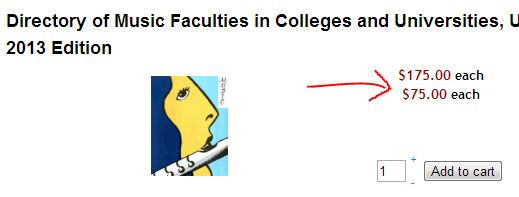
For the public, only the public price is displaying. This is good. For members who are logged in, BOTH the public and member prices are displaying. I want members to see only member discount price. When they add the item to the cart, it is using the correct price, but I don't want the public price to display on my items. Please help!
Please Log in or Create an account to join the conversation.

13 years 9 months ago #84447
by Jerome
Jerome - Obsidev.com
HikaMarket & HikaSerial developer / HikaShop core dev team.
Replied by Jerome on topic Two prices display for logged in members.
Hi,
There is in HikaShop an option which allow you to select the price display method.
System > Configuration > Display > Default parameters for products > Price display method.
You should select "Cheapest price" not, all.
Regards,
There is in HikaShop an option which allow you to select the price display method.
System > Configuration > Display > Default parameters for products > Price display method.
You should select "Cheapest price" not, all.
Regards,
Jerome - Obsidev.com
HikaMarket & HikaSerial developer / HikaShop core dev team.
Please Log in or Create an account to join the conversation.
13 years 9 months ago #84565
by dschafer
Replied by dschafer on topic Two prices display for logged in members.
My configuration is already set to 'cheapest price'. Is there a different reason two prices would be displaying??
Thanks.
Thanks.
Please Log in or Create an account to join the conversation.

13 years 9 months ago #84899
by Xavier
Replied by Xavier on topic Two prices display for logged in members.
Hi,
Can you try to add this code in the view "product / listing_price" in HikaShop > Display > Views:
Just before "echo JText::_('PRICE_END');"
PS: I don't tried this code.
Can you try to add this code in the view "product / listing_price" in HikaShop > Display > Views:
Code:
?>
<script>
var spans = document.getElementsByTagName("span");
for (var i = 0; i < <?php echo $i; ?>; i++) {
alert('hikashop_product_price_'+i);
if (spans[i].className == 'hikashop_product_price_'+i) {
spans[i].style.display = 'none';
}
}
</script>
<?php
Just before "echo JText::_('PRICE_END');"
PS: I don't tried this code.
Please Log in or Create an account to join the conversation.
13 years 9 months ago #85101
by dschafer
Replied by dschafer on topic Two prices display for logged in members.
Hi,
I added the code you specified in the file com_hikashop/views/product/tmpl/listing_price.php
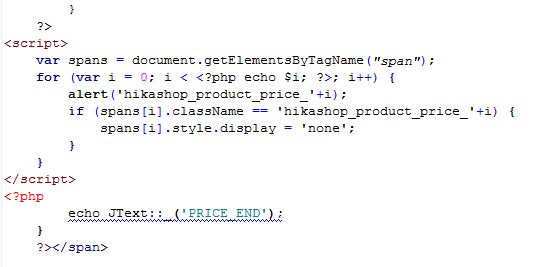
It brought up a dialog box to which I had to click on many times:
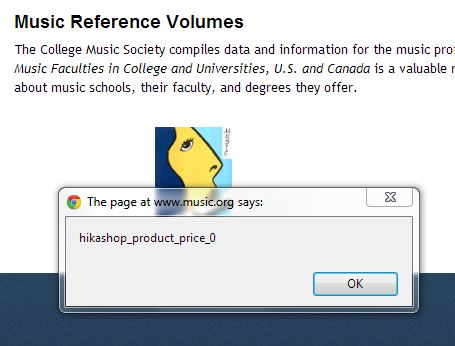
And at the end, two prices still displayed.
Other suggestions?
I added the code you specified in the file com_hikashop/views/product/tmpl/listing_price.php
It brought up a dialog box to which I had to click on many times:
And at the end, two prices still displayed.
Other suggestions?
Please Log in or Create an account to join the conversation.
13 years 9 months ago #85131
by Jerome
Jerome - Obsidev.com
HikaMarket & HikaSerial developer / HikaShop core dev team.
Replied by Jerome on topic Two prices display for logged in members.
Hi,
First, please do not write directly in HikaShop files and use view overrides.
You wouldn't be able to update HikaShop without loosing your modification otherwise.
You can use some code to display only the last (or the first) price.
Just use this code in the begin of the listing_price view.
Regards,
First, please do not write directly in HikaShop files and use view overrides.
You wouldn't be able to update HikaShop without loosing your modification otherwise.
You can use some code to display only the last (or the first) price.
Just use this code in the begin of the listing_price view.
Code:
<?php
$class ='';
if(!empty($this->row->prices) && count($this->row->prices)>1){
// Display several prices
// $class = ' hikashop_product_several_prices';
// Display the last one
$this->row->prices = array( end($this->row->prices) );
// Display the first one
// $this->row->prices = array( reset($this->row->prices) );
} ?>
Regards,
Jerome - Obsidev.com
HikaMarket & HikaSerial developer / HikaShop core dev team.
The following user(s) said Thank You: dschafer
Please Log in or Create an account to join the conversation.
Time to create page: 0.055 seconds