
- Posts: 14
- Thank you received: 0
problem with shopping cart module
- johnpeter001
-
 Topic Author
- Offline
Less
More
13 years 9 months ago - 13 years 9 months ago #84580
by johnpeter001
problem with shopping cart module was created by johnpeter001
OK, here is the problem, I made a hikashop shopping cart module on my website(on the top position of the "store" page, shows as "YOUR SHOPPING CART"), I assigned a delete button in that shopping cart module, and I already setup in the setting that when the cart is empty, it should bring the user back to the main "store" page(and when you have more than one item, after delete one, you should stay in the same page), but after I click delete button, doesn't matter if you have one item or more than one item in the cart, it bring me to the "product/updatecart" page, not to the main "store" page or stay on the same page.
If you go to checkout page by clicking "process to checkout", and delete the item inside the checkout page, when you have more than 2 items, you delete one, you stay on checkout page, when your cart is empty, then it will jump back to the main "store" page. So it seems like the delete button works fine inside the checkout page but not in the shopping cart module. Can someone help me with this issue, I was looking all over the setting, configuration, module setting, menu setting, but didn't find the solution, thank you very much.
PS: I tried it on 3 different browsers, on IE9 and chrome, after delete, it will bring me to the "product/updatecart" page, on firefox 16.0.2, after delete, it will stay on the same page but won't jump to main "store" page, thank you.
the website link is: www.biovoyage.org/store
If you go to checkout page by clicking "process to checkout", and delete the item inside the checkout page, when you have more than 2 items, you delete one, you stay on checkout page, when your cart is empty, then it will jump back to the main "store" page. So it seems like the delete button works fine inside the checkout page but not in the shopping cart module. Can someone help me with this issue, I was looking all over the setting, configuration, module setting, menu setting, but didn't find the solution, thank you very much.
PS: I tried it on 3 different browsers, on IE9 and chrome, after delete, it will bring me to the "product/updatecart" page, on firefox 16.0.2, after delete, it will stay on the same page but won't jump to main "store" page, thank you.
the website link is: www.biovoyage.org/store
Last edit: 13 years 9 months ago by johnpeter001.
Please Log in or Create an account to join the conversation.
- johnpeter001
-
Topic Author
- Offline
Less
More
- Posts: 14
- Thank you received: 0
13 years 9 months ago - 13 years 9 months ago #84595
by johnpeter001
Replied by johnpeter001 on topic problem with shopping cart module
update: without doing anything, now it won't jump into "product/updatecart" page, I am so confused.
Now it jumps into "product/updatecart" page again without me doing anything.
Now it jumps into "product/updatecart" page again without me doing anything.
Last edit: 13 years 9 months ago by johnpeter001.
Please Log in or Create an account to join the conversation.

13 years 9 months ago #84704
by Xavier
Replied by Xavier on topic problem with shopping cart module
Can you give us screenshots of your module configuration and your checkout configuration please ?
Please Log in or Create an account to join the conversation.
- johnpeter001
-
Topic Author
- Offline
Less
More
- Posts: 14
- Thank you received: 0
13 years 9 months ago #84937
by johnpeter001
No problem, thank you for your time, Xavier, below are some screenshots, for some reasons, my checkout configuration panel push really far to the right, so I have to take 2 screenshots for the checkout configuration, for "URL where to redirect when the cart is empty", I am using the link for the main store page, thank you very much.
Replied by johnpeter001 on topic problem with shopping cart module
Xavier wrote: Can you give us screenshots of your module configuration and your checkout configuration please ?
No problem, thank you for your time, Xavier, below are some screenshots, for some reasons, my checkout configuration panel push really far to the right, so I have to take 2 screenshots for the checkout configuration, for "URL where to redirect when the cart is empty", I am using the link for the main store page, thank you very much.
Please Log in or Create an account to join the conversation.
- johnpeter001
-
Topic Author
- Offline
Less
More
- Posts: 14
- Thank you received: 0
13 years 9 months ago #84938
by johnpeter001
I tried the module again today, without change anything to the Hikashop setting(or Joomla itself), now if I delete the item from module, it will stay on the same page instead of going to "product/updatecart" page, but sometimes it will start to jump to "product/updatecart" page again, so I am not sure if it is some other plugin or module that is causing the problem.
Replied by johnpeter001 on topic problem with shopping cart module
Xavier wrote: Can you give us screenshots of your module configuration and your checkout configuration please ?
I tried the module again today, without change anything to the Hikashop setting(or Joomla itself), now if I delete the item from module, it will stay on the same page instead of going to "product/updatecart" page, but sometimes it will start to jump to "product/updatecart" page again, so I am not sure if it is some other plugin or module that is causing the problem.
Please Log in or Create an account to join the conversation.
13 years 9 months ago #85008
by Xavier
Replied by Xavier on topic problem with shopping cart module
Do you have the latest version of HikaShop from our website ?
Please Log in or Create an account to join the conversation.
- johnpeter001
-
Topic Author
- Offline
Less
More
- Posts: 14
- Thank you received: 0
13 years 9 months ago #85453
by johnpeter001
Hi, Xavier, yes, I downloaded the newest version(2.0.0 stable) from HikaShop download page, and when I hit the "update/about", it shows "You have the latest stable version : 2.0.0", thank you.
Replied by johnpeter001 on topic problem with shopping cart module
Xavier wrote: Do you have the latest version of HikaShop from our website ?
Hi, Xavier, yes, I downloaded the newest version(2.0.0 stable) from HikaShop download page, and when I hit the "update/about", it shows "You have the latest stable version : 2.0.0", thank you.
Please Log in or Create an account to join the conversation.
13 years 9 months ago #85660
by Xavier
Replied by Xavier on topic problem with shopping cart module
Could you give us a backend access and a ftp acces ?
Please Log in or Create an account to join the conversation.
13 years 9 months ago #85683
by BasketBox
Replied by BasketBox on topic problem with shopping cart module
I have the same problem. If I delete an item in the cart module, it will jump to product/updatecart page with nothing in it. It should stay on same product page. And the same happens on certain product pages when I add to cart, the page jumps to product/updatecart with empty page. I have the latest Hikashop installed.
Please Log in or Create an account to join the conversation.
- johnpeter001
-
Topic Author
- Offline
Less
More
- Posts: 14
- Thank you received: 0
13 years 9 months ago - 13 years 9 months ago #85692
by johnpeter001
Hi, Xavier, I wish I can give you those information, but I am a web designer work for the website, and I am not allow to give out those info, since the issue I had is kind of fixed by itself, I will just stay the way it is for now, thank you for all your helps and responses.
Replied by johnpeter001 on topic problem with shopping cart module
Xavier wrote: Could you give us a backend access and a ftp acces ?
Hi, Xavier, I wish I can give you those information, but I am a web designer work for the website, and I am not allow to give out those info, since the issue I had is kind of fixed by itself, I will just stay the way it is for now, thank you for all your helps and responses.
Last edit: 13 years 9 months ago by johnpeter001.
Please Log in or Create an account to join the conversation.
13 years 9 months ago #85758
by Xavier
Replied by Xavier on topic problem with shopping cart module
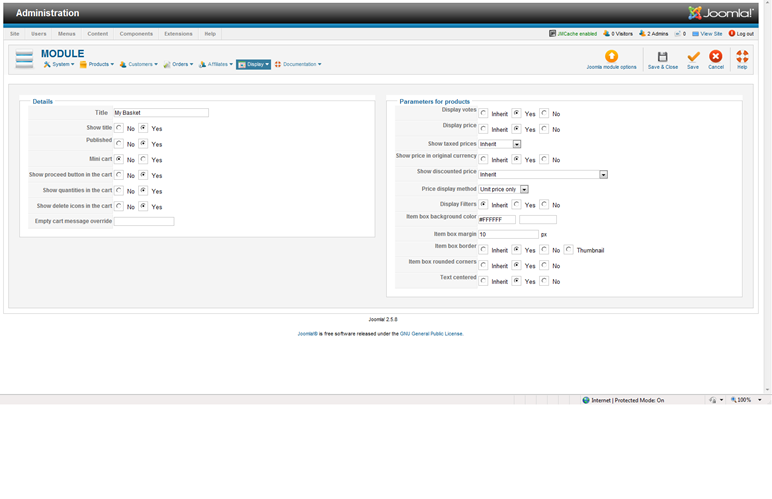
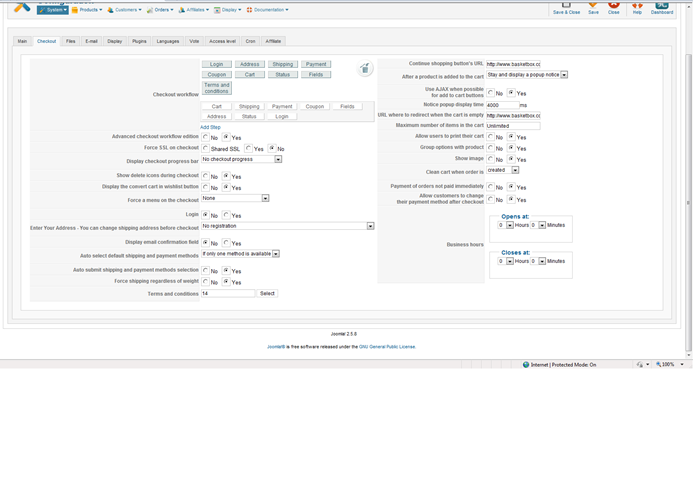
@BasketBox: Could you give us a screenshot of you checkout configuration and the cart module parameters ?
Please Log in or Create an account to join the conversation.
13 years 9 months ago #85799
by BasketBox
Replied by BasketBox on topic problem with shopping cart module
Attached is the cart module and checkout screenshots. You can also test this at BasketBox.com to see the behavior of the cart module when deleting a product and add to cart from a product page.
Please Log in or Create an account to join the conversation.
13 years 9 months ago #85912
by Xavier
Replied by Xavier on topic problem with shopping cart module
Hi,
I can't reproduce the problem on my end, could you give me backend & ftp access ?
I can't reproduce the problem on my end, could you give me backend & ftp access ?
Please Log in or Create an account to join the conversation.
13 years 9 months ago #85947
by BasketBox
Replied by BasketBox on topic problem with shopping cart module
Sure, sent. The problem with deleting from the cart module and returning an empty page happens every time in IE, Chrome.
Please Log in or Create an account to join the conversation.
13 years 9 months ago #86000
by Xavier
Replied by Xavier on topic problem with shopping cart module
I tried on your website the return_url is the good url, but due to sh404sef hikashop is not able to load this value.
By default the sef is with "-" instead of your "_", and the problem come from here.
Try to change the configuration of sh404sef to use "-".
By default the sef is with "-" instead of your "_", and the problem come from here.
Try to change the configuration of sh404sef to use "-".
Please Log in or Create an account to join the conversation.
13 years 9 months ago #86013
by BasketBox
Replied by BasketBox on topic problem with shopping cart module
We replaced the _ with a - in sh404SEF config and we still have the same problem.
Please Log in or Create an account to join the conversation.
13 years 9 months ago #86315
by Xavier
Replied by Xavier on topic problem with shopping cart module
Hi,
The problem come from your JRoot, a url with "www" is returned, or the base url given by Joomla is without the "www", so the line:
return false, and don't redirect.
Try to see where the "www" are added to the url, and don't add them.
To find the previous line, go in the file "components/com_hikashop/controllers/product" in the function "updatecart".
The problem come from your JRoot, a url with "www" is returned, or the base url given by Joomla is without the "www", so the line:
Code:
if(strpos($url,HIKASHOP_LIVE)===false && preg_match('#^https?://.*#',$url)) return false;
Try to see where the "www" are added to the url, and don't add them.
To find the previous line, go in the file "components/com_hikashop/controllers/product" in the function "updatecart".
Please Log in or Create an account to join the conversation.
13 years 9 months ago - 13 years 9 months ago #86411
by BasketBox
Replied by BasketBox on topic problem with shopping cart module
The www is used by our site for SEO purposes. What can we do to use www and return the cart to the correct page? Should this code be changed?
Update:
It's fixed. We noticed in the configuration.php file we had the live site as basketbox.com and we added www to this with the SEO redirect enforced.
Update:
It's fixed. We noticed in the configuration.php file we had the live site as basketbox.com and we added www to this with the SEO redirect enforced.
Last edit: 13 years 9 months ago by BasketBox.
Please Log in or Create an account to join the conversation.
Time to create page: 0.133 seconds