
- Posts: 4
- Thank you received: 0
Floating change address box in checkout
- sweet-print.co.uk
-
 Topic Author
- Offline
Less
More
13 years 9 months ago #85543
by sweet-print.co.uk
Floating change address box in checkout was created by sweet-print.co.uk
Hi,
Having a bit of trouble with the checkout page of my site ( www.order.pearlsoil.co.uk ) when you go to the cart after logging in your address displays as it should top left. However instead of the change address button being in the corner it is in a box that floats over the address in a fixed position.
Could you tell me why this is/how to fix it?
Or even better how to change it to make the change address button exactly the same as the new address button and next to it.
I have included a screenshot.
Thanks in advance for any guidance you can give me.
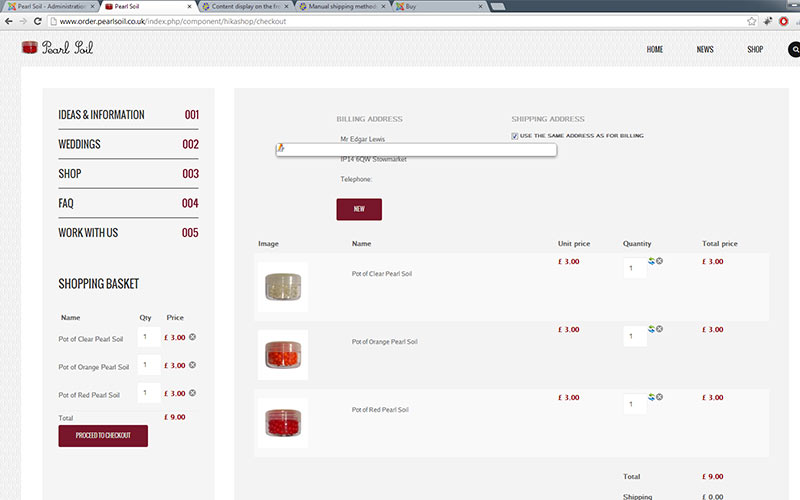
Having a bit of trouble with the checkout page of my site ( www.order.pearlsoil.co.uk ) when you go to the cart after logging in your address displays as it should top left. However instead of the change address button being in the corner it is in a box that floats over the address in a fixed position.
Could you tell me why this is/how to fix it?
Or even better how to change it to make the change address button exactly the same as the new address button and next to it.
I have included a screenshot.
Thanks in advance for any guidance you can give me.
Please Log in or Create an account to join the conversation.

13 years 9 months ago #85571
by Xavier
Replied by Xavier on topic Floating change address box in checkout
Hi,
I can't access the checkout because I can't add product in cart.
So I don't see the css of that page.
What you can do is read our documentation about the Styling of the display here:
www.hikashop.com/fr/support/documentation/faq.html#css
I can't access the checkout because I can't add product in cart.
So I don't see the css of that page.
What you can do is read our documentation about the Styling of the display here:
www.hikashop.com/fr/support/documentation/faq.html#css
Please Log in or Create an account to join the conversation.
- sweet-print.co.uk
-
Topic Author
- Offline
Less
More
- Posts: 4
- Thank you received: 0
13 years 9 months ago #85949
by sweet-print.co.uk
Replied by sweet-print.co.uk on topic Floating change address box in checkout
Thanks, It turned out to be bootstrap causing it to display as it was, have got it usable now!
But more importantly thanks for pointing out the add to cart button doesn't work in firefox. Do you have any idea why this is? I can't figure it out at all, it displays correctly (which I know it doesnt in ie due to the css3) but the button doesn't do anything.
If you look at the site in chrome it works perfectly?!?!
But more importantly thanks for pointing out the add to cart button doesn't work in firefox. Do you have any idea why this is? I can't figure it out at all, it displays correctly (which I know it doesnt in ie due to the css3) but the button doesn't do anything.
If you look at the site in chrome it works perfectly?!?!
Please Log in or Create an account to join the conversation.
13 years 9 months ago #86004
by Xavier
Replied by Xavier on topic Floating change address box in checkout
This problem is not hikashop related.
You have edited a view, and placed the form which submit the add to cart action in a button.
So this button is over the other one, and no actions are done onclick.
Replace the button by something else.
You have edited a view, and placed the form which submit the add to cart action in a button.
So this button is over the other one, and no actions are done onclick.
Replace the button by something else.
Please Log in or Create an account to join the conversation.

13 years 4 months ago #108953
by Kes
Replied by Kes on topic Floating change address box in checkout
Hi
I am having the same issue with the floating address box. I am new to the Joomla/Hikashop world. Is it possible to get a bit more help with how to get rid of the box?
Thanks
I am having the same issue with the floating address box. I am new to the Joomla/Hikashop world. Is it possible to get a bit more help with how to get rid of the box?
Thanks
Please Log in or Create an account to join the conversation.
13 years 4 months ago #109003
by Xavier
Replied by Xavier on topic Floating change address box in checkout
Hi,
You have to go in Hikashop > System > Configuration > Display tab, and disable the option "Use bootstrap design".
Regards,
You have to go in Hikashop > System > Configuration > Display tab, and disable the option "Use bootstrap design".
Regards,
Please Log in or Create an account to join the conversation.
13 years 4 months ago #109116
by Kes
Replied by Kes on topic Floating change address box in checkout
Thank you for the reply. The option was already disabled. I have tried turning it on, and then off again, but not visible effect on the site.
I am using Hikashop 2.1.3 Business with Joomla! 3.1.1
I am using Hikashop 2.1.3 Business with Joomla! 3.1.1
Please Log in or Create an account to join the conversation.
13 years 4 months ago #109180
by Xavier
Replied by Xavier on topic Floating change address box in checkout
Thanks to give us a link to your website (the page where the problem occur) and a test account.
You can send it via pm.
You can send it via pm.
Please Log in or Create an account to join the conversation.
13 years 4 months ago #109520
by Kes
Replied by Kes on topic Floating change address box in checkout
I only have the site on localhost at the moment. I already have a live site and this Joomla/HikaShop version is being developed to replace it.
The code associated with the floating box is:
<a id="hikashop_checkout_billing_address_edit_2" title="Change" class="modal hikashop_checkout_billing_address_edit" rel="{handler: 'iframe', size: {x: 450, y: 480}}" href="/choicestest/index.php/address/edit/redirect-checkout/address_id-2/step-0/type-billing/tmpl-component" onclick="return hikashopEditAddress(this,1,false);"><img alt="Change" src="/choicestest/media/com_hikashop/images/edit.png" border="0"></a>
Does this help?
The code associated with the floating box is:
<a id="hikashop_checkout_billing_address_edit_2" title="Change" class="modal hikashop_checkout_billing_address_edit" rel="{handler: 'iframe', size: {x: 450, y: 480}}" href="/choicestest/index.php/address/edit/redirect-checkout/address_id-2/step-0/type-billing/tmpl-component" onclick="return hikashopEditAddress(this,1,false);"><img alt="Change" src="/choicestest/media/com_hikashop/images/edit.png" border="0"></a>
Does this help?
Please Log in or Create an account to join the conversation.

13 years 4 months ago #109532
by nicolas
Replied by nicolas on topic Floating change address box in checkout
That does not help. We'll need to look at the headers of the page, the JS files, etc with firebug.
So we'll need to be able to access the page live to look at the issue as it seems to be a conflict with your template and that we don't have the problem on our end.
So we'll need to be able to access the page live to look at the issue as it seems to be a conflict with your template and that we don't have the problem on our end.
Please Log in or Create an account to join the conversation.
13 years 4 months ago #109533
by Kes
Replied by Kes on topic Floating change address box in checkout
Template!
I have been using t3_blank to a very clean look. I have just tried protostar and Beez3 and the box vanishes!
I will investigate other templates.
Thank you for your help.
I have been using t3_blank to a very clean look. I have just tried protostar and Beez3 and the box vanishes!
I will investigate other templates.
Thank you for your help.
Please Log in or Create an account to join the conversation.
Time to create page: 0.143 seconds