

- Posts: 31
- Thank you received: 2
Additional option information
13 years 9 months ago #85946
by smedia
Additional option information was created by smedia
Hello,
On the demosite (see attachment) the product shows a info sign for additional info. How can you add this to your options?
I searched for the answer in the demo but could not find it.
Who can help me?
Dizma
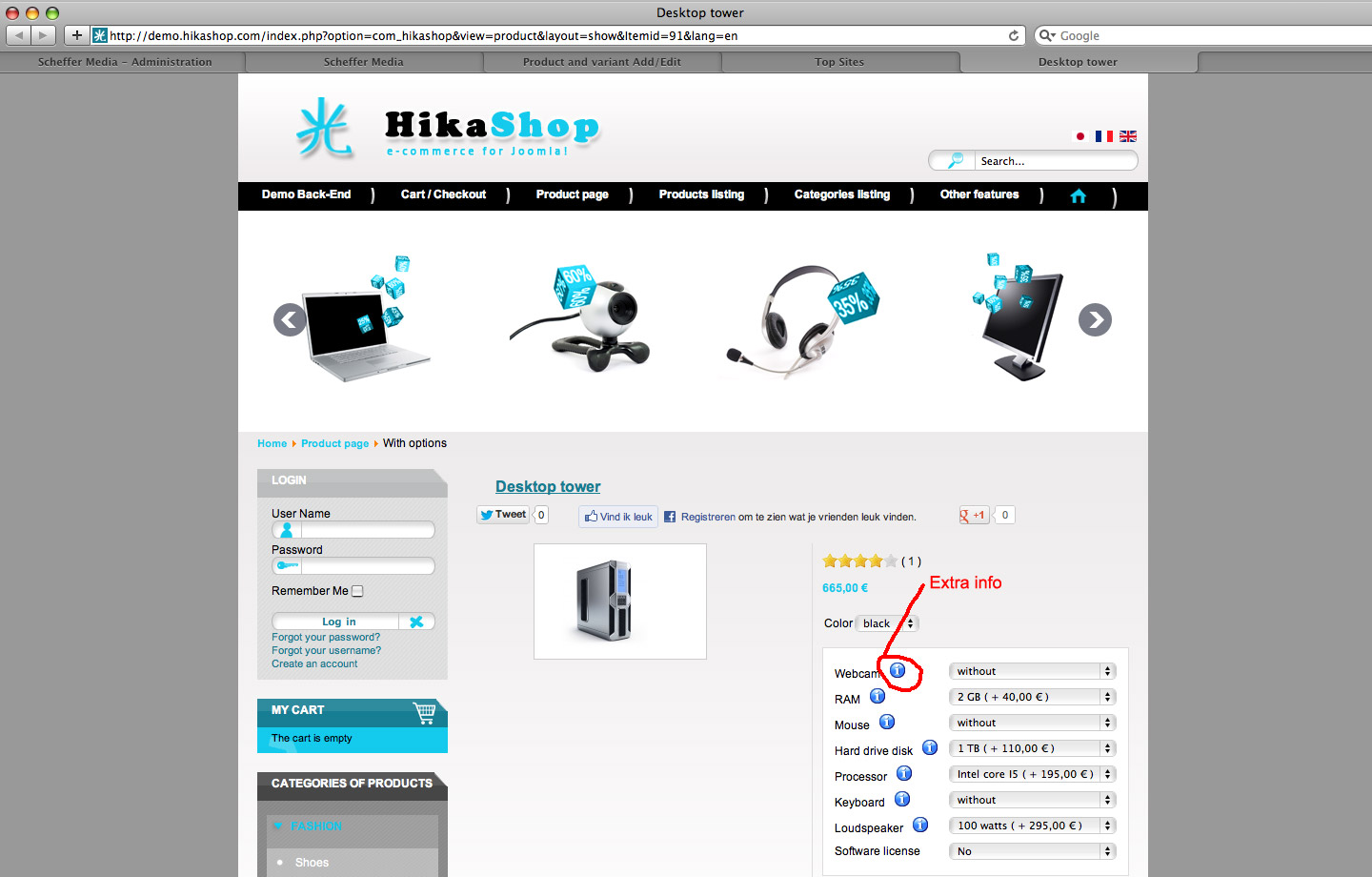
On the demosite (see attachment) the product shows a info sign for additional info. How can you add this to your options?
I searched for the answer in the demo but could not find it.
Who can help me?
Dizma
Please Log in or Create an account to join the conversation.

13 years 9 months ago #85981
by Eliot
Replied by Eliot on topic Additional option information
Hi there,
This icon automatically appears if you have a product with an option which already have characteristics.
I know can be unclear, so in this case you have a product (webcam) which have 2 characteristics (the characteristics displayed on the right).
And this webcam is added as an option to the main product.
And there you go, here is you icon!
This icon automatically appears if you have a product with an option which already have characteristics.
I know can be unclear, so in this case you have a product (webcam) which have 2 characteristics (the characteristics displayed on the right).
And this webcam is added as an option to the main product.
And there you go, here is you icon!
Please Log in or Create an account to join the conversation.
13 years 9 months ago #85991
by smedia
Replied by smedia on topic Additional option information
Hi Eliot,
If you got multiple characteristics the info illustration does not automaticallly appear.
To make the icon appear, you have to fill in the url field (first field beneath the product description) from your option product with a url link.
Et voila!
If you got multiple characteristics the info illustration does not automaticallly appear.
To make the icon appear, you have to fill in the url field (first field beneath the product description) from your option product with a url link.
Et voila!
The following user(s) said Thank You: Eliot
Please Log in or Create an account to join the conversation.
13 years 9 months ago #85999
by Eliot
Replied by Eliot on topic Additional option information
You're right, I forget that .
Glad to see you solved your problem!
.Glad to see you solved your problem!
Please Log in or Create an account to join the conversation.
12 years 11 months ago #133107
by smedia
Replied by smedia on topic Additional option information
Hello,
10 months ago I posted this message. Everything was working fine, but recently I migrated the site to Joomla 2.5.
The whole migration worked well but today I noticed that the options dont work wright anymore.
The symbol stil appears and shows the info, but when you click on it the symbol. The info first shows in a shadowbox popup (like it should and it was) and then suddenly opens in the whole window. How/where can I solve this problem?
Dizma
10 months ago I posted this message. Everything was working fine, but recently I migrated the site to Joomla 2.5.
The whole migration worked well but today I noticed that the options dont work wright anymore.
The symbol stil appears and shows the info, but when you click on it the symbol. The info first shows in a shadowbox popup (like it should and it was) and then suddenly opens in the whole window. How/where can I solve this problem?
Dizma
Please Log in or Create an account to join the conversation.

12 years 11 months ago #133182
by nicolas
Replied by nicolas on topic Additional option information
Hi,
Can you provide a link so such page so that we can see that ?
Can you provide a link so such page so that we can see that ?
Please Log in or Create an account to join the conversation.
12 years 11 months ago #133234
by smedia
Replied by smedia on topic Additional option information
Please Log in or Create an account to join the conversation.
12 years 11 months ago #133328
by nicolas
Replied by nicolas on topic Additional option information
Hi,
It's not because of the update of HikaShop/Joomla.
It's because you have that javascript:
<script type="text/javascript">
if (top!==self) {
top.location=location;
}
</script>
which is added at the end of the popups and which force them to be displayed in full. That is added by some kind of security plugin like anti-copy which doesn't prevent anyone from retrieving your copyrighted content anyway so you should just disable it and it will work again.
It's not because of the update of HikaShop/Joomla.
It's because you have that javascript:
<script type="text/javascript">
if (top!==self) {
top.location=location;
}
</script>
which is added at the end of the popups and which force them to be displayed in full. That is added by some kind of security plugin like anti-copy which doesn't prevent anyone from retrieving your copyrighted content anyway so you should just disable it and it will work again.
Please Log in or Create an account to join the conversation.
12 years 11 months ago #133490
by smedia
Replied by smedia on topic Additional option information
Hi Nicolas,
Youre totally right! The plugin is the cause of this problem. I removed the mentioned tags from the plugin and the problem is solved : )
I know that its still possible to copy material, but regular John doesn't know how to do it ; )
Thnx for the help! Great support Nicolas!
Youre totally right! The plugin is the cause of this problem. I removed the mentioned tags from the plugin and the problem is solved : )
I know that its still possible to copy material, but regular John doesn't know how to do it ; )
Thnx for the help! Great support Nicolas!
Please Log in or Create an account to join the conversation.
Time to create page: 0.396 seconds