

- Posts: 13
- Thank you received: 1
Nav bar active class issue
13 years 9 months ago #88321
by veefource
Nav bar active class issue was created by veefource
Hi,
I'm currently having problems with my nav bar marker incorrectly indicating the user is on the home page when in fact it's on the "Edit Customer Profile" page. I realise this is a Joomla view (which is no doubt is what's causing the active class to be incorrect) but as it's a sub menu of Hikashop's control panel with no apparent menu structure in the back end, I'm unable to change the alias so I can correct the active class allocation. Ultimately I'd like the nav marker to stay on the 'Your Account' menu item I've assigned to the Hikashop control panel which is working for the "Change Your Address" & "Manage Your Orders" menu items given they are Hikashop views.
Does anyone know if it's possible to make the edit customer profile page a proper sub menu item of the control panel or change how the active selector works to enable appropriate styling with css? Or if not can I change the url (currently sef enabled) if that's even possible either?
Many thanks,
John
I'm currently having problems with my nav bar marker incorrectly indicating the user is on the home page when in fact it's on the "Edit Customer Profile" page. I realise this is a Joomla view (which is no doubt is what's causing the active class to be incorrect) but as it's a sub menu of Hikashop's control panel with no apparent menu structure in the back end, I'm unable to change the alias so I can correct the active class allocation. Ultimately I'd like the nav marker to stay on the 'Your Account' menu item I've assigned to the Hikashop control panel which is working for the "Change Your Address" & "Manage Your Orders" menu items given they are Hikashop views.
Does anyone know if it's possible to make the edit customer profile page a proper sub menu item of the control panel or change how the active selector works to enable appropriate styling with css? Or if not can I change the url (currently sef enabled) if that's even possible either?
Many thanks,
John
Please Log in or Create an account to join the conversation.

13 years 8 months ago #88470
by nicolas
Replied by nicolas on topic Nav bar active class issue
Hi,
The problem is that HikaShop cannot keep the menu selected when you click on the "Edit Customer Profile" link because it is not a hikashop page but a joomla page. So it needs to direct you to another page. So it simply choose the default one, the home.
If you want it to go to a specific menu, that is possible. You need to edit the "user account" hikashop plugin via the joomla plugins manager and enter the id of your joomla user profile edition menu item in the "Force menu" option of the plugin.
The problem is that HikaShop cannot keep the menu selected when you click on the "Edit Customer Profile" link because it is not a hikashop page but a joomla page. So it needs to direct you to another page. So it simply choose the default one, the home.
If you want it to go to a specific menu, that is possible. You need to edit the "user account" hikashop plugin via the joomla plugins manager and enter the id of your joomla user profile edition menu item in the "Force menu" option of the plugin.
Please Log in or Create an account to join the conversation.
13 years 8 months ago #88501
by veefource
Replied by veefource on topic Nav bar active class issue
Hmmm, I really can't see any options to "Force Menu" anywhere & tried searching the forums/google too but there were no relevant results. Am I missing something obvious?
Thanks so much for your help on this
Thanks so much for your help on this
Please Log in or Create an account to join the conversation.
13 years 8 months ago #88531
by nicolas
Replied by nicolas on topic Nav bar active class issue
It's in the advanced options of the plugin. There is only one option there. You can't miss it.
Please Log in or Create an account to join the conversation.
13 years 8 months ago #88577
by veefource
Replied by veefource on topic Nav bar active class issue
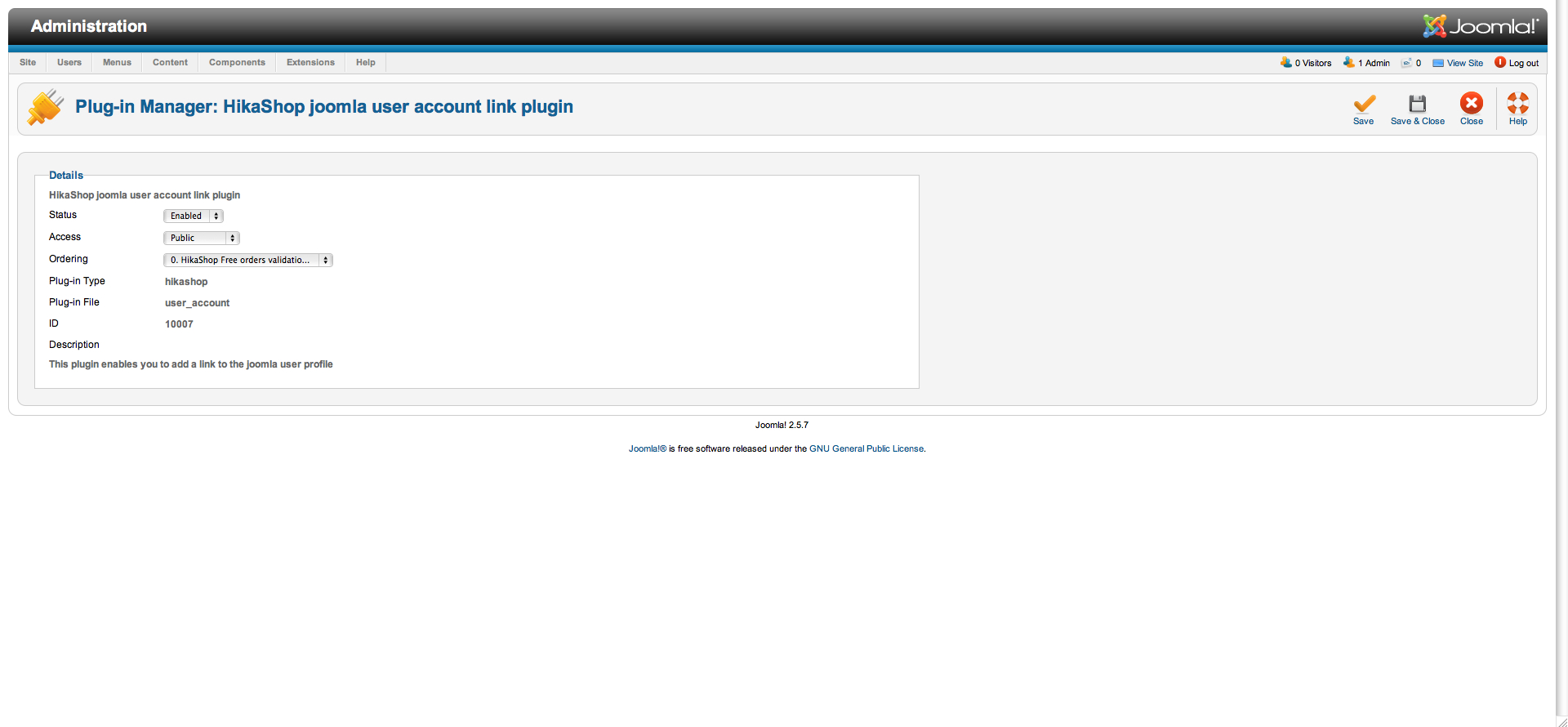
Here's a screenshot of the hikashop user account plugin via the Joomla plugin manager, I can't see advanced options anywhere or on any of the other plugins. Apologies if I'm doing something daft
Please Log in or Create an account to join the conversation.
13 years 8 months ago #88659
by nicolas
Replied by nicolas on topic Nav bar active class issue
Then you must not have a recent enough version of the plugin.
Install that plugin (it's the latest version) and you should have the option then.
Install that plugin (it's the latest version) and you should have the option then.
Please Log in or Create an account to join the conversation.
13 years 8 months ago #88747
by veefource
Replied by veefource on topic Nav bar active class issue
Still doesn't seem to have the option unfortunately. I only installed Hikashop on the 12th of January, would this not have included the most recent version of that plugin?
Please Log in or Create an account to join the conversation.

13 years 8 months ago #88840
by Jerome
Jerome - Obsidev.com
HikaMarket & HikaSerial developer / HikaShop core dev team.
Replied by Jerome on topic Nav bar active class issue
Hi,
HikaShop 2.0.0 was published at the end of November and it has minor updates during the month of December.
Yesterday we published HikaShop 2.1.0 with a lot of new features and with the new version of the plugins.
Regards,
HikaShop 2.0.0 was published at the end of November and it has minor updates during the month of December.
Yesterday we published HikaShop 2.1.0 with a lot of new features and with the new version of the plugins.
Regards,
Jerome - Obsidev.com
HikaMarket & HikaSerial developer / HikaShop core dev team.
Please Log in or Create an account to join the conversation.
13 years 8 months ago #88856
by veefource
Replied by veefource on topic Nav bar active class issue
Hi Jerome,
The code of the files seem to be identical to my originals apart from the lack of the following in your .php file:
<?php
/**
* @package HikaShop for Joomla!
* @version 2.0.0
* @author hikashop.com
* @copyright (C) 2010-2012 HIKARI SOFTWARE. All rights reserved.
* @license GNU/GPLv3 www.gnu.org/licenses/gpl-3.0.html
*/
defined('_JEXEC') or die('Restricted access');
?>
How would this therefore add the advanced options to the plugin?
Thanks for the quick replies, much appreciated!
John
The code of the files seem to be identical to my originals apart from the lack of the following in your .php file:
<?php
/**
* @package HikaShop for Joomla!
* @version 2.0.0
* @author hikashop.com
* @copyright (C) 2010-2012 HIKARI SOFTWARE. All rights reserved.
* @license GNU/GPLv3 www.gnu.org/licenses/gpl-3.0.html
*/
defined('_JEXEC') or die('Restricted access');
?>
How would this therefore add the advanced options to the plugin?
Thanks for the quick replies, much appreciated!
John
Please Log in or Create an account to join the conversation.
13 years 8 months ago #89027
by nicolas
Replied by nicolas on topic Nav bar active class issue
Ok, please try with this package.
It seems that there is an issue on Joomla 2.5 with the XML file.
It seems that there is an issue on Joomla 2.5 with the XML file.
Please Log in or Create an account to join the conversation.
13 years 8 months ago #89038
by veefource
Replied by veefource on topic Nav bar active class issue
Thanks so much Nicolas, it added the force menu option as hoped
Only thing is no matter what combination of ID or link or url I've tried entering in the field it either doesn't seem to have any effect or I just get a 404 error. Can't find any other posts on this so any further advice to help me over this last hurdle would be well received!
Only thing is no matter what combination of ID or link or url I've tried entering in the field it either doesn't seem to have any effect or I just get a 404 error. Can't find any other posts on this so any further advice to help me over this last hurdle would be well received!
Please Log in or Create an account to join the conversation.
13 years 8 months ago #89062
by nicolas
Replied by nicolas on topic Nav bar active class issue
You should not enter the id of a random menu item in there.
As I said previously, you need to enter the id of a menu item of the type user profile, otherwise, you will get a 404
As I said previously, you need to enter the id of a menu item of the type user profile, otherwise, you will get a 404
The following user(s) said Thank You: veefource
Please Log in or Create an account to join the conversation.
13 years 8 months ago #89131
by veefource
Replied by veefource on topic Nav bar active class issue
Thanks Nicolas, though I'm afraid I still couldn't get it to work. I've tried everything I can think of to do with the user profile menu & hikashop plugin option but it still keeps the home menu item active. I'm pretty new at all this stuff so apologies if I've not understood something properly.
I've managed to find another not especially elegant way to do it but it works, so for anyone reading this here's what I did:
1. Assign a 'Your Account' menu item to the hikashop "User Control Panel"
2. Assign an 'Edit Your Profile' submenu item of the above to the Joomla "User Profile" (Nicolas - This is what I assumed you meant I should try entering the ID of into the force menu option of the hikashop user account plugin but it didn't seem to work)
3. In the CSS; make the parent 'Your Account' menu item highlighted when the submenu is also highlighted by using the following code (use .active as .current will only make the submenu item highlighted):
#id-name ul li.active a { (desired code) }
4. In the CSS; hide the submenu item using the following code:
#id-name ul ul li {display: none;}
Thanks again Nicolas & Jerome for the support, will be purchasing the business edition in the near future!
John
I've managed to find another not especially elegant way to do it but it works, so for anyone reading this here's what I did:
1. Assign a 'Your Account' menu item to the hikashop "User Control Panel"
2. Assign an 'Edit Your Profile' submenu item of the above to the Joomla "User Profile" (Nicolas - This is what I assumed you meant I should try entering the ID of into the force menu option of the hikashop user account plugin but it didn't seem to work)
3. In the CSS; make the parent 'Your Account' menu item highlighted when the submenu is also highlighted by using the following code (use .active as .current will only make the submenu item highlighted):
#id-name ul li.active a { (desired code) }
4. In the CSS; hide the submenu item using the following code:
#id-name ul ul li {display: none;}
Thanks again Nicolas & Jerome for the support, will be purchasing the business edition in the near future!
John
The following user(s) said Thank You: nicolas
Please Log in or Create an account to join the conversation.
Time to create page: 0.139 seconds