
- Posts: 84
- Thank you received: 0
Layout address in 2 column
- davideventurini
-
 Topic Author
- Offline
Less
More
13 years 8 months ago - 13 years 8 months ago #90762
by davideventurini
Layout address in 2 column was created by davideventurini
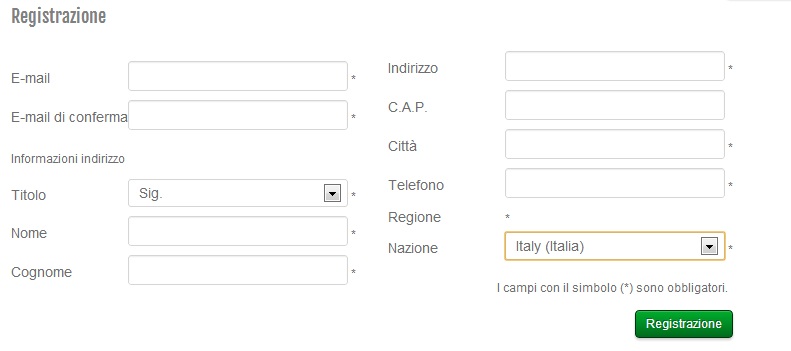
Hello, I would like to change the layout of the registration form.
What I'd like to create is a registration form in 2 column as the picture
Which is the layout concerning the form?
thank you
What I'd like to create is a registration form in 2 column as the picture
Which is the layout concerning the form?
thank you
Last edit: 13 years 8 months ago by davideventurini.
Please Log in or Create an account to join the conversation.

13 years 8 months ago #90884
by Xavier
Replied by Xavier on topic Layout address in 2 column
Hi,
You have to edit the view "checkout / address".
You have to edit the view "checkout / address".
The following user(s) said Thank You: davideventurini
Please Log in or Create an account to join the conversation.
- davideventurini
-
Topic Author
- Offline
Less
More
- Posts: 84
- Thank you received: 0
13 years 8 months ago #91052
by davideventurini
Replied by davideventurini on topic Layout address in 2 column
OK I dont think to be able to modify the layout in that way.
Thank you anyway.
Thank you anyway.
Please Log in or Create an account to join the conversation.

13 years 8 months ago #91115
by Eliot
Replied by Eliot on topic Layout address in 2 column
Hi there,
It's not especially difficult to do so, you just have to include the different elements for your form in a table (it's an easy html tag).
Or you can put the different part in two div with a css rule like float:left
It's not especially difficult to do so, you just have to include the different elements for your form in a table (it's an easy html tag).
Or you can put the different part in two div with a css rule like float:left
Please Log in or Create an account to join the conversation.
- davideventurini
-
Topic Author
- Offline
Less
More
- Posts: 84
- Thank you received: 0
13 years 8 months ago #91358
by davideventurini
Replied by davideventurini on topic Layout address in 2 column
Good, I'll try to do that, thank you
Please Log in or Create an account to join the conversation.
9 years 7 months ago - 9 years 7 months ago #265423
by shoppist
Replied by shoppist on topic Layout address in 2 column
Hi,
I tried doing the same but can't figure out which part belongs to which field:
I need exactly the same layout and of course to keep it responsive.
I tried doing the same but can't figure out which part belongs to which field:
I need exactly the same layout and of course to keep it responsive.
Code:
<?php
/**
* @package HikaShop for Joomla!
* @version 2.6.4
* @author hikashop.com
* @copyright (C) 2010-2016 HIKARI SOFTWARE. All rights reserved.
* @license GNU/GPLv3 http://www.gnu.org/licenses/gpl-3.0.html
*/
defined('_JEXEC') or die('Restricted access');
?><?php
if($this->identified) {
$config = hikashop_config();
$address_selector = (int)$config->get('checkout_address_selector', 0);
$mainId = 'hikashop_checkout_address_billing_only';
$leftId = 'hikashop_checkout_billing_address';
$mainClass = 'hikashop_checkout_address_billing_only';
$leftClass = 'hikashop_checkout_billing_address';
if($this->has_shipping) {
$mainId = 'hikashop_checkout_address';
$leftId = 'hikashop_checkout_address_left_part';
$mainClass = 'hikashop_checkout_address';
$leftClass = 'hikashop_checkout_address_left_part';
}
if(HIKASHOP_RESPONSIVE) {
$mainClass .= ' '.HK_GRID_ROW;
$leftClass .= ' '.HK_GRID_COL_6;
}
?>
<div id="<?php echo $mainId; ?>" class="<?php echo $mainClass; ?>">
<div id="<?php echo $leftId; ?>" class="<?php echo $leftClass; ?>">
<fieldset class="hika_address_field" id="hikashop_checkout_billing_address">
<legend><?php echo JText::_('HIKASHOP_BILLING_ADDRESS'); ?></legend>
<?php
if(empty($address_selector) || $address_selector == 0) {
$this->type = 'billing';
echo $this->loadTemplate('view');
} else {
$this->type = 'billing';
echo $this->loadTemplate('select');
}
if($this->has_shipping) {
?>
</fieldset>
</div>
<div id="hikashop_checkout_address_right_part" class="hikashop_checkout_address_right_part<?php if(HIKASHOP_RESPONSIVE){ echo ' '.HK_GRID_COL_6;} ?>">
<fieldset class="hika_address_field" id="hikashop_checkout_shipping_address">
<legend><?php echo JText::_('HIKASHOP_SHIPPING_ADDRESS'); ?></legend>
<?php
$checked = '';
$style = '';
$override = false;
foreach($this->currentShipping as $selectedMethod){
if(!empty($selectedMethod) && method_exists($selectedMethod, 'getShippingAddress')) {
$override = $selectedMethod->getShippingAddress();
}
}
if(!empty($override)) {
?> <span class="hikashop_checkout_shipping_address_info"><?php
echo $override;
?></span>
<?php
} else {
if($config->get('shipping_address_same_checkbox', 1)) {
$onclick = 'return hikashopSameAddress(this.checked);';
if($this->shipping_address==$this->billing_address){
$checked = 'checked="checked" ';
$style = ' style="display:none"';
$nb_addresses = count(@$this->addresses);
if($nb_addresses==1){
$address = reset($this->addresses);
if(!empty($address_selector)) {
$onclick='if(!this.checked) { window.localPage.switchAddr(0, \'shipping\', '.(int)$this->shipping_address.'); } '.$onclick;
}else{
$onclick='if(!this.checked) { hikashopEditAddress(document.getElementById(\'hikashop_checkout_shipping_address_edit_'.$address->address_id.'\'),1,false); } '.$onclick;
}
}
}
?>
<label for="same_address">
<input class="hikashop_checkout_shipping_same_address inputbox" <?php echo $checked; ?>type="checkbox" id="same_address" name="same_address" value="yes" alt="Same address" onclick="<?php echo $onclick; ?>" />
<?php echo JText::_('SAME_AS_BILLING');?>
</label>
<?php
} else {
$style = '';
}
?>
<div class="hikashop_checkout_shipping_div" id="hikashop_checkout_shipping_div" <?php echo $style;?>>
<?php
$this->type = 'shipping';
if(!empty($address_selector)) {
echo $this->loadTemplate('select');
} else {
echo $this->loadTemplate('view');
}
?>
</div>
<?php
}
}
?>
</fieldset>
</div>
</div>
<div style="clear:both"></div>
<?php
}else{
}
Last edit: 9 years 7 months ago by nicolas. Reason: please use the [code][/code] tags
Please Log in or Create an account to join the conversation.

9 years 7 months ago #265427
by nicolas
Replied by nicolas on topic Layout address in 2 column
Hi,
Please note that this thread is 4 years old. The address view isn't used for that anymore now.
If you're on HikaShop 2.6.4, it's the file "custom_fields" or "custom_fields_bootstrap" of the view "user" that you'll want to edit.
In fact, with bootstrap activated, each field is its own DIV and you might be able to arrange the fields in two columns with only CSS code.
And for HikaShop 3.x, it will be the file "sub_block_login_registration" of the view "checkout", and similarily, each field is its own DIV and you might be able to arrange the fields in two columns with only CSS code.
Please note that this thread is 4 years old. The address view isn't used for that anymore now.
If you're on HikaShop 2.6.4, it's the file "custom_fields" or "custom_fields_bootstrap" of the view "user" that you'll want to edit.
In fact, with bootstrap activated, each field is its own DIV and you might be able to arrange the fields in two columns with only CSS code.
And for HikaShop 3.x, it will be the file "sub_block_login_registration" of the view "checkout", and similarily, each field is its own DIV and you might be able to arrange the fields in two columns with only CSS code.
Please Log in or Create an account to join the conversation.
9 years 7 months ago #265470
by shoppist
Replied by shoppist on topic Layout address in 2 column
I have the latest stable version of HikaShop Business: 2.6.4
I cannot find those CSS classes in the checkout page.
I do use bootstrap.
I cannot find those CSS classes in the checkout page.
I do use bootstrap.
Please Log in or Create an account to join the conversation.
9 years 7 months ago #265483
by nicolas
Replied by nicolas on topic Layout address in 2 column
Hi,
I'm not sure what you mean ?
In the screenshot Capture2.JPG you provided in your last message, you did find the classes for the country and for the state.
For example, you could add such CSS:
.hikashop_registration_address .control-group{
width : 49% !important;
float : left !important;
}
That would make all the address fields on two columns normally.
I'm not sure what you mean ?
In the screenshot Capture2.JPG you provided in your last message, you did find the classes for the country and for the state.
For example, you could add such CSS:
.hikashop_registration_address .control-group{
width : 49% !important;
float : left !important;
}
That would make all the address fields on two columns normally.
Please Log in or Create an account to join the conversation.
Time to create page: 0.083 seconds